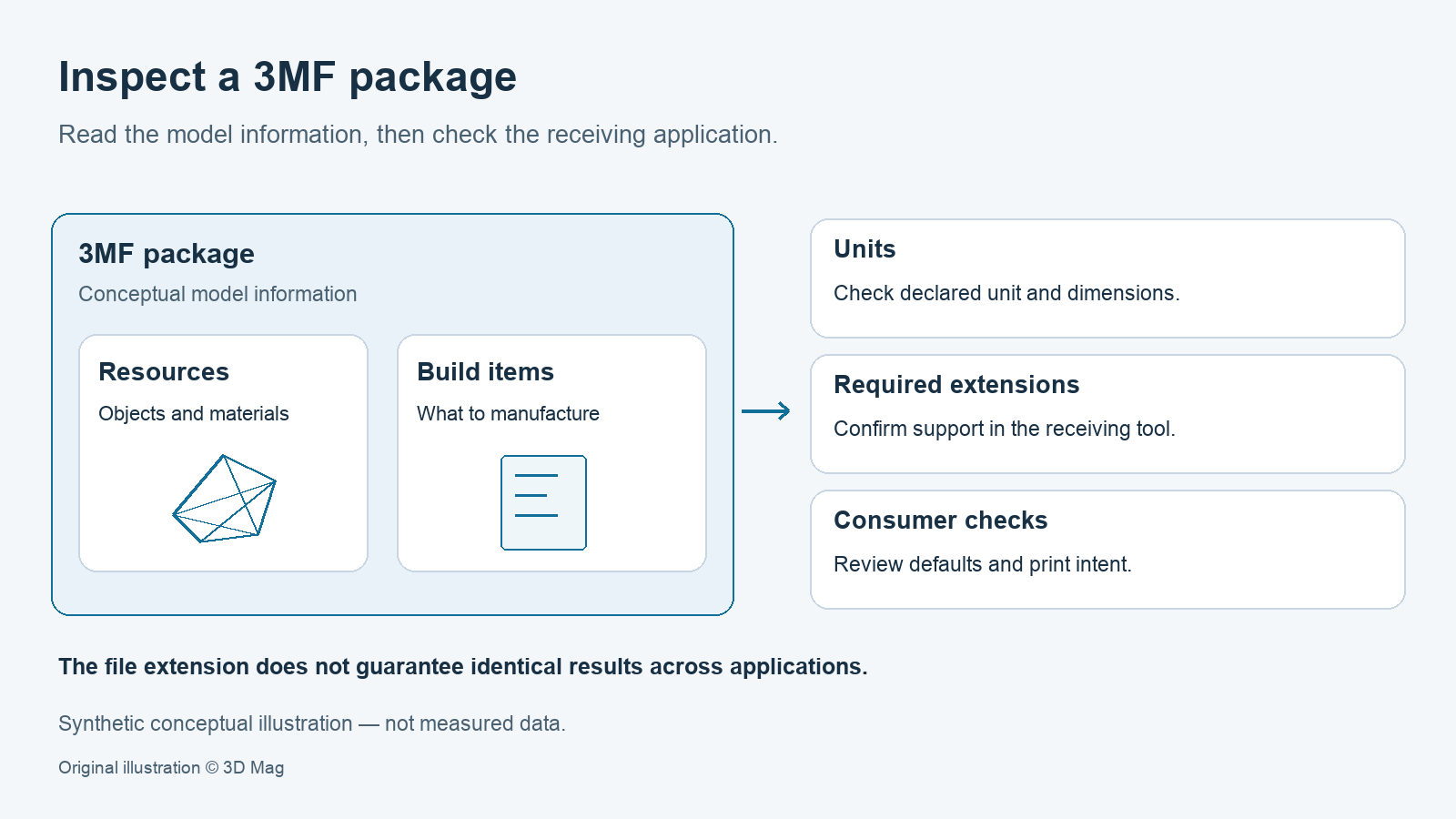

If you have received a .3mf file and need to open, check or share it, start here. Before you trust the result, check four things: the declared unit, the geometry type, any required extensions, and whether the print intent applies to your printer. This explainer separates what the format specifies from what it leaves to the application that opens the file.
What is a 3MF file?
The official 3MF Core Specification gives the expanded name as 3D Manufacturing Format. It describes 3MF as a set of conventions that uses XML to describe 3D models (3MF Consortium). The word “advanced” appears in this page’s long-standing web address. It is not part of the format’s official name.
This explainer is based on the 3MF Core Specification version 1.4.0, which has the status “Published”. The specification’s change history dates this version to February 6, 2025, and the text was retrieved from the official repository on October 7, 2026 (3MF Consortium). It describes what the format specifies, not how any particular application currently behaves.
A ZIP package, not a single mesh
The specification requires a 3MF document to use a ZIP archive as its physical model (3MF Consortium).
Its format requirements extend the packaging requirements of the Open Packaging Conventions (OPC) specification (3MF Consortium).
The package is meant to be self-contained. The core specification states that all content used to manufacture an object in the 3D payload must be contained in the 3MF document, and the document must not reference external resources unless an extension specifies otherwise (3MF Consortium).
Inside the model: units, resources, build and components
In core 1.4.0 the unit attribute on the model element defaults to millimeter and sets the unit for interpreting all vertices, locations and measurements. The valid values are micron, millimeter, centimeter, inch, foot and meter (3MF Consortium).
A 3D Model part has two sections: resource definitions, which include objects and materials, and build items, which list what should actually be manufactured. A consumer must not output objects that no build item references (3MF Consortium). A file can therefore define an object that never appears in the output.
Objects can also be assembled from components. A 3D manufacturing device must respect the relative positions of component objects, except as specified in the document (3MF Consortium).
Mesh rules by object type (summary)
The strict geometric rules depend on the object type. Meshes under “model” or “solidsupport” objects must form a continuous surface without holes, gaps or open edges. Objects of type “support”, “surface” and “other” may break these conditions (3MF Consortium).
This is a summary, not a complete validation checklist. The specification lists further mesh requirements. A file with a .3mf suffix is not automatically print-ready, and the format itself does not repair a mesh.
Materials, display colour and printer intent
The specification states that printer-specific information, including the mapping from base materials to actual printer materials, is intended to live in the Print Ticket (3MF Consortium). This describes the specification’s design intent, not the behaviour of any slicer.
The specification says a producer must not assume that displaycolor has any effect on the printed part (3MF Consortium). Physical colour intent is outside this explainer’s scope.
The PrintTicket format depends on the consumer environment. If a PrintTicket is absent or unsupported, the consumer applies its own defaults (3MF Consortium).
Why a 3MF may open differently in another application
If a producer marks an extension as required, consumers that do not support it must fail to edit or manufacture the document rather than ignore it (3MF Consortium).
Recommended extensions are handled more softly. Editors and devices should warn the user if they do not support them and ask how to proceed. This is a SHOULD, not a MUST (3MF Consortium).
Taken together with environment-dependent PrintTicket handling, these rules mean the .3mf suffix does not guarantee a complete, interoperable slicer project or identical settings in every application.
A checklist for opening and sharing a 3MF file
Suggested checking workflow (guidance; 3D Mag did not perform these steps as a test):
| Step | What to check | Why |
|---|---|---|
| Unit and dimensions | Compare the overall size with the expected real size. | The model unit defaults to millimeter and may also be micron, centimeter, inch, foot or meter (3MF Consortium). |
| Position and scale | Inspect placement and size in your slicer’s tools. | PrusaSlicer documentation, for example, describes a Move tool for X, Y or Z position and a Scale tool for uniform or non-uniform scaling (Prusa Research). |
| Geometry warnings | Review mesh warnings before printing. | Prusa documentation says PrusaSlicer repairs models automatically only to a certain degree, and not all corrupted models can be repaired automatically (Prusa Research). |
| Extensions | Confirm the receiving application supports any required extensions. | Consumers that lack a required extension must fail to edit or manufacture the document (3MF Consortium). |
| Print intent | Re-specify printer settings and materials in the target environment. | Absent or unsupported PrintTickets fall back to consumer defaults (3MF Consortium). |
The PrusaSlicer tools page cited above is filed under a legacy PrusaSlicer release (Prusa Research). Tool names and behaviour may differ in other versions and applications.
FAQ
What does 3MF stand for? 3D Manufacturing Format (3MF Consortium). “Advanced” is not part of the official name.
What unit does a 3MF file use? The model element declares it. In core 1.4.0 the default is millimeter, and the valid values are micron, millimeter, centimeter, inch, foot and meter (3MF Consortium).
Will a 3MF reproduce my print settings everywhere? This is not guaranteed. If a PrintTicket is absent or unsupported, the consumer applies its own defaults (3MF Consortium).
Does the display colour set the printed colour? No. A producer must not assume that displaycolor has any effect on the printed part (3MF Consortium).
Is a 3MF file automatically print-ready or repaired? No. The core imposes its strict closed-surface requirements only on “model” and “solidsupport” objects (3MF Consortium). Prusa documentation says PrusaSlicer repairs models automatically only to a certain degree (Prusa Research). Check the geometry before printing.
Sources
This explainer is based on the cited format specification and software documentation; 3D Mag did not conduct hands-on testing. Publisher sponsorship.