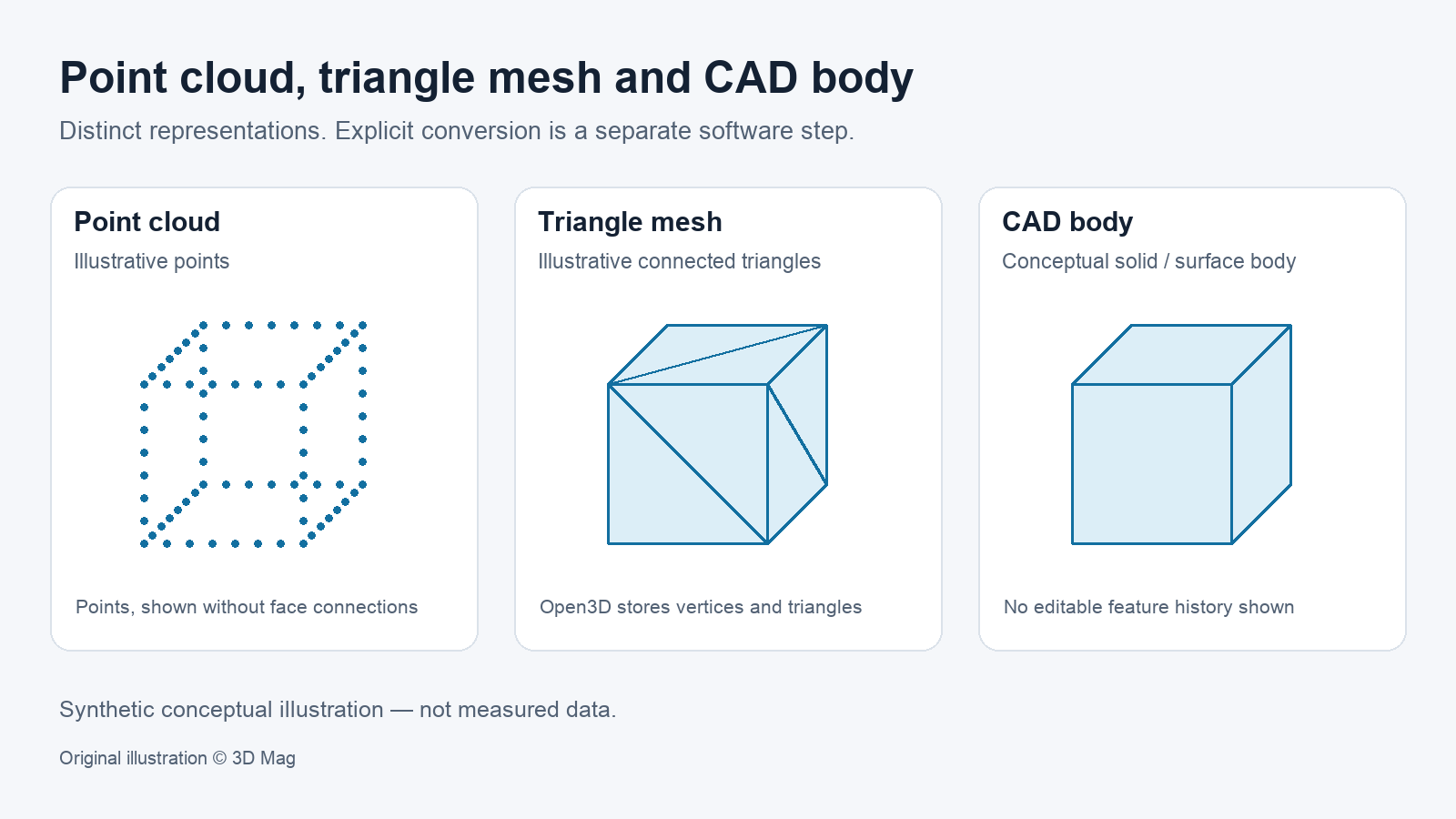

You may be handing off a scan-derived 3D mesh or receiving one. Either way, the practical question is whether its structure suits the next job: visualization, 3D printing, inspection against a nominal model, or CAD rework. The Open3D 0.19.0 tutorial describes a data structure for 3D triangle meshes called TriangleMesh, whose data fields include vertices and triangles. A mesh is not the same thing as a point cloud, and it is not an editable, feature-based CAD model.
Vertices, edges, faces and topology
Blender’s manual describes Edit Mode as used for the majority of polygon-based mesh editing.
Topology describes how mesh elements connect. Open3D defines a triangle mesh as edge manifold if each edge bounds either one or two triangles. Its check can be run with boundary edges either allowed or disallowed.
Open3D treats a mesh as watertight when three conditions hold: it is edge manifold with boundary edges disallowed, it is vertex manifold, and it is not self-intersecting. In its tutorial examples, an open box passes the edge-manifold check that allows boundaries but fails the watertight check.
Orientability is a separate property. Open3D’s is_orientable asks whether the triangles can be oriented so that all normals point towards the outside. Its open-box and intersecting-boxes examples are both orientable, yet neither is watertight. An orientable result therefore confirms neither closure nor that the current normals already point outward.
These are structural checks only. Passing them says nothing about dimensional accuracy or measured tolerance.
Mesh vs point cloud vs editable CAD
| Representation | What it holds | What to keep in mind |
|---|---|---|
| Point cloud | Points, a separate representation from a mesh | Open3D can sample point clouds from a triangle mesh; that is a software operation, not scanner acquisition |
| Polygon mesh | Vertices and triangles in Open3D’s TriangleMesh | Check topology and units against the downstream task before use |
| Solid or surface body | CAD body | Fusion’s Convert Mesh tool turns a mesh body into a solid or surface body as an explicit step |
In Autodesk Fusion, a watertight mesh body converts to a solid body, while a non-watertight one converts to a surface body. Fusion documents Faceted, Prismatic and Organic methods. Its documentation recommends Organic for geometry created from scan data and lists organic conversion as part of an extension.
Editorial guidance: if you need an editable model that reflects the intended design, plan for rework and verify the result; conversion alone is not our acceptance criterion. For file-format details, see the existing STL file guide. For the earlier processing stage, see point cloud to 3D model.
Normals, color and texture
In Open3D’s example, a mesh without normals for vertices or faces is drawn with uniform color shading instead of Phong shading. Other viewers may behave differently.
Open3D’s paint_uniform_color takes RGB values in the [0, 1] range. Other tools and formats may encode color differently.
The sources used here do not document texture or UV export behaviour. If the job needs texture maps, request them explicitly and confirm what the receiving tool imports.
Units and scale: what the file does and does not tell you
A mesh stores coordinates; whether one coordinate unit means a millimetre or a metre is a separate question. In Blender, Unit Scale is a factor for converting between internal units and the values displayed in the user interface, and the manual notes that it does not change how things behave internally. A display setting therefore does not establish the physical units of an exported file.
Confirm the unit with the data provider or the format documentation before scaling, printing or comparing against a nominal model.
Detail, smoothing and simplification trade-offs
Open3D describes simplification as representing a high-resolution mesh with fewer triangles and vertices while staying close to the original. The tutorial gives no deviation tolerance, and its examples use tutorial datasets rather than scan measurements.
Open3D also notes that average and Laplacian filters lead to a shrinkage of the triangle mesh, and it points to a Taubin filter as an alternative. Fine detail that matters for inspection can be lost to aggressive decimation or smoothing, so compare any processed mesh with the original before handoff.
A pre-export inspection workflow (proposed, not performed)
The checklist below is suggested guidance. It is not a test that 3D Mag carried out.
- Write down the downstream task: visualization, 3D printing, inspection against a nominal model, or CAD rework. Then name the representation that task needs: mesh, point cloud, or solid/surface body.
- Confirm the length unit and scale with the data provider or the format documentation. Do not infer metres or millimetres from a viewer’s display setting (see Blender’s unit notes).
- In your chosen tool, run these structural checks: edge-manifold with boundaries allowed and with boundaries disallowed, vertex-manifold, self-intersection, watertight and orientable. They are modelled on Open3D’s mesh property tests. For a closed-volume task, require no open boundary edges. An orientable result does not prove closure or the direction of the current normals. None of these checks verifies dimensions.
- Check whether vertex or face normals and color are present. If the task needs texture or UV data, request it separately.
- If you decimate or smooth the mesh, compare the result against the original before handing it off. Some filters shrink the mesh.
- If the task needs a CAD body, plan an explicit conversion step. An open mesh can become a surface rather than a solid in Fusion. Editorial guidance: plan rework and verify the intended design; this is our recommendation, not a statement from Autodesk.
FAQ
Is a 3D mesh the same as a point cloud? No. They are different representations; Open3D, for example, can sample a point cloud from a triangle mesh.
Can I edit a scan mesh like a CAD model? Not directly. In Autodesk Fusion, a mesh body must be explicitly converted, and a non-watertight mesh becomes a surface body rather than a solid. Editorial guidance: verify the intended design and plan any necessary rework; Autodesk’s cited conversion instructions do not establish that outcome.
Does a mesh file tell me its units? Do not assume it does. Blender’s Unit Scale changes displayed values, not internal behaviour. Confirm units with the data provider or the format specification.
What does watertight mean? In Open3D, it means edge manifold with boundary edges disallowed, vertex manifold and not self-intersecting. A designed through-hole can still sit within a closed surface; an unclosed surface boundary cannot.
Sources
This explainer is based on cited published sources; 3D Mag did not conduct hands-on testing. Publisher sponsorship.