
Summary
The best 3d printer for miniatures is usually a class decision before it is a model decision: character minis and busts typically point to an MSLA/LCD resin printer, while terrain, storage pieces, and resin-averse buyers usually do better with FDM. For the best 3d printer for miniatures and terrain, the real split is not just print quality. It is whether you need tiny surface detail, larger batch capacity, or an easier day-to-day workflow.
Best 3D printer for miniatures in 2026: quick picks by use case
For a current best 3d printer for miniatures shortlist, start with use case and evidence level rather than a single spec-sheet winner. The resin entries below are all vat-photopolymerization hobby machines, but only the Elegoo Saturn 4 Ultra 16K and Anycubic Photon Mono M7 Pro in this set have independent hands-on review support with test prints in the provided source pack. The others are best treated as current shortlist options unless you have your own testing data or a trusted third-party review to add. [13] [14] [15] [16] [17] [20] [21]
Product-page figures below are manufacturer-claimed, and live store pricing is volatile. On August 22, 2026, the US Saturn 4 Ultra 16K page showed $439.00 versus a $649.99 list price, the US Mars 5 Ultra page showed $259.00 versus a $338.00 list price, and the Anycubic Photon Mono M7 Pro page showed $562.00 versus a $769.00 list price. Recheck any live product page on publication day. [13] [14] [15]
| Model | Process & detail | Build & speed | Best for / evidence |
|---|---|---|---|
| Elegoo Saturn 4 Ultra 16K | MSLA/LCD resin; claimed 14 × 19 µm XY; 15120 × 6230 screen. | 211.68 × 118.37 × 220 mm; up to 150 mm/h claim; heated tank at 30 °C. | Mid-size batches of character minis and smaller terrain; resin wash/cure and PPE required; independent hands-on review plus manufacturer specs. [13] [21] |
| Elegoo Mars 5 Ultra | MSLA/LCD resin; claimed 18 µm XY; 8520 × 4320; 0.01–0.2 mm layer thickness. | 153.36 × 77.76 × 165 mm; compact plate. | Lower-cost compact resin option for single heroes and small squads; resin wash/cure and PPE required; manufacturer specs only. [14] |
| Anycubic Photon Mono M7 Pro | MSLA/LCD resin; claimed 16.8 × 24.8 µm XY; 0.01–0.15 mm layer height. | 223 × 126 × 230 mm; standard resin at 0.1 mm up to 130 mm/h, high-speed resin at 0.1 mm up to 170 mm/h. | Faster resin batches with a larger mid-size plate; resin wash/cure and PPE required; independent review with test prints plus manufacturer specs. [15] [20] |
| Anycubic Photon Mono M7 Max | MSLA/LCD resin; claimed 46 × 46 µm XY; 0.01–0.15 mm layer height. | 298 × 164 × 300 mm; standard resin at 0.05 mm up to 31 mm/h, standard resin at 0.1 mm up to 63 mm/h, high-speed resin at 0.1 mm up to 86 mm/h. | Large busts, dioramas, and bigger terrain batches; resin wash/cure and PPE required; manufacturer specs only. [16] |
| Phrozen Sonic Mini 8K S | MSLA/LCD resin; claimed 22 µm XY; 0.01–0.30 mm layer thickness. | L16.5 × W7.2 × H17 cm; max 80 mm/hr. | Compact detail-focused reference option, but the page showed the product as Unavailable on August 22, 2026; manufacturer specs only. [17] |
| Bambu Lab A1 mini | FDM/FFF; 0.4 mm nozzle included; optional 0.2, 0.6, and 0.8 mm nozzles. | 180 × 180 × 180 mm. | Resin-averse starter machine for small terrain and functional pieces; no wash/cure workflow, but more visible nozzle and layer texture; manufacturer specs only. [18] |
| Prusa CORE One+ | FDM/FFF; enclosed CoreXY machine; miniature detail still depends on nozzle and profile choice, not enclosure alone. | 250 × 220 × 270 mm; chamber up to 55 °C. | Larger terrain and utility prints, with a more controlled chamber for tougher materials; no wash/cure workflow; manufacturer specs only. [19] |
Read this table as a shortlist, not a podium. It separates dense-detail miniature 3d printer options from batch-capacity options and from the best 3d printer for miniatures not resin path.
Why most buyers should start with use case, not marketing labels
Character minis, busts, and other small display pieces usually favor resin because the target is tiny surface detail: faces, fingers, fabric folds, jewelry, armor edges, and thin weapons. Terrain, ruins, trays, inserts, and large scenic pieces often favor FDM because the economics change as part size grows. Print volume matters more, and visible layer lines become easier to tolerate. Build volume is not a detail metric by itself. It is about batch capacity and part size. A larger plate helps with squads and scenery, but it does not automatically improve faces or fingertips.
This is why marketing labels can mislead. A 16K screen label, an AI camera, Wi‑Fi, or app control may change the ownership experience, but none of those features alone proves that a machine will produce better tabletop minis. The quality question is still process-based: how the printer forms small geometry, how the material behaves, how much tuning it needs, and how much cleanup you are willing to do afterward. The same STL can look excellent or disappointing depending on orientation, supports, exposure, resin choice, nozzle size, or filament choice.
Resin vs FDM for miniatures
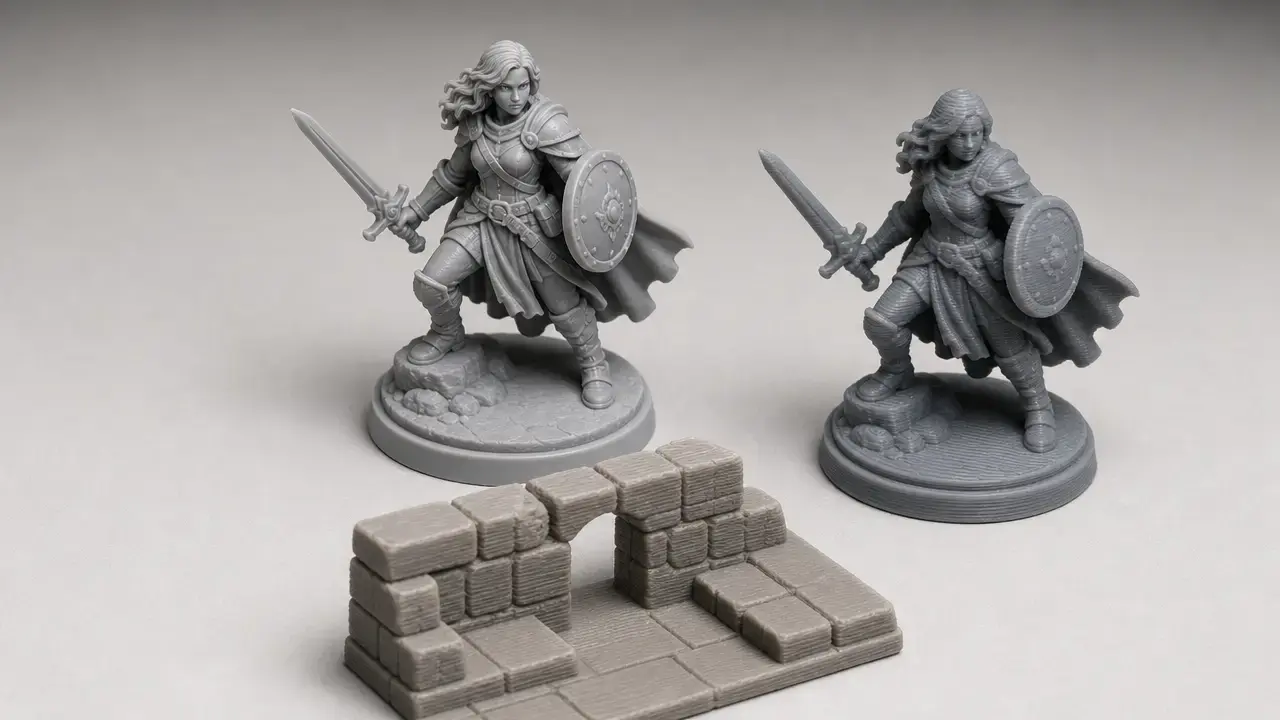
Under ISO/ASTM additive-manufacturing vocabulary, hobby resin printing sits in the vat photopolymerization family, while FDM/FFF sits in material extrusion. For character minis, resin usually wins because most consumer hobby “SLA” machines are actually MSLA/LCD printers. They use an LCD mask to expose a whole layer at a time, and the XY pixel size is fixed by the display. That helps explain why resin is so common for faces, hands, cloth folds, thin blades, and other small features where softness or stair-stepping is obvious. It also explains why support placement matters so much: a detailed model can still be scarred if supports land on the wrong surfaces. [1] [8] [11]
FDM can absolutely print miniatures, but it is constrained by nozzle diameter, layer height, cooling, and profile quality. Prusa’s documentation is useful here because it states the basics clearly: layer height changes vertical resolution only, and a common rule of thumb is to keep layer height below about 80% of nozzle diameter, so a 0.4 mm nozzle gives an example ceiling of roughly 0.32 mm. If you want better FDM minis, you usually move to a smaller nozzle, such as 0.25 mm, and slow the job down. Even then, FDM remains more vulnerable to weak faces, soft fingers, thick swords, flattened cloth texture, and support or seam artifacts that are harder to hide on 28–32 mm figures. [9] [10]
If you can buy only one machine, choose by your dominant output rather than your most aspirational print. If most of your work is character minis, busts, or small premium-detail pieces, buy resin/MSLA and accept the wash, cure, storage, and safety burden. If most of your work is terrain, trays, organizers, dungeon walls, or other larger pieces, buy FDM and accept that tiny organic detail will be more compromised than on resin. That trade-off is normal.
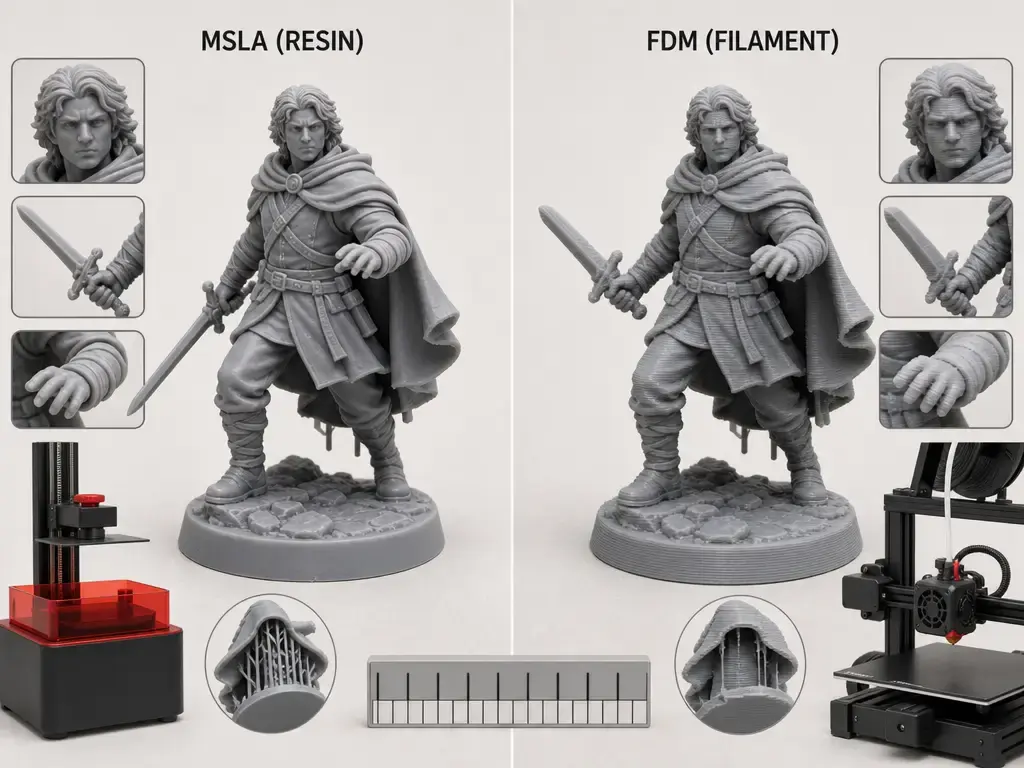
Metric taxonomy: what “resolution” means
This is where 3D-printer marketing gets slippery. In this guide, “SLA” means laser stereolithography, “DLP” means a projected-light engine, and “MSLA/LCD” means a masked LCD-style resin printer. All three are light-cured resin processes, but they are not interchangeable labels. Most consumer hobby listings that people casually call “SLA printers for tabletop miniatures” are really MSLA/LCD machines. That distinction matters because the light engine, optical behavior, and speed logic differ. [7] [8]
For resin machines, XY pixel size is the lateral step size tied to the screen and optics. It is not the same thing as a screen’s 12K, 14K, or 16K label. Those K labels are screen-resolution shorthand, not a standardized print-quality score. Formlabs’ comparison is useful here because it explains why headline resolution is only part of the story: print quality and accuracy also depend on light size and power distribution, resin scattering, light bleeding, and polymerization behavior. In plain terms, a smaller pixel can help, but it does not guarantee sharper edges, cleaner supports, or more accurate dimensions by itself. [7]
Layer height is different again. It affects vertical stepping and print time, but not the whole XY-detail story. Accuracy language is different from both. ISO 5725-1 separates trueness and precision: trueness is how close the average result is to the intended dimension, while precision is how repeatable the results are from print to print. Neither term is interchangeable with resolution. A miniature can have a small claimed XY pixel size and still be dimensionally off, or it can be very repeatable while still needing support cleanup and exposure tuning. [3] [7]
How we judged printers
We treated manufacturer specs as a starting point, not a verdict. A machine becomes a stronger pick only when there is independent testing with sample prints and some method context. That does not need to be a lab-grade standards test, but it should be more than an unboxing or store-page copy. If that evidence is missing, the printer stays a current shortlist option rather than a declared category winner. For miniature buyers, that distinction matters because a glossy product page can hide awkward setup, weak slicer defaults, or fiddly support behavior.
We also separated ownership convenience from print outcome. Heated vats, cameras, Wi‑Fi, auto-leveling, and app features can improve workflow, but they are not proof of cleaner faces or sharper weapon edges. Likewise, a large plate is a batch-capacity advantage, not a universal quality advantage. The practical question is always whether the machine fits your models, materials, space, and cleanup routine.
Before you buy, recheck these live details:
- US price and stock.
- Shipping region and service coverage.
- Spare film or screen availability.
- Wash and cure capacity.
- Resin heating needs.
- Slicer compatibility.
Workflow: from STL to tabletop-ready miniature
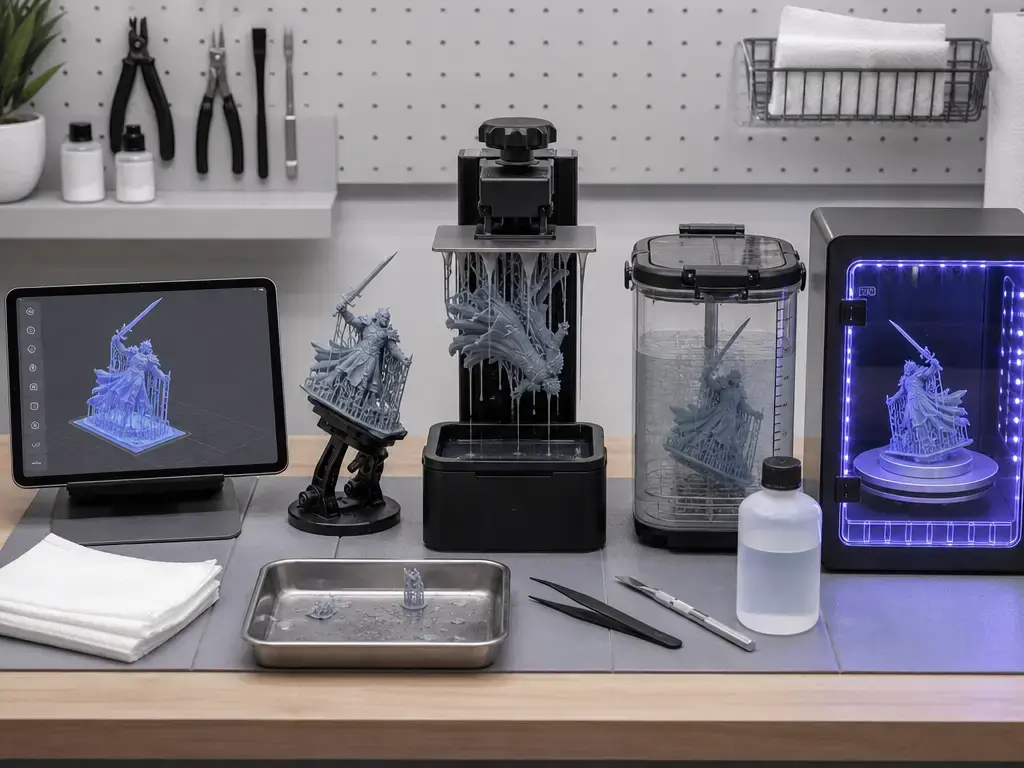
Most buyers underestimate how much of a resin printer for miniatures workflow happens after exposure finishes. The machine only creates the part. You still have to decide orientation, support density, and exposure settings, then wash, dry, remove supports, and cure the print. Formlabs notes that supports are tied to orientation, so scar placement should be deliberate. Prusa also notes that fresh resin prints come off the machine soft and sticky and typically need washing in isopropyl alcohol and then UV curing before they are ready to handle normally. [8] [11]
FDM is lighter on post-processing, but it is not consequence-free. You avoid resin solvents and UV curing, but you trade them for nozzle tuning, bed adhesion, seams, retractions, and more visible surface texture. That is why a “best 3d printer for miniatures” decision is as much a workflow decision as a hardware decision.
- Prep the STL and check wall thickness, hollowing, and drainage where needed.
- Orient the model to protect visible faces and reduce peel or suction stress.
- Place supports where scars will be least noticeable, not where auto-supports happen to land.
- Run an exposure test or profile check with the exact resin you plan to use.
- Print the model.
- Wash the part in the appropriate cleaning fluid and keep splashing to a minimum.
- Let it dry, then remove supports at the stage that works best for that resin and geometry.
- UV cure the part and inspect for weak areas, support marks, and surface defects.
Safety & home setup checklist
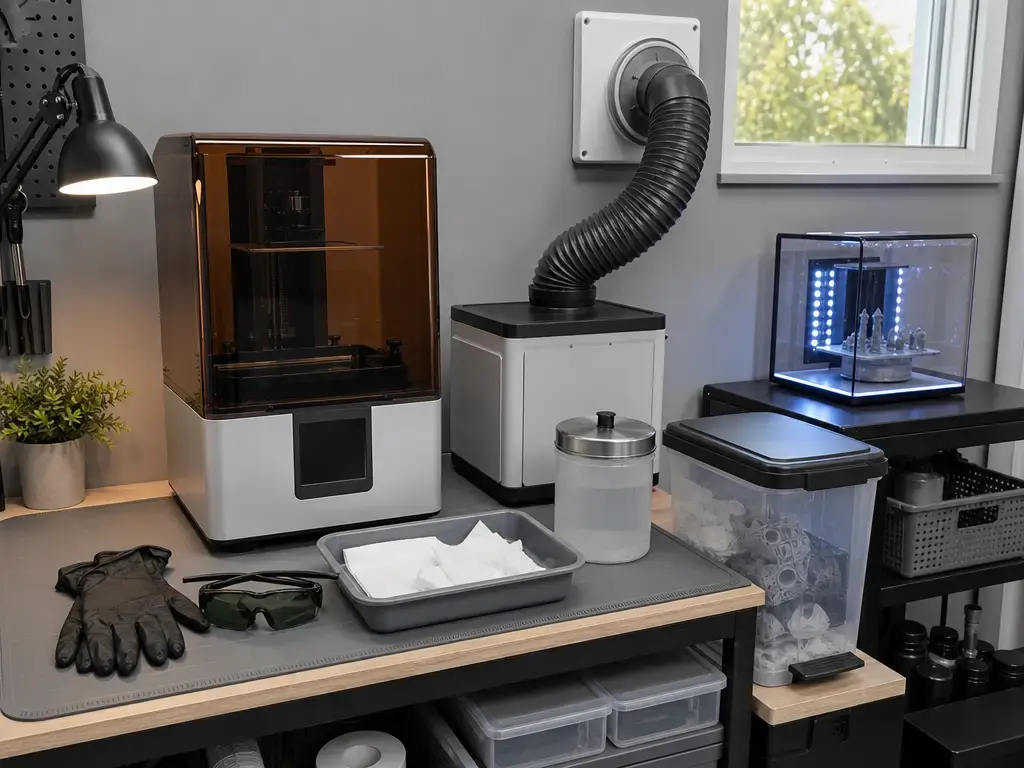
Resin safety is not optional background detail. NIOSH’s January 2025 guidance says printing can release uncured resin particles and gases into the air and that these may not be contained by the printer cover. The same guidance warns that curing with UV light or heat generates particles and gases that should not be breathed in. That does not mean every home setup produces the same exposure, and the Stefaniak study should not be generalized to every machine or resin, but it does show that emissions can be measured. The paper quantified compounds such as benzaldehyde at 1.0–2.3 ppb and acetone at 0.7–18.0 ppb for some tested printers. UL 2904 matters here because it exists specifically as a standard method for characterizing and quantifying particle and VOC emissions from operating 3D printers indoors. [4] [5] [6]
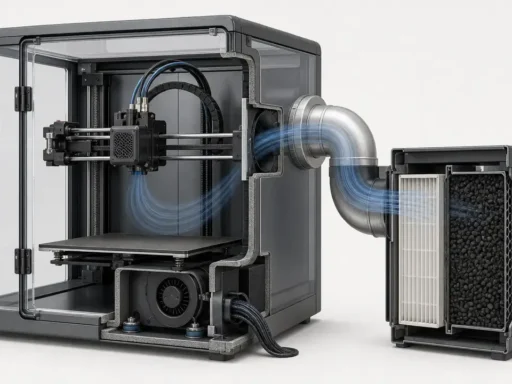
The practical takeaway is simple: treat resin printing as a controlled workspace, not just a hobby object on a desk. NIOSH recommends lowering exposures with ventilation, forced air movement, or a printer with effective particulate and gas filtration, and it recommends appropriate PPE including gloves, UV eye protection, and a lab coat. In a home setup, that translates to a dedicated work surface, sealed wash containers, a spill response plan, and storage that keeps resin, solvent, and contaminated tools away from living areas and direct UV light. A closed hood can help with splashes and ambient light, but it is not a substitute for ventilation or protective equipment. [4]
Disposal deserves the same seriousness. Formlabs’ disposal guidance says not to pour liquid or partially cured resin into drains, and not to pour solvent containing dissolved resin into drains either. If you do not have a formal chemical-waste stream, cured resin can be solidified with sunlight or 405 nm light and heat before disposal, but local rules still apply. Check the safety data sheet for the exact resin and solvent you buy, because resin chemistry and waste rules are not universal. [12]
Use this checklist before your first print:
- Ventilation strategy or effective filtration.
- Nitrile or other appropriate gloves for resin and solvent handling.
- UV eye protection for curing and splash-prone steps.
- A dedicated workspace you can clean easily.
- A spill kit with wipes and cleanup supplies.
- Sealed solvent containers to limit evaporation and splashing.
- A plan for handling contaminated wipes, gloves, and supports until they are cured or otherwise disposed of properly.
- Storage away from living areas and direct UV light.
| Item | Why you need it | Ongoing consumable? |
|---|---|---|
| Nitrile gloves | Skin-contact barrier for uncured resin and contaminated parts | Yes |
| UV eye protection | Protects during curing and splash-prone handling | No, but replace if damaged |
| Ventilation or filtration | Lowers exposure to airborne particles and gases | Sometimes, depending on filters |
| Spill kit and wipes | Lets you contain drips and clean surfaces quickly | Yes |
| Sealed solvent container | Reduces evaporation, odor, and accidental splashing | No |
| Dedicated waste container | Keeps contaminated items separate until proper disposal | Yes |
| Storage bins and lids | Protects resin, tools, and cleaned parts from UV and dust | No |
Recommended categories: shortlists, not spec-sheet winners
For an overall resin/MSLA shortlist, the Elegoo Saturn 4 Ultra 16K, Anycubic Photon Mono M7 Pro, and Elegoo Mars 5 Ultra are the current options most miniature buyers will compare first. The Saturn 4 Ultra 16K has the smallest claimed XY pixel size in this group and adds a heated tank at 30 °C, while the M7 Pro combines a roomy mid-size plate with explicit speed conditions for standard and high-speed resin at 0.1 mm. The Mars 5 Ultra is the smaller, cheaper desk-friendly option. Evidence level matters, though: the Saturn 4 Ultra 16K has hands-on review support from Creative Bloq, and the M7 Pro has an independent review with sample prints from Tom’s Hardware, while the Mars 5 Ultra is a specs-first shortlist entry here. Who should not buy this: anyone who wants a low-maintenance, no-solvent workflow. [13] [14] [15] [20] [21]
For a compact resin shortlist, the Mars 5 Ultra and Phrozen Sonic Mini 8K S are the most desk-friendly examples in this set, with the Saturn 4 Ultra 16K as the step-up if you want more batch capacity without moving to a very large-format machine. The Mars 5 Ultra’s claimed 18 µm XY and 153.36 × 77.76 × 165 mm build volume make it the cleaner current compact option in this source set, while the Phrozen remains a reference-only candidate because its page was live but the product showed Unavailable on August 22, 2026. Who should not buy this: anyone whose priority is large terrain pieces or avoiding resin handling entirely. [13] [14] [17]
For a large resin shortlist, the Anycubic Photon Mono M7 Max is the clearest big-batch option in this article because its 298 × 164 × 300 mm build volume is much larger than the mid-size machines here. The trade-off is just as clear: its claimed 46 × 46 µm XY pixel size is much coarser than the detail-focused compact and mid-size printers in this guide, so you are buying capacity more than peak fine-detail ambition. That can still make sense for large busts, scenery pieces, and fuller plates of minis where throughput matters more than squeezing the smallest possible pores or fabric texture out of a face. If you want a middle ground instead of maximum size, the M7 Pro and Saturn 4 Ultra 16K are the more balanced plate-size options. Who should not buy this: someone whose main goal is tiny facial detail and the smallest possible support-mark footprint. [13] [15] [16] [17]
For the best 3d printer for miniatures not resin path, the Bambu Lab A1 mini and Prusa CORE One+ are the sensible FDM shortlist entries here. The A1 mini is the smaller, simpler starting point, especially if you plan to experiment with an optional 0.2 mm nozzle for more miniature-oriented profiles. The CORE One+ shifts the conversation toward larger terrain, more build volume, and a controlled chamber up to 55 °C for more demanding materials. Neither one changes the underlying limitations of FDM: faces, fingers, cloth texture, and thin swords still demand design compromises that resin avoids. Who should not buy this: buyers who expect resin-like facial fidelity on 28–32 mm character models. [18] [19]
- Best overall resin/MSLA shortlist.
- Best compact resin shortlist.
- Best large resin shortlist.
- Best not-resin / terrain-friendly FDM shortlist.
How to validate your choice with two test prints
The fastest sanity test is not another hour of spec reading. It is two real prints. ISO/ASTM 52902 exists because geometric capability has to be checked with actual artifacts, not assumed from headline numbers, and that same mindset applies to hobby buying. Print one detailed character mini and one terrain piece, then compare what you got with the cleanup time and failure rate you had to accept. [2]
For the character mini, look closely at the face, fingers, weapon edges, fabric folds, and any front-facing support contact points. Ask whether the printer preserved shape cleanly or whether you are seeing softened features, seam distraction, support scars in obvious places, or repeated failures on thin geometry. Support strategy and resin choice can matter as much as the machine here. [7] [11]
For the terrain print, look at batch efficiency, visible texture, cleanup speed, and whether the printer’s build area actually fits your scenery workflow. A terrain-friendly winner is not just the machine that prints the biggest wall. It is the one that lets you finish the wall, remove supports if needed, and move on without friction. If two machines look similar on paper, these two tests will usually tell you more than another round of marketing labels. [2]
Materials matter: resin choice and FDM material notes
Resin choice matters almost as much as printer choice. Standard resins are often the easy path to sharp detail and smooth surfaces, but tougher or ABS-like families can make more sense when the miniature is meant to be handled, packed, dropped, or used for regular tabletop play. A shelf-display bust and a gaming piece do not have the same durability target. The safest rule is not to generalize from brand names alone: if mechanical properties matter to you, read the technical data sheet for the exact resin you intend to buy, because those numbers are resin-specific.
For FDM terrain and utility pieces, material choice can improve toughness, heat resistance, or ease of printing, but it does not erase nozzle limits. A stronger filament still comes out through the same nozzle diameter and still shows the same general surface language. That is why walls, scatter, trays, inserts, and other larger scenery pieces often make more sense on FDM than organic character minis. Material choice changes durability and convenience more than miniature-scale facial fidelity.
What to budget beyond the printer
A miniature 3d printer is a system, not a single box price. Resin buyers also need a wash-and-cure plan, cleaning fluid, PPE, spare release film or screen protection, funnels and filters, sealed containers, and cleanup supplies. FDM buyers can keep the accessory list shorter, but they still need spare nozzles, maintenance items, and sometimes storage or enclosure upgrades. The point is not to fake a universal ownership total. It is to avoid comparing a bare printer price with a more complete setup.
Estimate your own setup by grouping purchases into machine, post-processing, safety, consumables, and workspace protection. That keeps the comparison honest without pretending that every home workshop spends the same amount. If a printer looks cheap on paper but needs several add-ons before it becomes easy to live with, that matters more than a small difference in list price.
| Category | Typical items | Why it matters |
|---|---|---|
| Post-processing | Wash/cure station, wash containers, curing box | Turns sticky resin prints into handled parts |
| Consumables | IPA or cleaner, resin, paper towels | Ongoing operating cost |
| Safety | Gloves, eye protection, lab coat, spill kit | Reduces exposure and cleanup risk |
| Protection | Release film, screen protection | Helps maintain uptime and reduce repair surprises |
| Handling | Funnels, filters, disposable strainers | Reduces contamination and clogs |
| Storage | Sealed containers, bins, labels | Keeps resin, tools, and parts organized |
| Workspace | Mats, liners, cleanup supplies | Makes drips and residue easier to manage |
Research & market context
Most buyers end up comparing a small cluster of brands because search results are crowded around a few resin and FDM ecosystems, but that does not make the decision simple. It means buyer judgment matters more. In practice, test prints, workflow fit, cleanup burden, and parts availability tell you more than screen labels or camera features. When two machines look close on paper, the better purchase is usually the one that fits your space, materials, and tolerance for maintenance.
Conclusion: choosing the best 3D printer for miniatures
The best 3d printer for miniatures is the one that matches your main output, not the one with the flashiest label. Choose resin/MSLA for character detail, choose FDM for terrain or a lower-mess workflow, validate the decision with two test prints, and plan for safety and post-processing before you buy.
FAQ
What is the best 3d printer for miniatures in 2026?
There is no single universal winner. For character minis, a resin/MSLA shortlist is usually the right class; for terrain or lower-mess ownership, FDM is more practical. In this source set, the Saturn 4 Ultra 16K and Anycubic Photon Mono M7 Pro have independent review support, while several other models remain credible shortlist options based mainly on official specs. [13] [15] [20] [21]
Resin vs FDM for miniatures: which should I buy for character models vs terrain?
Buy resin if your priority is faces, thin weapons, cloth folds, and smoother small-scale surfaces. Buy FDM if your priority is terrain, scenery, trays, and easier ownership with less solvent and curing overhead. If you can buy only one machine, choose by what you will print most often, not by the occasional edge case. [1] [8] [9] [10]
What is the best 3d printer for miniatures not resin?
For a not-resin path, start with FDM machines such as the Bambu Lab A1 mini or an enclosed option like the Prusa CORE One+. The A1 mini gives you the smaller entry point and optional 0.2 mm nozzle path, while the CORE One+ gives you more room and a controlled chamber. Just keep expectations realistic: FDM can make usable minis, but it will not normally match resin on tiny faces and surface softness. [18] [19]
Is an SLA printer for tabletop miniatures the same as an MSLA printer for miniatures?
Not exactly. SLA properly refers to laser stereolithography, while most consumer “SLA” miniature printers are actually MSLA/LCD machines that cure a whole layer through a masked screen. All of them sit within light-cured resin printing, but the terminology matters because the light engine and detail behavior are not identical. [1] [7] [8]
How much XY pixel size do miniatures need?
There is no magic threshold. Smaller XY pixel size can help, but Formlabs’ comparison is a useful reminder that optics, light distribution, resin scattering, bleeding, and polymerization behavior also shape the result. Treat XY pixel size as one input, not a standalone quality verdict. [7]
Expert: How do post-curing and solvent washing affect dimensional stability or warping risk?
They can change the part a little, but the direction and magnitude depend on resin chemistry, geometry, support strategy, and how aggressively you wash or cure. The practical rule is to avoid assuming a universal correction factor. Follow the resin maker’s workflow, avoid overhandling, and validate with a few calibration or fit-check parts before you commit to a large batch.
Expert: How should I compare claimed print speeds across resin printers?
Only compare speed claims when the conditions are explicit. Layer height, resin type, and operating mode matter. For example, the M7 Pro’s headline numbers are tied to 0.1 mm settings and differ between standard and high-speed resin, while the M7 Max splits its claims across both 0.05 mm and 0.1 mm settings. A single “max speed” number without context is directional, not universal. [13] [15] [16]
Sources
- ISO/ASTM 52900:2021 — Fundamentals and vocabulary — standard — 2021-11; confirmed 2025 — https://www.iso.org/standard/74514.html
- ISO/ASTM 52902:2023 — Test artefacts / geometric capability assessment — standard — 2023-08 — https://www.iso.org/standard/79683.html
- ISO 5725-1:2023 — Accuracy (trueness and precision) definitions — standard — 2023-07 — https://www.iso.org/standard/69418.html
- CDC/NIOSH — Safe Desktop Vat Photopolymerization 3-D Printing — official documentation — 2025-01 — https://www.cdc.gov/niosh/media/pdfs/2025/01/Safe-3D-Printing.pdf
- UL 2904 Ed.2-2023 — Standard method for measuring printer emissions — standard — 2023-05-26 — https://webstore.ansi.org/standards/ul/ul2904ed2023
- Stefaniak et al. — Particle and vapor emissions from vat polymerization desktop-scale 3D printers — scientific — 2019 — https://stacks.cdc.gov/view/cdc/83250/cdc_83250_DS1.pdf
- Formlabs — SLA vs DLP vs MSLA/LCD resin 3D printer comparison — manufacturer — n.d. — https://formlabs.com/blog/sla-dlp-msla-lcd-resin-3d-printer-comparison/
- Prusa Knowledge Base — Types of printers and their differences — official documentation — n.d. — https://help.prusa3d.com/article/types-of-printers-and-their-differences_112464
- Prusa Knowledge Base — Layers and perimeters — official documentation — n.d. — https://help.prusa3d.com/article/layers-and-perimeters_1748
- Prusa blog — Printing great-looking miniatures with a 0.25mm nozzle — manufacturer — 2020 — https://blog.prusa3d.com/printing-great-looking-miniatures-with-a-0-25mm-nozzle-on-the-original-prusa-mini_33457/
- Formlabs — How supports work in SLA printing — manufacturer — n.d. — https://formlabs.com/global/support/How-supports-work-in-SLA-printing/
- Formlabs — Disposing of resin — manufacturer — n.d. — https://formlabs.com/support/Disposing-of-resin/?langue=en_US
- Elegoo Saturn 4 Ultra 16K (US) product page — manufacturer — live; accessed 2026-08-22 — https://us.elegoo.com/products/saturn-4-ultra-16k-10inch-monochrome-lcd-resin-3d-printer
- Elegoo Mars 5 Ultra (US) product page — manufacturer — live; accessed 2026-08-22 — https://us.elegoo.com/products/mars-5-ultra-9k-7inch-monochrome-lcd-resin-3d-printer
- Anycubic Photon Mono M7 Pro product page — manufacturer — live; accessed 2026-08-22 — https://store.anycubic.com/products/photon-mono-m7-pro
- Anycubic Photon Mono M7 Max product page — manufacturer — live; accessed 2026-08-22 — https://store.anycubic.com/collections/aff-deals/products/photon-mono-m7-max
- Phrozen Sonic Mini 8K S product page — manufacturer — live; accessed 2026-08-22 — https://us.phrozen3d.com/products/sonic-mini-8k-s
- Bambu Lab A1 mini (US store) product page — manufacturer — live; accessed 2026-08-22 — https://us.store.bambulab.com/products/a1-mini?id=543566369394393101
- Prusa CORE One+ (Gen 2) product page — manufacturer — live; accessed 2026-08-22 — https://www.prusa3d.com/en/product/prusa-core-one-5/
- Tom’s Hardware — Anycubic Photon Mono M7 Pro review — industry — 2024 — https://www.tomshardware.com/3d-printing/anycubic-photon-mono-m7-pro-review
- Creative Bloq — Elegoo Saturn 4 Ultra 16K review — industry — 2025 — https://www.creativebloq.com/3d/3d-printing/ive-been-testing-3d-printers-for-over-a-decade-i-tried-the-elegoo-saturn-4-ultra-16k-and-its-truly-innovative