
Summary
Draft resin is a practical, throughput-first photopolymer category for fast prototypes, but “Draft Resin” itself is a Formlabs product name rather than an ISO/ASTM material class. Formlabs positions Draft Resin V2 as an SLA resin for rapid iteration, with a 100 µm minimum layer thickness and a 200 µm option for faster builds. [1] [3]
In practice, the key trade-off is speed versus visible detail, and the final properties depend heavily on cure state. The official TDS reports separate green, post-cured-at-room-temperature, and post-cured-at-60 °C values for strength, stiffness, elongation, and heat deflection temperature, so “how strong is it?” has no single answer without the post-processing context. Wash and cure settings are also device-specific: Form Wash, Form Cure, and Fast Cure each have their own official instructions. [4] [6] [7] [8]
Draft Resin V2 at a Glance (Specs + Official Settings)
If you only need the operational baseline, use the current product page, TDS, and support PDFs together. Draft Resin V2 is an SLA material in the Form 2/Form 3 ecosystem, with 100 µm and 200 µm layer options, official wash guidance, and device-specific cure settings. These are validated settings for specific hardware, not a universal resin-printing recipe. [3] [4] [6] [7] [8]
| Setting | What to use |
|---|---|
| Print tech / layer options | SLA; minimum layer thickness 100 µm; use 200 µm for fast print speeds or 100 µm for finer details. [3] |
| Compatible printers / tanks | Printers: Form 3, Form 3L, Form 3B, Form 3BL, Form 2. Tanks: Form 2 LT Tank, Form 3 Resin Tank V2.1, Form 3L Resin Tank V3. [3] |
| Form Wash | 10 min for Draft Resin; tackiness has been observed when alcohol contains more than 5% resin concentration; avoid washing longer than recommended. [6] |
| Form Cure | 5 min, no heat for better elongation; or 5 min at 60 °C for better UTS. [7] |
| Fast Cure | 1 min, LED intensity 5, no flip. [8] |
| General tolerance figure | No reliable general dimensional tolerance figure found. [3] |
That is enough to place Draft Resin V2 in a workflow, but not enough to reduce it to a single “accuracy” number or a generic cure time. Start with the official device-specific settings, then validate the result on your own geometry. [3] [6] [7] [8]
What Is Draft Resin for SLA Printing?
In SLA printing, draft resin is a speed-first material for getting physical parts quickly during iteration, not a standards-defined material family. Draft Resin V2 is Formlabs’ named product in that space, while “fast resin” and “speed resin” are generic market labels that can mean different things across printer families, wavelengths, and workflows. The safer comparison method is not the label on the bottle, but the combination of compatibility, validated settings, the technical data sheet, and the stated test methods. [3] [4]
That makes Draft Resin V2 most useful when the question is about shape, fit, review speed, or batching efficiency rather than end-use load, heat, or cosmetic finish. It is better treated as a workflow material than as a universal performance resin. [3] [4]
Use draft resin when…
- you need same-day concept models or quick form studies. [3]
- you want fast fit checks before moving to a stronger or more application-specific resin. [3] [4]
- you are batching parts for design reviews or classroom demos. [3]
- you are printing large prototypes where turnaround matters more than the finest surface detail. [3]
- you need dental models within the thermoforming-model workflow context described by Formlabs, not as a generalized clinical claim. [3] [9]
- you are still validating geometry and workflow, not freezing an end-use specification. [4]
Where It Fits in Vat Photopolymerization (SLA vs DLP vs LCD)
Draft Resin V2 sits within vat photopolymerization, the additive-manufacturing family that forms parts by curing liquid photopolymer resin with light in staged build steps. ISO/ASTM 52900 provides the standards vocabulary backdrop, and NIST describes vat photopolymerization in plain language as building structures by curing liquid photopolymer resin with ultraviolet light while the structure is submerged, raised, and cured through successive stages. [1] [2]
Within that family, SLA, DLP, and LCD are related but not identical. A recent VPP review describes SLA as using a scanning laser to cure photo-curable material voxel by voxel, while DLP projects 2D patterns layer by layer, which can improve throughput relative to scanning SLA. LCD printing also falls under the broader VPP umbrella, but it uses a masked exposure approach in which an LCD controls where light passes through for each layer. The important distinction is that Draft Resin V2 is tuned for Formlabs’ SLA workflow, not positioned as a general-purpose resin for every VPP machine type. [13] [14]
A metrology note matters here. XY optical resolution is not the same thing as Z layer height. In VPP systems, lateral resolution is driven mainly by optics and light delivery, while Z resolution depends on Z-axis motion plus cure-depth behavior in the resin. Neither is the same as dimensional accuracy, and neither automatically becomes a usable assembly tolerance. That is why a printer can advertise fine detail and still require part-specific measurement before anyone should trust a fit-critical interface. [13]
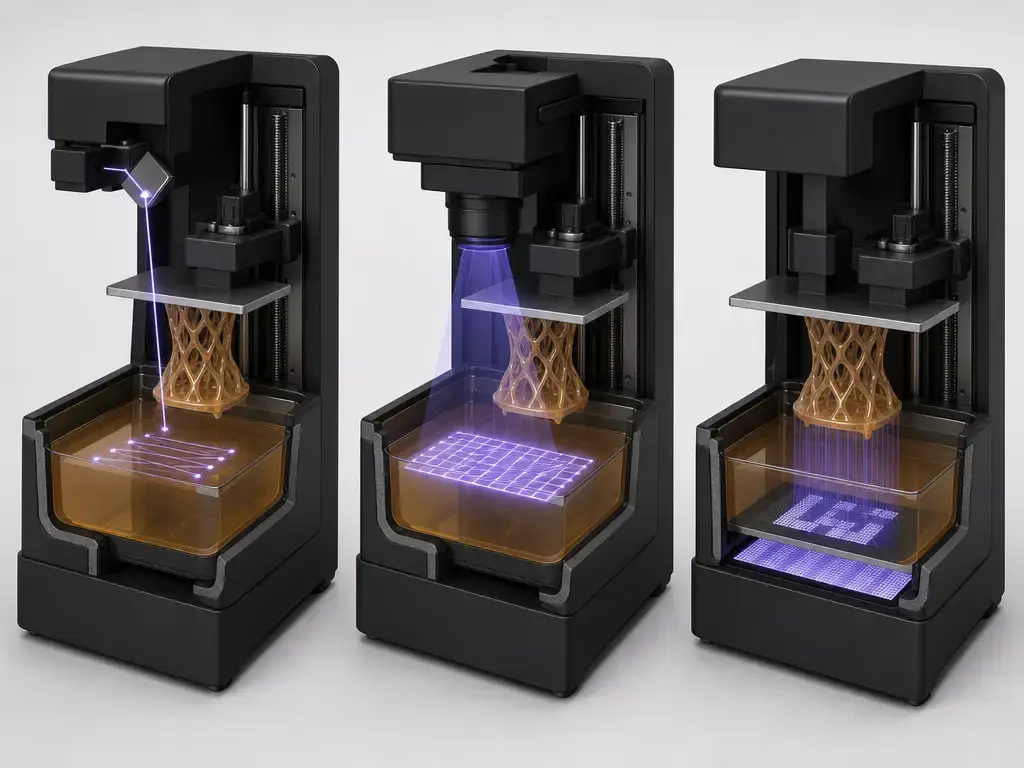
A Short History of “Draft Resin” (Only the Useful Bits)
The useful history is short. Formlabs states that it introduced Draft Resin in 2019, and in a blog post published on 11 February 2021 it described the material as a way to enable faster design iterations. The same post says that “this past October” Formlabs launched a new formulation with faster print time and improved surface finish. In practical terms, that is the context for the later Draft Resin V2 naming: not a new process class, but a revised speed-oriented material within the same product line. [10]
Why Draft Resin Prints Faster (What Actually Changes)
Draft Resin V2 prints faster because speed in SLA is a system outcome, not a single chemistry trick. Formlabs says Draft Resin prints up to 4× faster than its General Purpose Resins on Form 3 Series printers, and the most obvious contributor is layer count: at the same part height, 200 µm layers cut the number of layers roughly in half compared with 100 µm. That does not guarantee half the total job time, but it removes a major share of repeated layer-by-layer work. [3]
The rest of the speed story is workflow physics. Each layer still has to be exposed, separated, recoated, and repeated, and the finished part still has to be washed, dried, and sometimes post-cured. A faster resin profile only pays off fully when it works with layer height, exposure strategy, support strategy, peel and recoat behavior, and post-processing capacity. That is also why “print finished sooner” and “part ready sooner” are not always the same thing: the machine can save time during the build while the bench workflow becomes the next bottleneck. [3] [6] [7] [8]
Speed variables you control:
- layer height
- part orientation
- support density
- hollowing and drainage
- peel/recoat load
- batch layout
- wash throughput
- cure queue time
There is also a materials nuance behind the shortcut. A review of laser-based photopolymer AM notes that, under fixed light intensity and curing time, lower layer thickness can allow a higher and more uniform degree of cure through the layer, while higher layer thicknesses may require increased curing time or light intensity to ensure complete and uniform cure. Faster settings are real, but they still operate inside a process window. [15]
Workflow (Validated Baseline): Print → Wash → Dry → Post-Cure
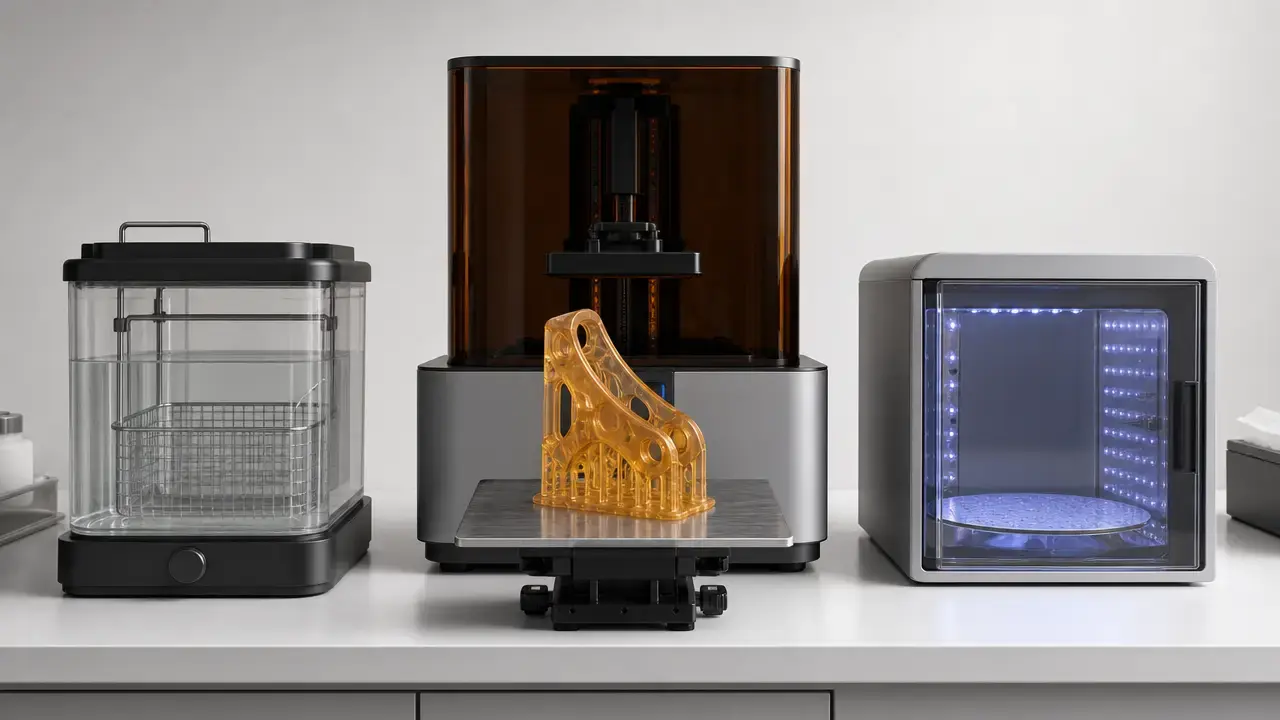
The validated baseline is simple: print with the official material profile, wash off uncured resin, dry the part, then post-cure according to the device you are actually using. For washing, the current Form Wash settings PDF lists Draft Resin at 10 minutes and warns that tackiness has been observed when alcohol contains more than 5% resin concentration; it also says not to wash longer than recommended. If you are using the thermoforming guide’s Finish Kit alternative instead of Form Wash, that application-specific workflow calls for two IPA baths at 96% or higher: 10 minutes in the first bath and 5 minutes in the second. [6] [9]
Drying is a separate step, not part of the wash time. Formlabs’ thermoforming guide gives application-specific drying guidance of about 10 minutes of air drying at room temperature or about 5 minutes of bench drying when compressed air is used, but those figures should stay tied to that guide rather than treated as a universal Draft Resin rule. Post-cure is device-specific as well. The current Form Cure settings PDF updated 9 June 2026 lists two Draft Resin options: 5 minutes with no heat for better elongation, or 5 minutes at 60 °C for better UTS. The Fast Cure settings PDF lists 1 minute at LED intensity 5, with no flip. [7] [8] [9]
One clarification matters. The thermoforming guide shows “Draft V2 Resin – 5 minutes at 0 °C” in that dental-model context, but the newer Form Cure settings PDF updated 9 June 2026 uses “No heat” and also lists the 60 °C option. For current production practice, follow the newer support PDF rather than treating the older guide line as the primary authority. Settings can change, so check the current Form Wash, Form Cure, or Fast Cure PDFs before release-critical runs. [6] [7] [8] [9]

Draft Resin vs Fast Resin vs Speed Resin (Terminology That Helps You Choose)
The market uses “draft,” “fast,” and “speed” loosely, which is why the names help less than they seem to. “Draft Resin” is a Formlabs product line with documented compatibility and a TDS. “Fast resin” and “speed resin” are generic labels unless a manufacturer defines them precisely. The useful comparison questions are simple: which printer is it validated for, which tank or build platform, which post-processing settings, and which test methods? [3] [4]
That is also why Form 4-era names should not be mixed into Draft Resin V2 data by default. Fast Model Resin is a separate Formlabs product context for the Form 4 ecosystem, so its settings and performance data should stay attached to its own documentation. [3] [11]
| Term | Product context | What to compare / caveat |
|---|---|---|
| Draft Resin (Formlabs product line) | Form 2 / Form 3 ecosystem. [3] | Compare by compatibility, validated settings, TDS, and stated test methods. [3] [4] |
| fast resin (generic) | Informal market label. | Do not assume equivalence across brands, wavelengths, or machines. Compare by compatibility, validated settings, TDS, and test methods. [4] |
| speed resin (generic) | Informal market label. | Same caution: compare by compatibility, validated settings, TDS, and test methods, not name alone. [4] |
| Fast Model Resin (Form 4 ecosystem) | Separate Formlabs product for Form 4 family. [11] | Do not transfer Draft Resin V2 data or settings to it by default. [3] [11] |
Performance Metrics (Cure-State Matters)
With Draft Resin V2, cure state has to come before performance claims. A part fresh off the printer is not the same as a washed, dried, and post-cured part, and the official TDS reflects that by reporting green, post-cured-at-room-temperature, and post-cured-at-60 °C values separately. That matters because the trade-off is not one-dimensional: higher post-cure can raise strength, stiffness, and heat resistance while reducing elongation. [4]
Official TDS values are shown below by cure state. [4]
| Property | Green | Post-cured (RT) | Post-cured (60 °C) |
|---|---|---|---|
| Ultimate tensile strength | 24 MPa | 36 MPa | 52 MPa |
| Tensile modulus | 0.8 GPa | 1.7 GPa | 2.3 GPa |
| Elongation at break | 14% | 5% | 4% |
| Flexural modulus | 0.6 GPa | 1.8 GPa | 2.3 GPa |
| Notched Izod | 26 J/m | 29 J/m | 26 J/m |
| HDT @ 1.8 MPa | 37 °C | 44 °C | 57 °C |
| HDT @ 0.45 MPa | 43 °C | 53 °C | 74 °C |
ASTM methods: D638-14, D790-17, D256-10, D648-18; Form 3 @ 200 µm; Form Wash; Form Cure 5 min. [4]
The pattern is familiar for photopolymers. Post-curing moves the material toward a stiffer, more heat-resistant state, but it also makes the part less stretch-tolerant. Here, elongation at break drops from 14% in the green state to 5% after room-temperature post-cure and 4% after 60 °C post-cure, while tensile modulus rises from 0.8 GPa to 1.7 GPa and then 2.3 GPa. The question is not whether post-cure is “better,” but which balance of stiffness, strength, and compliance the part actually needs. [4]
The TDS also sets a clear boundary around those numbers. Formlabs says the reported properties can vary with part geometry, print orientation, and temperature, and that the published data were obtained from Form 3 parts printed at 200 µm using Draft v2 settings, then washed in Form Wash and either air dried or post-cured in Form Cure for 5 minutes. Treat the table as a validated baseline, not a universal promise. [4]
Accuracy, Resolution, and the Tolerance Trap
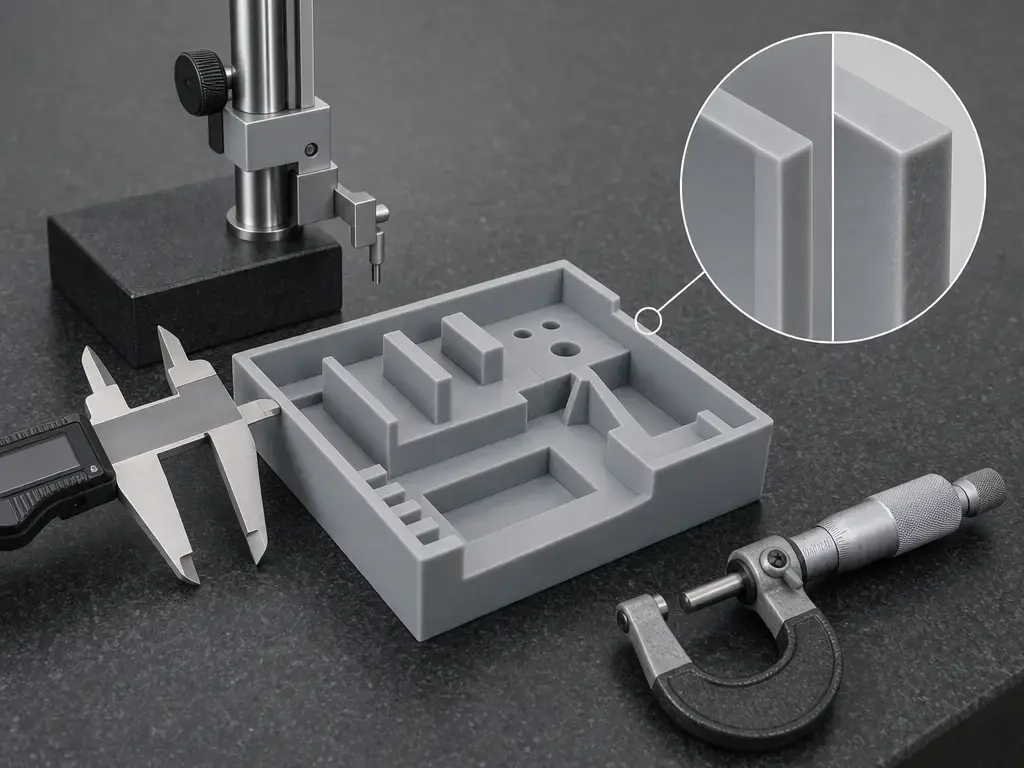
Accuracy language around draft materials tends to get sloppy, so it helps to be strict. No reliable general dimensional tolerance figure found for Draft Resin V2. Formlabs describes Draft Resin as having a smooth grey finish and high accuracy, but it does not publish a universal ± tolerance that transfers across all geometries, printers, orientations, and post-processing conditions. Layer height, XY optical behavior, and final dimensional result are related, but they are not interchangeable. [3] [13]
That matters even more after post-cure. A 2026 study on five commercial SLA resins found that UV post-curing can significantly improve stiffness and tensile strength in rigid photopolymers while also increasing secondary shrinkage and dimensional deviation, with the direction and severity depending on the resin family. Post-cure should not be treated as an automatic accuracy upgrade. For fit-critical work, measure your own geometry under your own orientation, wash routine, and cure state. [16]
Best-Fit Applications (Where Draft Resin Is the Right Tool)
Draft Resin V2 fits applications where a physical answer is needed quickly. That includes concept models, fit checks, large prototypes, batches for design reviews, and education demos where the priority is throughput rather than the best possible finish or end-use durability. Its value is workflow speed inside a supported Formlabs ecosystem, especially when you want more iteration cycles in the same day. [3]
The dental use case should stay narrow. Formlabs includes Dental in the product-page application context, and the thermoforming guide gives a specific workflow for printing models used to make clear appliances. That supports Draft Resin V2 as a model-making material in that workflow context; it does not justify broader clinical or regulatory claims beyond the guide. [3] [9]
Limitations and Common Failure Modes
The limitations mirror the speed advantage. Faster settings make visible layer steps more noticeable, especially at 200 µm, and Draft Resin V2 is not the right material to judge final cosmetic finish from a prototype alone. Heat limits should be read from the TDS by cure state, not guessed from the product name. The official HDT values are the right screening boundary, not a substitute for application-specific testing. [3] [4]
The most common failure modes are usually process failures rather than mysterious resin behavior. Over-washing should be avoided, and contaminated alcohol can leave tacky surfaces; Formlabs notes tackiness when alcohol exceeds 5% resin concentration, while the thermoforming guide warns that greatly exceeding wash duration may affect dimensional accuracy and part performance over time. Cure state can also surprise users: elongation drops from 14% in the green state to 5% or 4% after post-cure, so a part can feel much stiffer and less forgiving than it did right after printing. And in some resin systems, stronger post-cure can trade away dimensional fidelity through secondary shrinkage. [4] [6] [9] [16]
For validation, watch four things first: visible layers, wash cleanliness, cure condition, and measured dimensions on the features that matter. If those are stable, most of the workflow is usually under control. [4] [6]
Safety, Handling, and Waste (What Changes When It’s Cured)
The SDS boundary is clear. Draft V2 Resin carries the signal word Warning and the hazard statements H315, H319, H317, H335, and H411. In practice, uncured resin should be handled as a chemical exposure risk: avoid skin and eye contact, use protective gloves, protective clothing, and eye protection, and work with adequate ventilation or in a well-ventilated area. The SDS also directs users toward P501 disposal in accordance with local, regional, and national regulations. [5]
Keep the waste picture split into three buckets. First, uncured resin: this is the main hazard state, so spills, contaminated tools, and resin-wet surfaces need controlled handling under the SDS precautions. Second, solvent handling and contaminated wash media: IPA and resin-loaded cleaning media are process wastes, not ordinary shop trash, and the thermoforming guide also calls for ventilation, masks, and gloves during solvent washing. Third, cured-part handling and disposal: the thermoforming guide says cured resin in that application context may be disposed of as regular waste, subject to facility protocols, while liquid resin still requires regulated disposal. That guide statement should stay scoped to its stated context rather than generalized as a blanket rule for every cured Draft Resin part. [5] [9]
Current Market Context: Form 4, Fast Model Resin, and Naming Confusion
The current naming confusion mostly comes from platform change. Draft Resin V2 belongs to the Form 2/Form 3 ecosystem, while the current Draft Resin V2 product page tells Form 4 Series users to choose Fast Model Resin instead. That is a compatibility and workflow boundary, not just a branding difference. [3]
Formlabs also describes Fast Model Resin as the next generation of Draft Resin for the Form 4 ecosystem, but that still does not make the two materials interchangeable in practice. Keep each material tied to its own printer family, settings documents, and property sheet. [3] [11]
What Draft Resin Is Best For (Conclusion)
Draft resin is best understood as a fastest-iteration tool, not a universal “fast and good at everything” resin. For Formlabs users, Draft Resin V2 makes the most sense when you want quick prototypes, fit checks, and rapid design loops in the supported Form 2/Form 3 ecosystem, using either 200 µm for speed or 100 µm for finer detail. If the part is heat-critical, load-critical, or tolerance-critical, treat the TDS and the current cure settings as the starting point and validate the full workflow before trusting the result. [3] [4] [7]
FAQ
What is draft resin for SLA printing?
Draft resin for SLA printing is a practical label for a throughput-focused photopolymer used to get prototypes quickly, usually before a team commits to a higher-performance or more application-specific resin. In this article’s main example, Draft Resin V2 is a Formlabs product name used in an SLA workflow inside the broader vat photopolymerization family, not a standardized ISO material class. That distinction matters because the product name carries specific compatibility, settings, and TDS data, while generic “fast” labels often do not. [2] [3]
What layer height should I use with Draft Resin V2: 100 µm or 200 µm?
Use 200 µm when speed is the priority and 100 µm when you need finer visible detail. Formlabs explicitly recommends 200 µm for fast print speeds and 100 µm for models with finer details. The reason is simple: for the same part height, 200 µm cuts the layer count roughly in half relative to 100 µm. Review literature on photopolymer AM also notes that higher layer thickness can require different curing conditions to maintain a complete and uniform cure. [3] [15]
What is the Formlabs Draft Resin wash time?
For Form Wash, the official Draft Resin wash time is 10 minutes. Formlabs also warns that tackiness has been observed when alcohol contains more than 5% resin concentration, and it advises against washing longer than recommended. If you are using a different cleaning method, do not assume that “10 minutes” transfers directly. In the thermoforming guide’s Finish Kit workflow, for example, the application-specific alternative is two IPA baths: 10 minutes in the first and 5 minutes in the second. [6] [9]
What is the Formlabs Draft Resin cure time?
It depends on the curing device. In the current Form Cure settings PDF, Draft Resin has two listed options: 5 minutes with no heat for better elongation, or 5 minutes at 60 °C for better UTS. In the Fast Cure settings PDF, Draft Resin V2 is listed at 1 minute, LED intensity 5, with no flip. Those numbers are device-specific, not interchangeable. If you see an older or application-specific guide showing a different line, use the current support PDF as the primary authority before a production run. [7] [8] [9]
Why can post-curing improve strength but worsen dimensional accuracy?
Because UV post-curing does more than simply finish the part. It continues polymer-network development and can increase conversion, stiffness, and tensile strength while also driving additional shrinkage or stress redistribution. A 2026 study on five commercial SLA resins found that rigid photopolymers often gained stiffness and strength after UV post-cure, but those gains could come with increased secondary shrinkage and dimensional deviation. The critical point is that this trade-off is resin-dependent, so mechanical improvement is not a reliable proxy for geometric fidelity. [16]
How do I validate dimensional accuracy for my specific geometry and workflow if no universal tolerance is published?
Start by defining the measurement problem, not the marketing claim. Separate XY optical detail, Z layer height, and final dimensional accuracy, then choose the features that actually matter to function: datums, hole sizes, wall thicknesses, flatness-critical faces, or mating interfaces. Print test coupons or representative parts in the exact orientation, layer height, wash routine, and cure state you plan to use, then measure against CAD and record the workflow capability you achieved. That workflow-specific result is more useful than borrowing a universal tolerance that Formlabs does not publish for Draft Resin V2. [3] [13]
Related on 3D Mag
- Comprehensive Guide to Resin 3D Printers: SLA, MSLA, and Achieving High Detail Prints
- Rigid Resin for SLA Printing: Uses, Properties, and Warping
- Comprehensive Guide to Resin Printing: SLA Resin and UV Resin Technologies
Sources
[1] ISO/ASTM 52900:2021 — Additive manufacturing — General principles — Fundamentals and vocabulary. https://www.iso.org/standard/74514.html
[2] NIST — Vat Photopolymerization. https://www.nist.gov/additive-manufacturing/research-areas/technologies/vat-photopolymerization
[3] Formlabs — Draft Resin V2 product page. https://formlabs.com/global/products/draft-v2-resin/
[4] Formlabs — Draft Resin V2 Technical Data Sheet (ENUS PDF). https://formlabs-media.formlabs.com/datasheets/2001477-TDS-ENUS-0.pdf
[5] Formlabs — Draft V2 Resin SDS (ENUS PDF). https://formlabs-media.formlabs.com/datasheets/2001476-SDS-ENUS-0.pdf
[6] Formlabs — Form Wash time settings (PDF). https://s3.amazonaws.com/servicecloudassets.formlabs.com/media/Finishing/Washing/115001347744-Form%20Wash%20Time%20Settings/FormWashSettings.pdf
[7] Formlabs — Form Cure time and temperature settings (PDF). https://s3.amazonaws.com/servicecloudassets.formlabs.com/media/Finishing/Post-Curing/115001414464-Form%20Cure%20Time%20and%20Temperature%20Settings/FormCurePost-CureSettings.pdf
[8] Formlabs — Fast Cure time settings (PDF). https://s3.amazonaws.com/servicecloudassets.formlabs.com/media/Finishing/Post-Curing/Formlabs%20Fast%20Cure/FastCureSettings.pdf
[9] Formlabs — Thermoforming clear appliances with 3D printed models (PDF). https://formlabs-media.formlabs.com/rs/060-UIG-504/images/manufacturing-thermoformed-clear-aligners.pdf
[10] Formlabs blog — Rapid SLA prototyping with the new Draft Resin. https://formlabs.com/eu/blog/prototyping-draft-resin/
[11] Formlabs — Fast Model Resin product page. https://formlabs.com/global/products/fast-model-resin/
[13] npj Advanced Manufacturing — Multi-material vat photopolymerization 3D printing: a review of mechanisms and applications. https://www.nature.com/articles/s44334-024-00005-w
[14] Polymers — A Review of Multi-Material 3D Printing of Functional Materials via Vat Photopolymerization. https://www.mdpi.com/2073-4360/14/12/2449
[15] Journal of Materials Science — Laser-based additively manufactured polymers: a review on processes and mechanical models. https://link.springer.com/article/10.1007/s10853-020-05254-6
[16] The International Journal of Advanced Manufacturing Technology — Process–property Trade-offs Induced by UV Post-curing in Stereolithography Building: A Resin-dependent Analysis. https://link.springer.com/article/10.1007/s00170-026-18359-0