



Summary
The RealityCapture review 2018 page is best read as an archival explainer, not a current benchmark. The 2018 3D Mag review page shows a publication date of March 15, 2018, displayed result models from June 2017 that were not reprocessed for the later refresh, an in-body update reference to July 28, 2026, and a footer that reads “Updated September 02, 2026.” [1]
That layered timeline explains why searches for “RealityCapture review 2018” can be confusing now. The page is still useful for understanding a RealityCapture photogrammetry workflow, the image-to-3D pipeline it illustrates, and the limits of what an archival review can prove about accuracy. It is not a controlled validation study or a clean 2026 retest. The historical comparison frame matters too: in March 2018 the competing Agisoft product was still PhotoScan, not Metashape, while later product-history changes belong to a separate timeline that includes Epic’s 2021 acquisition, the 2025 RealityScan rename, and 2026 licensing changes. [1] [2] [3] [4]
What the “RealityCapture review 2018” page actually is
The 2018 3D Mag review page shows a layered artifact with at least three distinct time markers: the displayed models date to June 2017, the review publication date is March 15, 2018, and the page also carries much later 2026 update signals. That separation matters. An updated page shell does not retroactively turn a historical review into a fresh benchmark. The safest reading is archival: treat the page as evidence of what was shown, how it was framed, and what the author wrote, while keeping later edits in a separate bucket. [1]
The 2018 3D Mag review page also shows one hardware line that belongs to historical context only: Alienware Aurora R5, i5 dual-core CPU, 32 GB RAM, and NVIDIA GTX 1070. That setup helps place the original review, but it cannot support a generalized claim about RealityCapture speed, throughput, or performance on other machines. [1]
| Date | Refers to | Why it matters | Evidence source |
|---|---|---|---|
| June 2017 | Result models | The outputs shown are older than the publication date and were not reprocessed for the later refresh. | [1] |
| March 15, 2018 | Published date | This is the original review frame. | [1] |
| July 28, 2026 | In-body update reference | This adds a later content layer inside the page body. | [1] |
| September 02, 2026 | Footer updated date | This confirms the page was touched again after publication. | [1] |
| March 9, 2021 | Epic acquisition of Capturing Reality | This is later corporate context, not evidence about the 2018 test. | [2] |
| June 17, 2025 | RealityCapture renamed under RealityScan branding | This explains why present-day searches can surface a newer name. | [3] |
| August 3, 2026 | Legacy licensing server closure | This is part of later access and licensing history, not the original review frame. | [4] |
The table is the key to reading the page correctly. The 2018 3D Mag review page shows a historical review layered with later update signals, while current official documentation states later naming and licensing changes separately. Readers should not flatten those dates into one timeline or treat the page as a single-date benchmark. [1] [2] [3] [4]
Naming and product timeline after 2018
This section is context only, not evidence about the 2018 test build or interface. The 2018 3D Mag review page shows the older RealityCapture naming, while current official documentation states that the ownership, branding, and licensing context changed later. That is why someone looking for a RealityCapture review 2018 can now land on RealityScan pages even though the historical review belongs to an earlier product-name era. [1] [2] [3] [4]
- 2018: The review belongs to the original RealityCapture naming era. [1]
- 2021: Epic Games announced that Capturing Reality had become part of Epic Games on March 9, 2021. [2]
- 2025: Current official documentation states that on June 17, 2025, the desktop product formerly known as RealityCapture was rebranded as RealityScan. [3]
- 2026: Current official documentation states that the legacy RealityCapture licensing server was set to close on August 3, 2026. [4]
Current official documentation states that, as of the October 2, 2026 audit frame, organizations under $1 million USD in revenue can use RealityScan for free, while organizations over that threshold are shown a $1,250 per-seat annual license. That licensing snapshot helps orient present-day readers, but it should not be read back into March 2018 as if it were historical pricing for the reviewed build. [5]
Technical principles
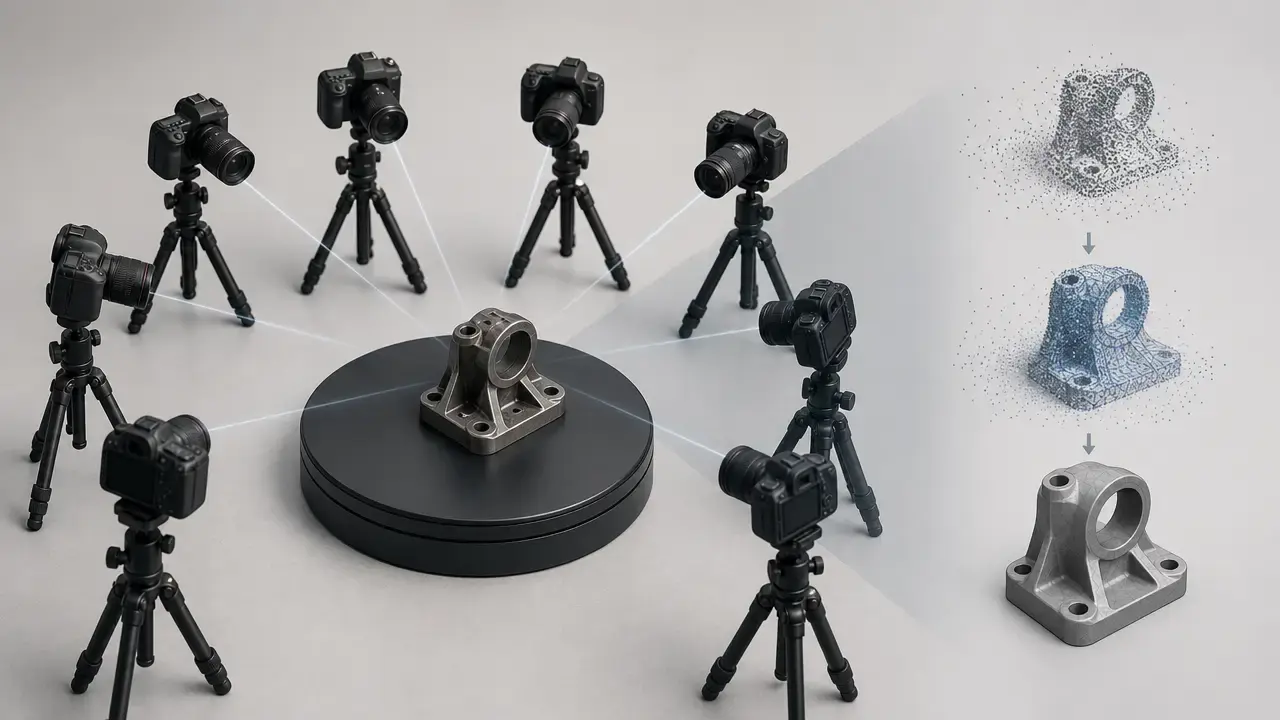
Current official documentation states that alignment is the process of registering cameras by matching images based on common features and poses, while NIST defines photogrammetry as obtaining reliable information about physical objects and environments from photographic images. In that sense, the workflow discussed here is image-based reconstruction: geometry is inferred from overlapping photos and camera relationships, not measured by an emitted beam as in active scanning. [6] [13]
Current official documentation states that alignment depends on overlap and feature matching. At a high level, the software detects visual features, matches them across views, estimates camera poses, and refines camera calibration and scene geometry together. In a standard photogrammetry pipeline, the first geometric result is a sparse point cloud: a limited set of tie points marking where reliable image matches were reconstructed in 3D. That sparse stage is not a finished model. It is an early geometric scaffold, and its quality depends heavily on overlap, feature richness, and how well image observations fit the final camera solve. [6] [15]
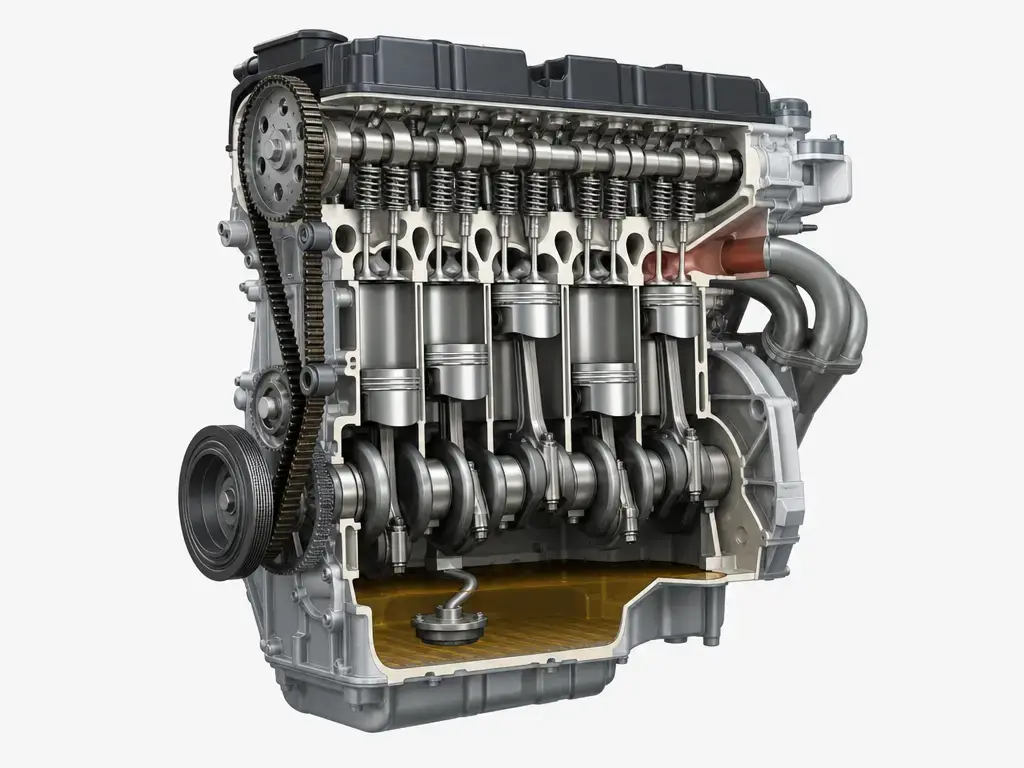
Current official documentation states that the first part of model calculation is a depth-map calculation for each image. It also states that downscale 1 means full image resolution, downscale 2 means each side is halved to 25 percent of the original image resolution, and High Detail uses full resolution. From there, the reconstruction is typically meshed, unwrapped into UV space, textured, and exported. Those later stages improve deliverability and appearance, but they do not erase weak capture geometry created earlier in the pipeline. [7] [12]
RealityCapture photogrammetry workflow
The 2018 3D Mag review page shows a recognizable photo-to-3D sequence, but current official documentation states the settings and labels in present-day help pages, not a verified 2018 default list. That distinction matters: a RealityCapture image to 3D model workflow can remain conceptually similar across versions even when thresholds, labels, or export options change. [1] [6] [7]
-
Capture a set of overlapping photos with stable focus, exposure, and viewpoint spacing. Current official documentation states that “Low” overlap is for cases below 20 percent and that greater than 60 percent is preferred for best quality, which makes overlap a design variable rather than a one-size-fits-all rule. [6]
-
Import the image set and run alignment. Current official documentation states that alignment registers cameras by matching shared features and that a maximum feature reprojection error of 3 px is recommended as an internal guidance threshold, not a dimensional guarantee. [6]
-
Inspect the aligned cameras and sparse point cloud. At this stage the reconstruction has a camera solve and a tie-point structure, but a sparse result is still only an intermediate geometric state, not a validated model. [6] [15]
-
Correct obvious alignment problems before dense reconstruction if needed. That may mean removing outlier images, improving overlap, or rethinking the capture pattern. The exact fix depends on the scene, and no reliable figure found for a universal 2018 recipe. [6]
-
Generate depth maps and the denser reconstruction stage. Current official documentation states that reconstruction downscale uses a percentage meaning, where 1 equals 100 percent and 2 equals 25 percent, and that High Detail uses full resolution. [7]
-
Build the mesh from the reconstructed geometry. This is where the dense result becomes a triangulated surface that can be cleaned or simplified, but the mesh still inherits capture and alignment weaknesses from earlier steps. [7]
-
Unwrap and texture the model if appearance data matters. Current official documentation states that unwrap and texture settings control how image detail is mapped onto the surface, not whether the underlying geometry is metrically correct. [8] [12]
-
Export the result in a target format. Current official documentation states that export formats include .obj and .fbx, but no reliable figure found for a build-specific 2018 export matrix from the evidence provided here. [8]
A workflow can produce a model that looks convincing on screen while still being weak in scale, drift, or local shape. That is why the production sequence and the question of validation should be kept separate: one explains how the model is produced, the other explains what the result can actually prove. [6] [9] [10]
Taxonomy table: inputs, intermediate data objects, outputs
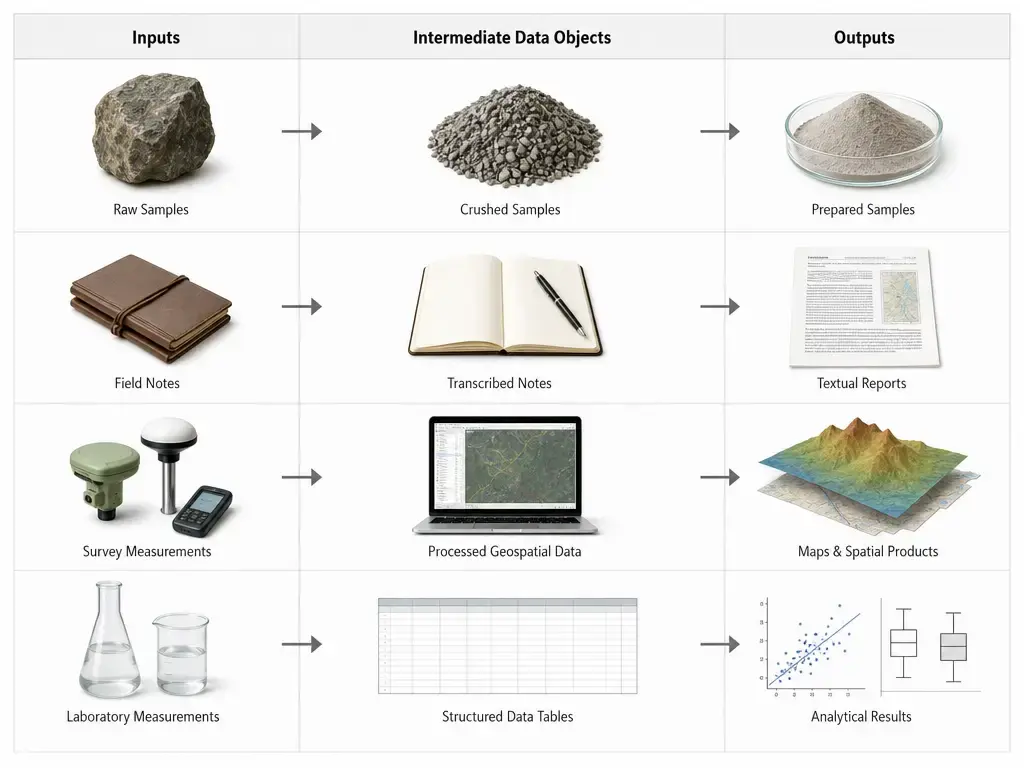
This table is the article’s definition anchor for RealityCapture scan processing results. It separates inputs, intermediate data objects, and outputs because readers often compress the whole pipeline into one vague idea of a “scan.” Image resolution, texture resolution, geometric detail, point density, and polygon count are related, but they are not interchangeable metrics. [8] [12]
| Object/data type | What it represents | Where it appears | Common mistake |
|---|---|---|---|
| Photos | Source images used for matching and reconstruction | Capture stage | Assuming more photos automatically fix poor overlap |
| Aligned cameras | Estimated camera positions and orientations | After image alignment | Treating successful registration as proof of dimensional accuracy |
| Sparse point cloud | Tie-point geometry from the alignment stage | Early reconstruction output | Confusing a sparse result with a finished model |
| Depth maps / dense reconstruction | Per-view depth estimates and the denser reconstruction stage | After alignment, before meshing | Assuming later density repairs weak input geometry |
| Mesh | Triangulated surface built from reconstructed data | Geometry output | Using triangle count as a direct accuracy metric |
| UVs | 2D coordinates used to place texture on the mesh | Unwrap stage | Thinking UV layout changes the mesh shape |
| Texture atlas | Image texture packed onto the UV layout | Texturing stage | Assuming sharper textures mean better dimensions |
| Exported model | Final interchange file such as a mesh export | Delivery stage | Treating file format as a quality metric by itself |
Current official documentation states that the unwrap tool uses a default gutter of 2 px and offers unwrap resolution choices from 512×512 up to 16384×16384, while current export documentation states that a single exported texture side can go up to 65536 px. Those are appearance and packaging settings. They can change how usable or sharp a deliverable looks, but they do not fix warped geometry, drift, or scale error. Later references to sparse points, depth-based reconstruction, mesh, UVs, and texture should be read through this table rather than redefined from scratch. [8] [12]
Export and deliverable context
Current official documentation states that present-day export support includes formats such as .obj and .fbx, and that a single exported texture can reach 65536 px on its maximum side. That tells readers something about deliverable flexibility, not about measurement quality. A model can export cleanly and still be dimensionally wrong, just as a good geometric reconstruction can still have mediocre texturing or inconvenient packaging. Export support is a handoff capability, not a validation result. [8]
For the March 2018 review frame, no reliable figure found for a build-specific export-format matrix or a verified 2018 default export list in the evidence set used here. The 2018 3D Mag review page shows that a review workflow existed and displayed results, but current official documentation should only be used as present-day context when describing export options. [1] [8]
“RealityCapture scan processing results accuracy”: what the page can’t prove, and what good validation looks like
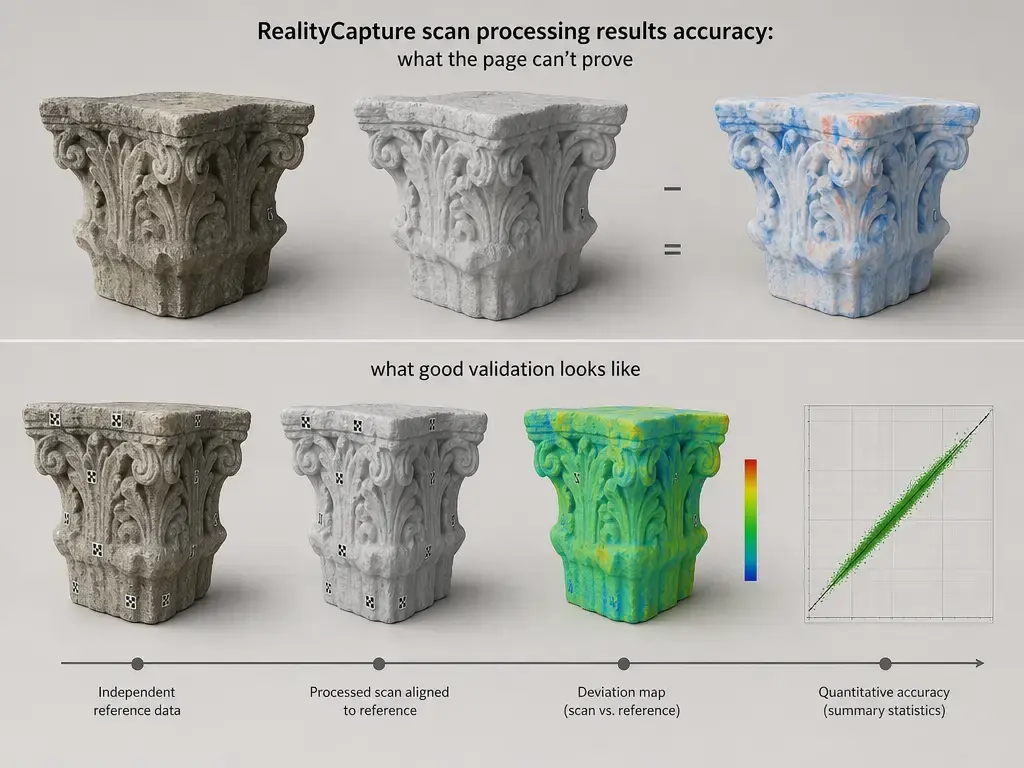
The 2018 3D Mag review page shows processed projects and dated outputs, but it does not publish a universal accuracy number for RealityCapture scan processing results accuracy. In this article, accuracy means agreement with an external reference, while repeatability or internal consistency is a different question. Current official documentation states that feature reprojection error is reported in pixels and that 3 px is a recommended maximum guidance threshold during alignment. That makes reprojection error a useful internal health check, but not the same thing as millimeter truth. A dense-looking model can still be off in scale, drift, or local form if the scene is weakly constrained. [1] [6]
A practical ladder of evidence looks like this. [6] [9] [10]
- Visual inspection: lowest level, useful for spotting obvious holes or failures, but not for proving dimensional correctness. [1]
- Internal diagnostics: current official documentation states that reprojection error is an image-space residual in pixels, which helps with quality control but does not directly report real-world accuracy. [6]
- Scale constraints: current official documentation states that distance constraints, scale bars, and GCPs used in optimization can anchor scale or orientation, but they are still part of the solve rather than an independent test. [9] [10]
- Independent check points or Ground Test points: current official documentation states that Ground Test points are for reporting deviations and are not involved in optimization, which is why they are stronger evidence than fitted control alone. [9]
- Reference geometry comparison: highest level, where the reconstruction is checked against calibrated artifacts, held-out measurements, laser scans, or comparable external references. [16] [17]
Current official documentation states that RealityScan distinguishes Tie Point, Ground Control, and Ground Test. It also states that at least 2 control points in 2 to 5 images are recommended, and that one GCP can define scene origin while two GCPs can define origin and scale. Those are useful foundations, but they do not remove the need for holdout validation. Reprojection error in px should not be converted into mm without a fully specified camera model, scene scale, and measurement setup. Dense point counts and triangle counts should not be read as accuracy scores either; they describe sampling and model complexity, not guaranteed agreement with an outside reference. [9] [10]
A later independent study found a more rigorous example of what measured evaluation looks like. The RFPT industrial comparison assessed 6 software solutions across 4 industrial datasets captured with 2 DSLR cameras and evaluated 12 calibrated scale bars. In the conclusion of that dataset-bound study, mean reprojection errors for most software were about 0.5 ± 0.2 pix, the best reported performance was RealityCapture at 0.3 pix, and PhotoScan plus RealityCapture reached about 0.1 mm RMSE on the estimated scale-bar distances in that specific test context. Those numbers are useful precisely because they are conditional. They belong to those datasets, cameras, and procedures, not to every possible photogrammetry project. [16] [17]
For mapping and other geospatial deliverables, later checkpoint standards can add context, but they should stay in that lane. ASPRS announced its 2024 Edition 2, Version 2 positional accuracy update with a minimum of 30 checkpoints and a maximum of 120 for large projects. That is relevant to geospatial accuracy assessment practice, not to certifying the archived meshes shown on the 3D Mag page. [18]
Photogrammetry software comparison: RealityCapture vs Agisoft PhotoScan in the 2018 frame
The correct historical comparison frame for March 2018 is RealityCapture versus Agisoft PhotoScan. A manufacturer forum record shows that the Metashape 1.5.0 pre-release thread started on October 6, 2018, and the same thread notes the final 1.5.0 build on December 31, 2018. That means a March 2018 comparison should still use the PhotoScan name. The point is not branding trivia; it is historical accuracy. [14] [1]
PhotoScan’s user manual also gives a useful baseline for capture assumptions. It recommends a digital camera of 5 MPix or more, a focal length in the 20 to 80 mm equivalent range, and warns against not-textured, shiny, highly reflective, transparent, and absolutely flat objects. Those limitations are not unique to one brand. They underline that both workflows depend on overlapping image geometry, feature stability, and scenes that actually support matching. Without a shared dataset, matched settings, and an external validation method, a photogrammetry software comparison RealityCapture claim should stay at the workflow-concept level rather than turning into a winner-loser ranking. [15]
Limitations and common failure modes
Many apparent software failures are really capture failures against photogrammetry assumptions. Current official documentation states that overlap below 20 percent is a weak condition and that greater than 60 percent is preferred for best quality. If the photos do not share enough stable content, the solver may still produce a plausible-looking result while carrying disconnected components, weak alignment, or local distortion. [6]
Common failure modes include these cases. [6] [10] [11] [15]
- Shiny or reflective surfaces, because appearance shifts across viewpoints. [15]
- Transparent subjects, because the camera does not record stable surface features. [15]
- Weakly textured areas, because there are too few repeatable features for robust matching. [13]
- Flat surfaces, because they offer limited parallax and weak geometric cues. [15]
- Moving subjects, because the scene changes between images. [15]
- Blur or noise, because they degrade feature quality and make alignment less stable. [6]
- Insufficient overlap, because the model may fragment into disconnected components. [6]
- Scale ambiguity, because a finished-looking reconstruction can still lack reliable metric size without GCPs or other scale constraints. [10]
- Weak constraints, because a sparse or poorly distributed control network can make errors look smaller without fixing the overall shape. [9]
- Improper scaling assumptions, because current official documentation states that non-uniform scaling is not allowed. [11]
The practical lesson is simple. Texture sharpness, dense surface detail, and a clean export can create false confidence if the scene was never anchored and checked. A photogrammetry result can be visually impressive yet still unreliable in size, straightness, or local shape. That is why capture design, scale control, and independent checks matter more than appearance alone. [6] [9] [10]
Bottom line: how to read a RealityCapture review 2018 today
A RealityCapture review 2018 page still has value as an archival record of workflow, terminology, and dated outputs. The 2018 3D Mag review page shows June 2017 result models, a March 15, 2018 publication frame, a July 28, 2026 in-body update reference, and a footer updated date of September 02, 2026. Read that page for historical context and a readable photo-to-3D workflow example. Do not read it as a current benchmark, a pricing guide, or a certified claim about RealityCapture scan processing results accuracy. Its value is real, but it is the value of archive and interpretation, not of universal measurement proof. [1]
FAQ
What does this RealityCapture review 2018 actually prove?
It proves that a specific page existed, what timeline markers it carries, what kinds of models it displayed, and how the workflow was described for readers. The 2018 3D Mag review page shows a March 15, 2018 publication frame, June 2017 outputs that were not reprocessed for the later refresh, and later 2026 update signals. It does not, by itself, prove a universal speed number, a universal accuracy number, or a current feature matrix. [1]
How does the RealityCapture photogrammetry workflow turn images into a 3D model?
At a high level, photogrammetry reconstructs geometry from overlapping photos by matching repeated image features across views. In a typical RealityCapture workflow, the project moves from capture to alignment, then to sparse geometry, then to depth-based reconstruction, mesh, UV unwrap, texturing, and export. Current official documentation states the present-day settings for parts of that pipeline, but the overall flow should be understood as a generic image-based reconstruction process rather than a claim about one exact 2018 interface. [6] [7] [13]
Expert-level: Does reprojection error equal accuracy?
No. Current official documentation states that reprojection error is an internal image-space residual in pixels, and the help guidance recommends keeping feature reprojection error at or below 3 px. That makes it useful for screening alignment quality, but it is not the same as external dimensional accuracy in millimeters. A model can have low reprojection error and still be wrong in scale or local shape if scene constraints are weak or the validation method is missing. [6] [9]
How accurate are RealityCapture scan processing results?
There is no single number that applies to all scenes. Accuracy depends on overlap, texture, camera geometry, scale control, and validation method. Current official documentation states that Ground Test points are reserved for reporting deviations rather than optimization, which is why they matter in a real check. A later independent study found dataset-bound examples around 0.5 ± 0.2 pix for mean reprojection errors, 0.3 pix for the best RealityCapture result, and about 0.1 mm RMSE for PhotoScan and RealityCapture on scale-bar distances in that specific test. Those are examples, not guarantees. [9] [10] [17]
Is it RealityCapture or RealityScan, and why did the name change?
Both names are historically relevant, but they belong to different dates. The 2018 review belongs to the RealityCapture naming era. Current official documentation states that on June 17, 2025, the desktop product formerly known as RealityCapture was rebranded as RealityScan. So if a present-day search turns up RealityScan pages, that reflects later branding history rather than a rewrite of the original March 2018 review frame. [1] [3]
Can RealityCapture export OBJ or FBX?
Current official documentation states yes: present-day export support includes .obj and .fbx. That is useful for deliverable planning, but it does not prove dimensional correctness, and it should not be backdated into a specific March 2018 export matrix unless older evidence confirms it. For the build-specific 2018 matrix discussed here, no reliable figure found. [8]
Expert-level: How would you design a real accuracy test for a photogrammetry project?
Use a controlled capture, known scale references, and held-out validation. In practice, separate tie points from Ground Control points and Ground Test or check points, then compare the finished reconstruction against independent references such as calibrated scale bars or other known geometry. Current official documentation states that one GCP can set origin and two can set origin plus scale, but mapping work needs a broader checkpoint discipline. In that geospatial context, ASPRS’s 2024 update raised the minimum checkpoint count to 30 and capped it at 120 for large projects. [9] [10] [17] [18]
Sources
Citations appear as [1] after punctuation.
- 3D Mag – RealityCapture photogrammetry software review (3dmag.com)
- Epic Games – Capturing Reality is now part of Epic Games (epicgames.com)
- RealityScan – RealityScan 2.0 new release brings powerful new features to a rebranded RealityCapture (realityscan.com)
- RealityScan – The RealityCapture legacy licensing server will close down on August 3 (realityscan.com)
- RealityScan – Licensing (realityscan.com)
- RealityCapture Help – Alignment Settings (rchelp.capturingreality.com)
- RealityScan Help – Reconstruction Settings (rshelp.capturingreality.com)
- RealityCapture Help – Model Export (rchelp.capturingreality.com)
- RealityCapture Help – Control Points (rchelp.capturingreality.com)
- RealityCapture Help – Georeferencing a Scene (rchelp.capturingreality.com)
- RealityScan Help – Scaling a Scene (rshelp.capturingreality.com)
- RealityCapture Help – Unwrap Tool (rchelp.capturingreality.com)
- NIST Glossary – Photogrammetry (nist.gov)
- Agisoft Forum – Metashape 1.5.0 pre-release thread (agisoft.com)
- Agisoft – PhotoScan User Manual Standard Edition v1.4 (agisoft.com)
- RFPT – Comparative study of photogrammetry software in industrial field (rfpt.sfpt.fr)
- RFPT – Comparative study of photogrammetry software in industrial field PDF (rfpt.sfpt.fr)
- ASPRS – Edition 2 Version 2 of the positional accuracy standards for digital geospatial data (old.asprs.org)



Hello sir, I have a question about reality capture, as you said in your conclusion : “audience might be attracted to some features from competitor PhotoScan, which include the ability to re-import optimized meshes and UVs (from zBrush, for example) for texturing.”
This is my case, so what is the alternative if we cannot re-import the meshes or UVs for texturing in reality capture software ?
Thank you
Hello Thomas,
You can re-import your mesh into RealityCapture with the import model button (at the right of top menu).
Pascal Godard
Hi Pascal,
I’m a geologist and am wondering if I would be able to use this software to measure features in a rock outcrop. Do any of these programs provide tools to quantify/ measure feature geometries & spacing that would be true-to-scale?
Thanks! – Steph
Hi Stephanie,
If you objects in the scene of known scale in the scene (preferably more than one at different places) you can scale the virtual object by defining the distance between two points. The more of these control points you define, the more accurate the model becomes.
Unfortunately RealityCapture doesn’t yet have measurement features but if the model is scaled correctly you can import it into the open source program MeshLab to perform measurments.
If you want to perform distance, area, and volume measurements inside a photogrammetry tool, you can check out 3DF Zephyr Professional.
I have a special post planned about scaling photogrammetry projects in all major software packages. Keep an eye out for this!
Hello Nick
What texture size are have the last one women bust model? (Bust — RealityCapture (High)
At the moment texture look a little low quality and blurry. Does that happened because of Canon 550d and kit lenses or you just desides not to rendering too big texture size?
Thank you
Thank you for the reviews. I’m currently looking for a photogrammetry software solution and your reviews are very helpful. If I can make a request, would it be possible for you to review the PhotoModeler software?
Hi Nick,
How long do you think before most cellphone have proper depth sensor in the back?
Thanks
Website Design and Development Company in Lucknow
hey! Mr Official Online
How long do you think before most cellphone have proper depth sensor in the back?
Website Design and Development Company in Lucknow
[…] Processing photos in RealityCapture (source: 3D Scan Expert) […]