
Summary
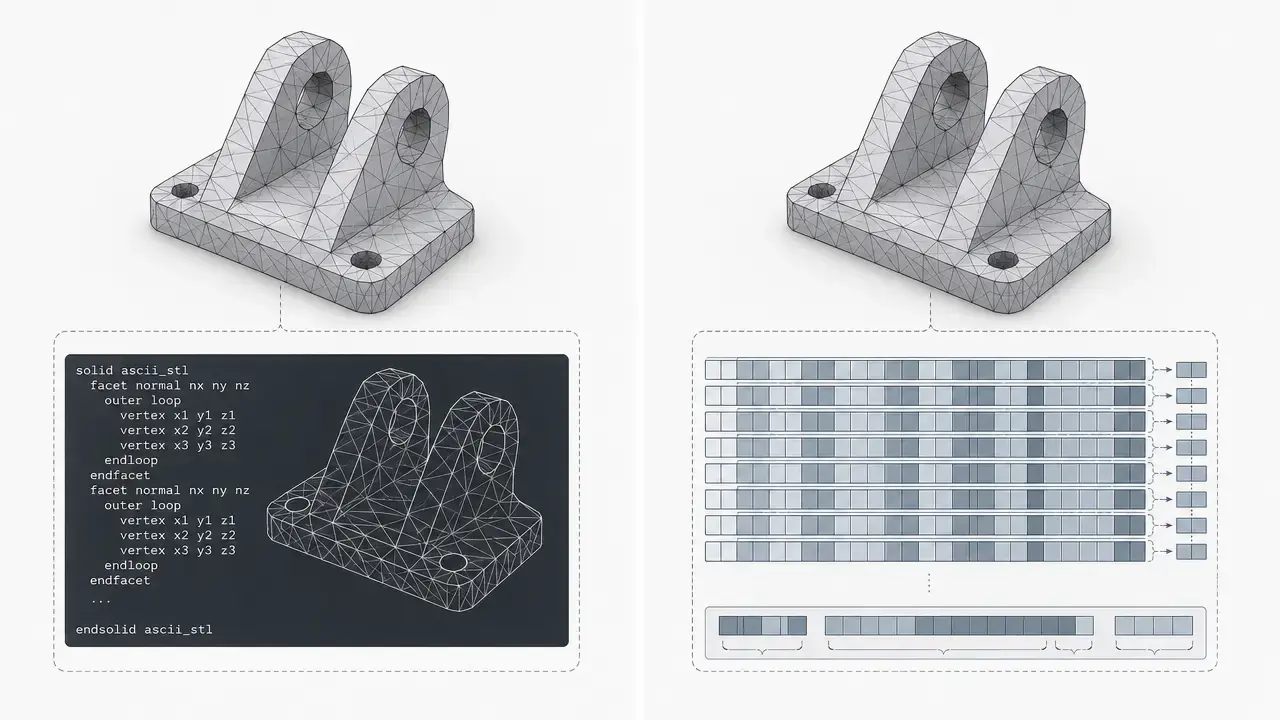
STL ASCII vs binary is a comparison between two encodings of the same STL triangle-mesh format, not two different modeling systems. STL has two subtypes, ASCII and binary, and both commonly use the same .stl extension. [1] [4]
For most 3D printing workflows, binary STL is the practical default because modern software commonly uses it and it is more compact. ASCII STL remains useful when you want to inspect a file directly, troubleshoot export issues, or teach the structure of the format. If the triangles and coordinates are identical, the encoding does not change print quality; the bigger variables are tessellation, mesh validity, scale handling, slicing, and the printer-process-material combination. Neither encoding adds units, assemblies, materials, or dependable metadata. [1] [2] [3] [5]
Quick answer: which STL format should you use for 3D printing?
Use binary STL for normal slicer workflows. It is the more compact encoding in modern practice, it is more commonly used by current software, and there is no separate file extension that tells you which encoding a .stl file uses. ASCII STL is still valid, but today it is mostly a specialist or debugging choice rather than the default export for day-to-day printing. [1] [4]
ASCII STL was historically described as primarily intended for testing, which helps explain why readability comes with larger files. As one compatibility example rather than a universal rule, Prusa’s documentation says its software supports both binary and ASCII STL and prefers 3MF for project files. [3] [17]
- Choose binary STL for routine slicing, larger meshes, uploads, and file sharing. [1] [4]
- Choose ASCII STL for debugging, teaching, very small test files, text-based diff workflows, or legacy edge cases. [3]
STL encodings in one minute
STL was documented by 3D Systems in 1988, with a second edition published in 1989. Both encodings describe the same underlying model: a surface approximated by triangular facets. Each facet stores a normal vector and three vertices, for a total of 12 numeric values per facet. Valid STL also depends on orientation rules: the normal should point outward, and the vertices should be ordered counterclockwise when viewed from outside, following the right-hand rule. [1] [5]
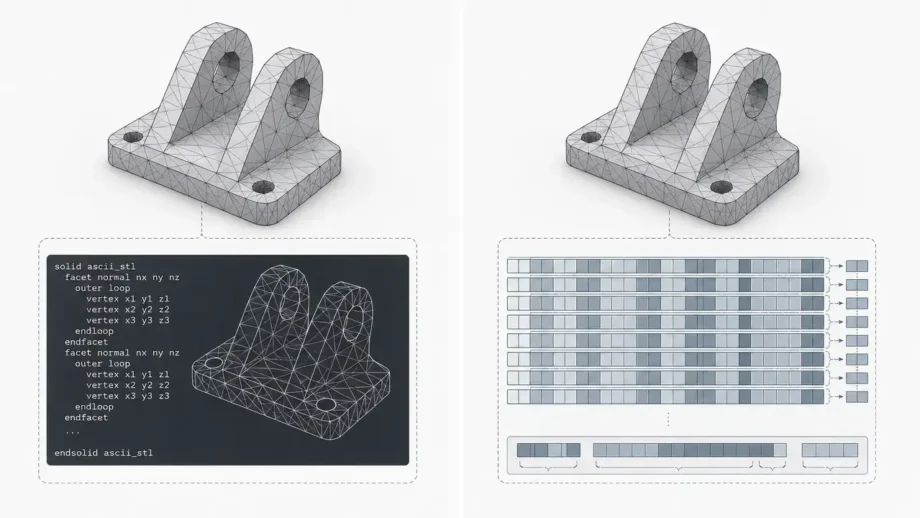
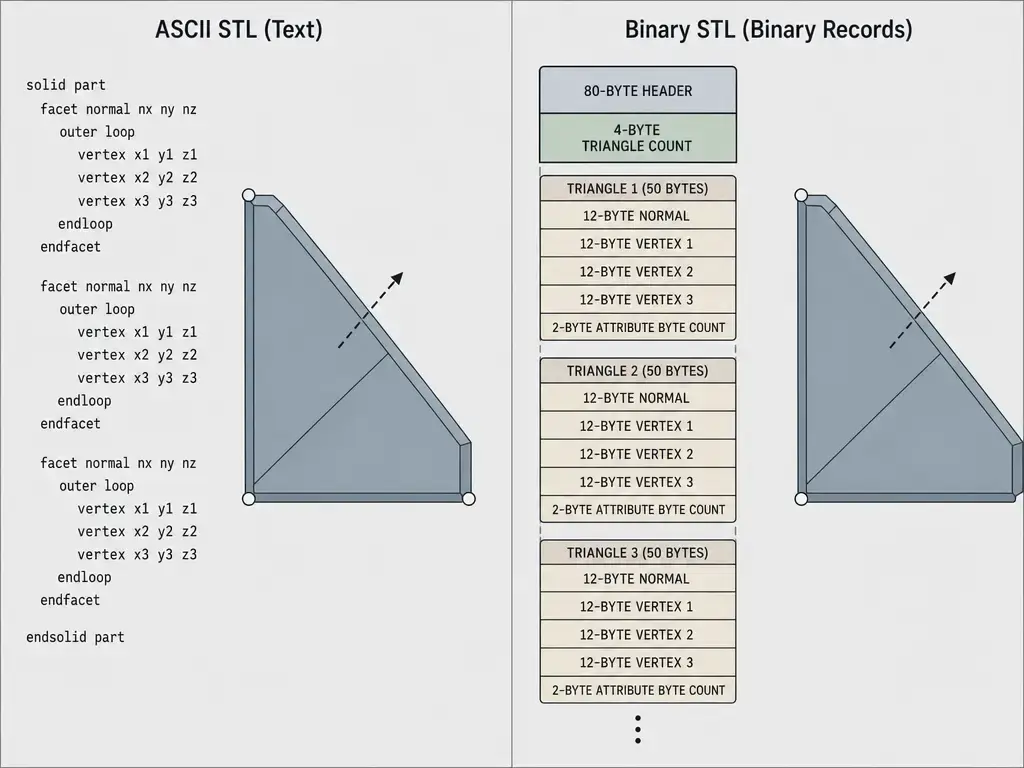
What changes between encodings is representation, not geometry. The ASCII STL encoding writes the mesh as line-based text records such as solid, facet, outer loop, vertex, endloop, endfacet, and endsolid. The binary STL encoding stores the same facet data in fixed-length records after a short header and triangle count. That affects readability, file-size predictability, and some parser behavior, but not the mesh concept itself. [2] [3]
| Aspect | ASCII STL encoding | Binary STL encoding | Best use |
|---|---|---|---|
| Readability | Human-readable text | Not human-readable | ASCII for inspection; binary for routine exchange |
| Size rule | Varies with formatting | For a valid file, derived size = 84 + 50 × N bytes |
Binary is easier to size-check |
| Interoperability caveats | No reliable units or rich metadata | Same limits, plus nonstandard color conventions | Neither solves STL’s missing semantics |
| Mesh model | Same triangles, normals, and vertices | Same triangles, normals, and vertices | Geometry model is shared |
The binary size rule in the table is derived from the file layout: 80 bytes for the header, 4 bytes for the triangle count, and 50 bytes per facet. Across both encodings, STL still lacks reliable units, dependable metadata, and standard color or texture support. [2] [5]
How to tell if an STL is ASCII or binary (and why solid is not enough)
Do not identify an STL only by checking whether the file starts with solid. The IANA registration makes no distinction in file extension between the two variants, and real binary STL files can begin with header text that starts with solid, which breaks simplistic detection. The safest first step is to open the file in a known-good viewer or parser that already handles both variants. [4] [10] [11]
A practical checklist is:
- If the file is readable text throughout and you see the expected STL keywords in sequence, it is likely ASCII. [3]
- If you treat it as binary, read the triangle count at byte offset 80 as a little-endian 32-bit integer and check whether the total file size matches
84 + 50 × Nbytes. Use this as a validation heuristic, not a formal signature. [2] [10] - If the result is ambiguous, fall back to a trusted parser rather than guessing from the header. [10] [11]
That heuristic is useful because binary STL has no magic number. A 2019 formalized specification example uses both a header sanity check and the expected-size equation, while at least one mature reader notes that little-endian is the de facto norm but still attempts byte-order detection in ambiguous cases. Parser output, size validation, and basic sanity checks together are safer than any single header rule. [10] [12]
Anatomy of a binary STL file
The binary STL encoding is simple enough to describe at the byte level. [2]
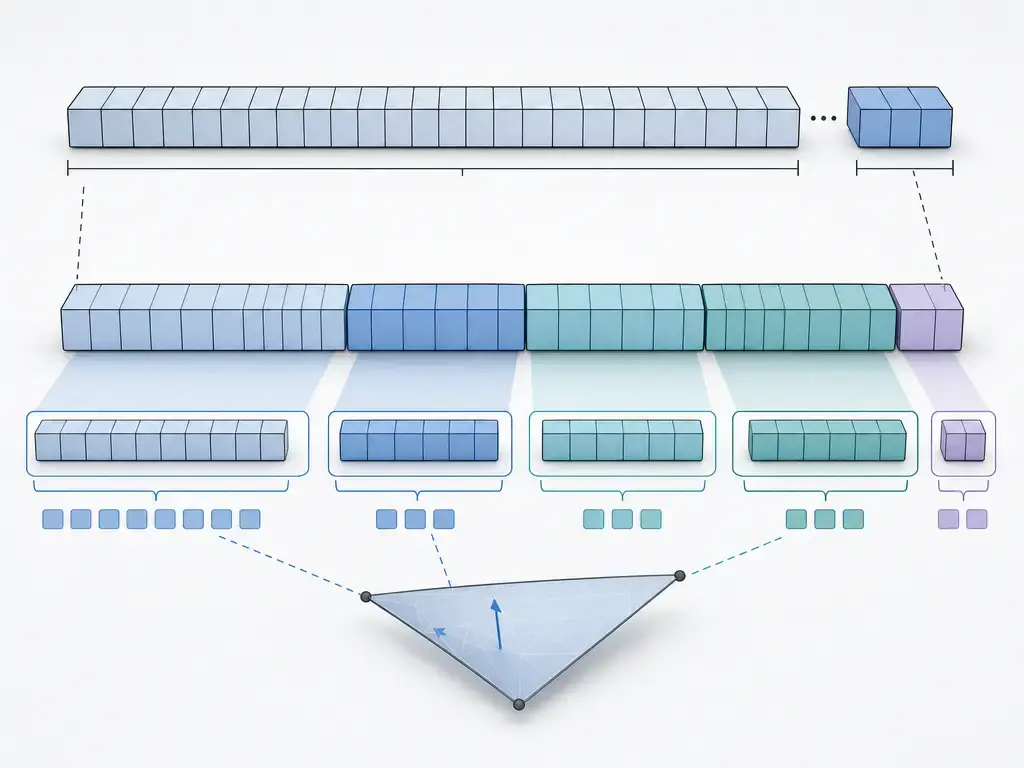
A binary STL file begins with an 80-byte header, followed by a 4-byte triangle count, followed by one 50-byte record for each triangle. The header may contain text, but it is not standardized metadata, so it should not be trusted for units, authorship, or other project information. [2]
| Byte offset | Length | Field | Meaning |
|---|---|---|---|
| 0 | 80 | Header | Comment/header area; not standardized metadata |
| 80 | 4 | Triangle count | uint32 little-endian count of facets |
| 84 | 50 × N |
Triangle records | Repeated per-triangle data |
Each triangle record contains 12 little-endian float32 values, which is 48 bytes total: 3 values for the facet normal and 9 values for the three vertex coordinates. Those 48 bytes are followed by a 2-byte unsigned integer usually called the attribute byte count. Historical guidance commonly treats that field as zero, and the format never established a dependable general-purpose attribute scheme there. [2] [5]
From that layout, the total size of a valid binary STL is derived as 84 + 50 × N bytes. The 84 comes from the 80-byte header plus the 4-byte count; the 50 comes from 48 bytes of float32 facet data plus the 2-byte attribute field. Library of Congress documentation describes the fields as little-endian, and MOAB notes that little-endian is the de facto standard even though some readers still probe for byte order. Binary color extensions also remain ambiguous rather than standardized. [2] [12]
Anatomy of an ASCII STL file
The ASCII STL encoding uses keywords and line-based records instead of fixed byte blocks. A file begins with solid and ends with endsolid; inside that outer wrapper, each facet runs from facet to endfacet. A facet may include a unit-length normal after normal, and its three vertices appear between outer loop and endloop as (X, Y, Z) coordinate triplets. [3]
A short record sequence looks like this:
solid namefacet normal ...outer loopvertex ...vertex ...vertex ...endloopendfacetendsolid name
Because ASCII STL is text, its file size varies with whitespace, line endings, optional names, and how many digits the exporter writes for each number. That is why there is no useful universal ASCII-to-binary size ratio. The ASCII STL encoding was also described historically as primarily intended for testing, which helps explain why its main advantage today is transparency rather than compactness. [3]
Performance and representation trade-offs
Binary STL is usually smaller because it stores each triangle in a fixed 50-byte record instead of spelling the same structure out with repeated text keywords and decimal strings. For valid binary files, size is deterministic once you know the triangle count. ASCII STL has no equivalent fixed-size rule, because its storage cost changes with textual formatting choices. That is why binary became the common default in modern practice without being a different or “better” mesh model. [1] [2] [3]
Parsing speed is more situational. Many implementations can step through binary data efficiently because the record length is fixed, while ASCII readers must tokenize text and parse numbers from strings. Even so, implementation details, operating systems, file sizes, and library design all affect results, so no reliable universal figure found. That makes speed a reasonable secondary consideration, but not a number you should generalize without a controlled benchmark. [2] [3]
Precision is easy to overstate. The binary STL encoding stores facet values as float32, while the ASCII STL encoding stores text representations of numbers. That does not mean ASCII is automatically “higher quality,” and it does not mean binary hurts print quality by itself. If the same triangles reach the slicer, the print outcome is driven by tessellation quality, mesh validity, scale interpretation, slice settings, and the printer-process-material context. [2] [5] [8]
CAD-to-slicer workflow
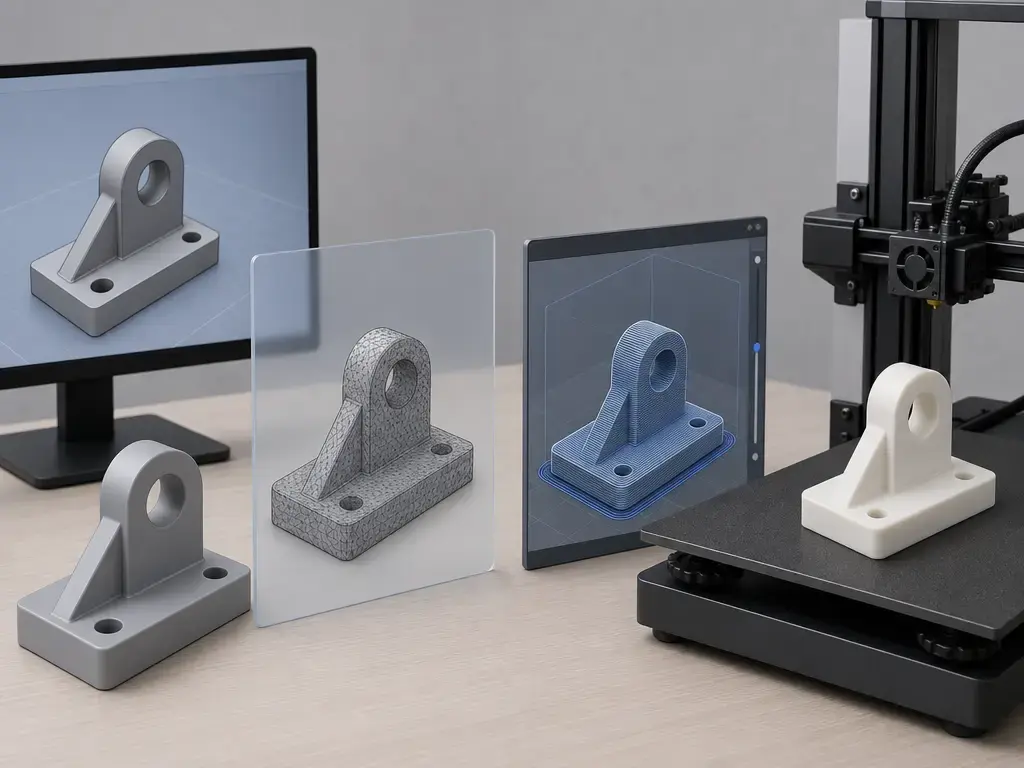
STL usually sits in the middle of the toolchain, not at the end of it. IANA describes the usual sequence as 3D model data created by modeling software and then sent to 3D print preparation software, which produces machine- and material-specific instructions. In that sense, STL is an interchange mesh rather than a full manufacturing package. [4]
A practical workflow is:
- Model the part in CAD or mesh software.
- Export STL and choose tessellation settings deliberately, because triangle density controls how curved surfaces are approximated.
- Prefer binary unless you specifically need the ASCII STL encoding for inspection or debugging.
- Import the file into the slicer and verify scale, manifoldness, and obvious defects.
- Slice to machine instructions such as G-code or another printer-specific output. [4]
As a compatibility example rather than a universal rule, Prusa documents support for both STL encodings and prefers 3MF for project files. [17]
Limitations and edge cases
The most important STL limitations apply to both encodings. STL does not contain reliable scale information, so the coordinates are just arbitrary units until another tool assigns meaning to them. That is why the same mesh can import at the wrong size when exporter and importer assume different units. STL also does not provide dependable descriptive metadata; even the binary header is only a comment field, not a standardized metadata block. [2] [5]
Topology is another core limitation. NIST notes that STL stores a collection of facets with no connectivity information, so software may need to reconstruct adjacency before tasks such as slicing can proceed efficiently. In practical terms, mesh health usually matters more than choosing ASCII or binary. If the model has gaps, missing facets, or broken adjacency, the encoding alone will not save the job. [8]
Common failure modes include inconsistent or flipped normals, degenerate facets, and gaps caused by missing surfaces or facets. NIST distinguishes topological degeneracy, where vertices coincide, from geometric degeneracy, where vertices are distinct but collinear. Color and texture are also shaky territory: the documented STL specification has no standard support for them, and the binary color conventions in use are incompatible with one another. For everyday printing, those problems are more likely to cause trouble than the ASCII-versus-binary choice itself. [2] [8]
When STL’s limits matter: quick alternatives
Alternative formats matter mainly when STL’s omissions become a real problem. If you need explicit units, richer metadata, appearance information, or broader model semantics, that is the point where a different format starts making sense. The 3MF Core Specification gives <model> a unit attribute whose default is millimeter and whose allowed values include micron, millimeter, centimeter, inch, foot, and meter. [14]
| Format | Units | Metadata / appearance | When it helps |
|---|---|---|---|
| STL | No reliable built-in units | No standard metadata, color, or texture | Minimal triangle-mesh exchange |
| 3MF | Explicit units; default millimeter | Richer project data | Better when units and project context matter |
| STEP / AMF | Varies by format | Better support for broader model semantics | Use when STL’s omissions are the actual problem |
This is not a claim that 3MF, STEP, or AMF universally replaces STL. It is a narrower point about capabilities. 3MF is now published as ISO/IEC 25422:2025, with edition 1 published in June 2025, and the AMF standards abstract explicitly frames STL as a surface-mesh-only format lacking provisions for color, texture, material, substructure, and related properties. [15] [16]
Niche note: medical workflows
One specialized exception is medical data exchange. DICOM Supplement 205 encapsulates STL models for 3D manufacturing, but the encapsulated document is a binary STL byte stream; ASCII STL is not supported in that pathway. That is a niche standards choice, not a reason to export binary differently for ordinary hobby or general CAD-to-slicer work. [13]
Conclusion: which STL format should I use for 3D printing?
For most users, STL ASCII vs binary is a representation choice, not a geometry choice. If you are asking which STL format should I use for 3D printing, the short answer is binary by default, with ASCII reserved for readability, debugging, or legacy text workflows. If you need units, metadata, appearance, or richer model semantics, the better fix is usually choosing 3MF, STEP, or AMF rather than switching between STL encodings. [1] [2] [5]
FAQ
What is the difference between ASCII and binary STL encodings?
They are two encodings of the same STL mesh model. The ASCII STL encoding writes facets as human-readable text records, while the binary STL encoding stores the same kind of facet data in fixed-size binary records. The difference is operational — readability, file-size behavior, and parser handling — not a change in the geometry concept. [1] [2] [3]
Is binary STL smaller than ASCII STL, and why?
Usually, yes. A valid binary STL uses a fixed 50-byte record per triangle plus an 80-byte header and 4-byte triangle count, so its size is predictable. ASCII STL has to store keywords, spaces, line breaks, and decimal strings, so its size changes with formatting. That is why binary is generally more compact, but there is no universal ratio that applies to every file. [1] [2] [3]
Which STL format should I use for 3D printing?
For normal slicer workflows, use binary unless you have a specific reason not to. It is the common modern default because it is more compact and widely handled. The ASCII STL encoding is mainly useful when you want to inspect the file directly, diff it as text, or troubleshoot an export. Some slicers explicitly support both, but that should be treated as product-specific confirmation, not a universal rule. [1] [3] [17]
Does STL ASCII vs binary affect print quality?
Not by itself. If the slicer receives the same triangles and coordinates, changing only the encoding does not improve surface fidelity or printer accuracy. Print results depend far more on tessellation, mesh repair status, unit interpretation, slicing settings, and the printer-process-material combination. Encoding choice is usually a workflow decision, not a print-quality control. [2] [5] [8]
How can I reliably tell if an STL is ASCII or binary?
Do not rely on solid alone. Real binary STL files sometimes start with that text in the header, so header sniffing can fail. Use a reliable parser or viewer first. If you need a manual sanity check, treat the file as binary, read the little-endian triangle count at byte offset 80, and see whether the total size matches 84 + 50 × N bytes. That is a heuristic, not a formal signature. [2] [10] [11]
Expert: What exactly is stored per triangle in binary STL?
Each triangle record is 50 bytes long. The first 48 bytes are 12 little-endian float32 values: 3 for the facet normal and 9 for the three vertex coordinates. The last 2 bytes are an unsigned integer field called the attribute byte count. Repeated N times after the header and triangle count, those records define the mesh. [2]
Expert: What is the attribute byte count, and why is color in binary STL unreliable?
The attribute byte count is the last 2 bytes of each binary triangle record. Historical guidance commonly sets it to zero, and the original documentation did not establish a general interoperable attribute scheme. Some software later used binary STL extensions for color, but the conventions conflict, so software cannot automatically know which interpretation to trust from the file alone. [2] [5]
Sources
- Library of Congress — STL (STereoLithography) File Format Family
- Library of Congress — STL (STereoLithography) File Format, Binary
- Library of Congress — STL (STereoLithography) File Format, ASCII
- IANA — Media Type
model/stl - Fabbers — The StL Format
- NISTIR 6216 — An Assessment of Data Requirements and Data Transfer Formats for Layered Manufacturing
- CEUR-WS Vol-2406 paper — On the Use of Specifications of Binary File Formats…
- meshio issue — Cannot read binary STL file with a header that starts with solid
- MOAB documentation — moab::ReadSTL Class Reference
- DICOM / NEMA — Supplement 205: Encapsulation of STL Models for 3D Manufacturing
- 3MF Consortium — 3MF Core Specification
- ISO — ISO/IEC 25422:2025 (3MF specification suite)
- ISO — ISO/ASTM 52915:2013 abstract
- Prusa Knowledge Base — Supported file formats