
Summary
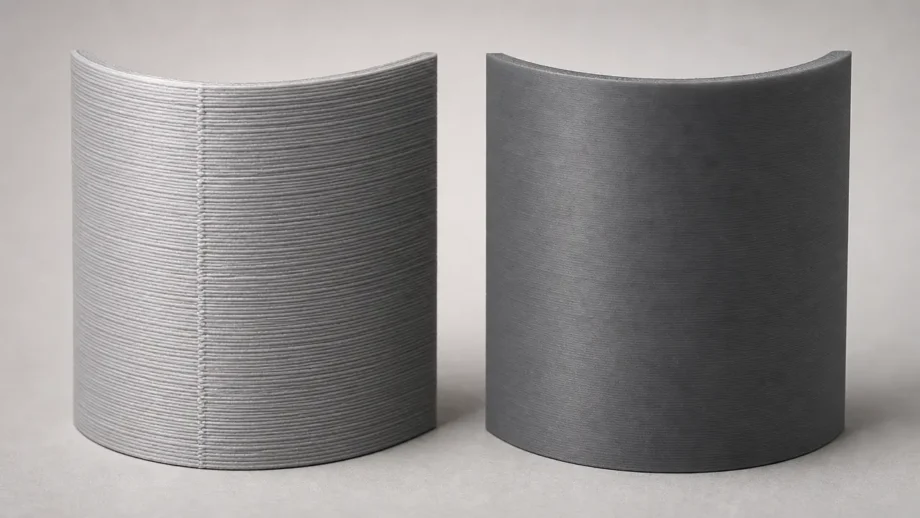
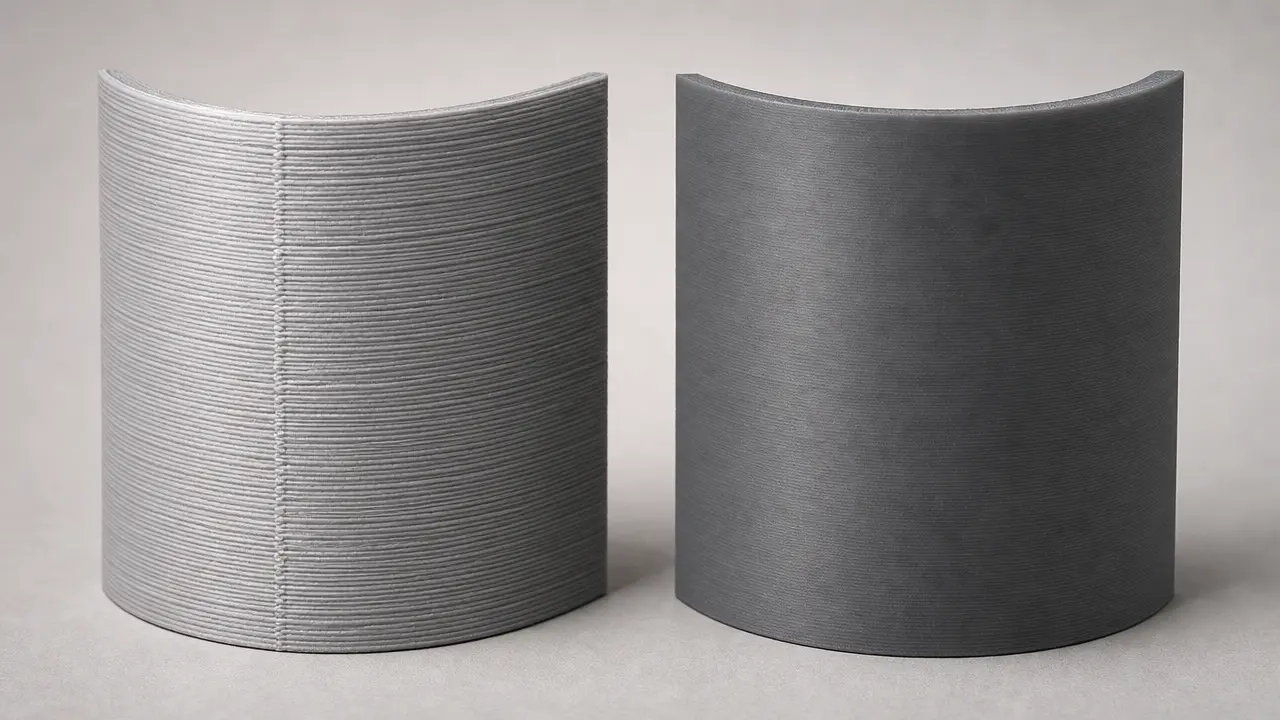
SLA vs FDM quality depends first on what you mean by quality. For fine visual detail, cleaner surfaces, and small features, resin printers usually have the edge: one named resin example lists 0.05 mm XY resolution and layer height from 0.01 mm, with 0.05 mm recommended for ordinary use. [12] A common desktop filament reference, by contrast, lists 0.05-0.35 mm layer height overall and a 0.4 mm default nozzle, while Prusa’s guidance says a 0.4 mm nozzle should stay below about 0.32 mm layer height. [10] [11] That helps explain why extrusion lines and seams are usually more visible on filament prints. [11]
Functional quality is a different question. Printed properties depend heavily on the exact material, build direction, cure state, and post-processing. An UltiMaker PLA example shows tensile stress at break of 45.5 ± 1.1 MPa in XY, 56.0 ± 1.5 MPa in YZ, and 33.1 ± 2.8 MPa in Z. [16] Resin properties can also shift strongly with post-cure: Formlabs Draft Resin moves from 24 MPa to 36 MPa to 52 MPa ultimate tensile strength, with HDT at 0.45 MPa changing from 43 °C to 53 °C to 74 °C across those states. [14] If you need higher heat resistance from a thermoplastic workflow, Stratasys ABS-M30 is listed at 104.4 °C HDT at 66 psi. [19]
SLA vs FDM Quality: What “Quality” Actually Means
Why this article says SLA, but technically compares resin and filament workflows
In buyer language, “SLA vs FDM quality” usually means resin printer versus filament printer. Technically, this article compares material extrusion against vat photopolymerization, following ISO/ASTM 52900 as the vocabulary anchor and NIST’s additive-manufacturing process taxonomy. [1] [22] Many consumer resin printers are not classic laser SLA machines, but DLP or MSLA/LCD systems that cure resin in different ways. [21]
Before any winner-loser claim, one distinction matters: resolution, dimensional accuracy, repeatability, and surface finish are not interchangeable metrics. [2] NIST notes that “resolution” can mean the smallest printable feature or merely axis increment, while “accuracy” can mean closeness to target dimensions and is often confused with tolerance or resolution unless the test method is defined. [2] Visual quality is what you notice first: layer visibility, edge crispness, small-feature reproduction, and outer-surface appearance. Functional quality is whether the part does its job: fit, consistency, strength in the needed direction, heat behavior, and workflow burden. [2] [3]
A practical quality checklist includes:
- Surface finish: the visible texture and cleanup state of the outer skin.
- Visible layer lines: how obvious stair-stepping, seams, and road marks are.
- XY feature fidelity: how well small horizontal details, edges, holes, and thin walls are reproduced.
- Z layer height / stair-stepping: how finely sloped surfaces are built from stacked layers.
- Dimensional accuracy: how close the printed feature is to its target size under a defined test method. [2]
- Repeatability: how consistently the same machine reproduces the same result across repeated builds.
- Stiffness, strength, toughness, and heat resistance: how the finished part behaves in service.
- Workflow burden and post-processing: washing, curing, support cleanup, seam visibility, tuning burden, and support-interface damage. [13] [21]
ISO/ASTM 52902 is useful because it treats geometric capability as a structured assessment problem rather than a single headline number, and ISO/ASTM 52927 separately identifies quality characteristics for feedstock and for finished parts. [3] [4] That separation helps prevent “good resin” or “good filament” from being mistaken for “good finished part.” [4]
How the Two Processes Build Parts
30-second origin story
Chuck Hull created the first 3D-printed part in 1983, filed his stereolithography patent in 1984, co-founded 3D Systems in 1986, and commercialized the SLA-1 in 1987. The patent record shows a priority date of 1984-08-08 and publication on 1986-03-11. [5] [6] Scott Crump later invented FDM, patented it in 1989, and founded Stratasys with Lisa Crump; the underlying patent priority is 1989-10-30. FDM is still a Stratasys trademark. [7] [8] [9]
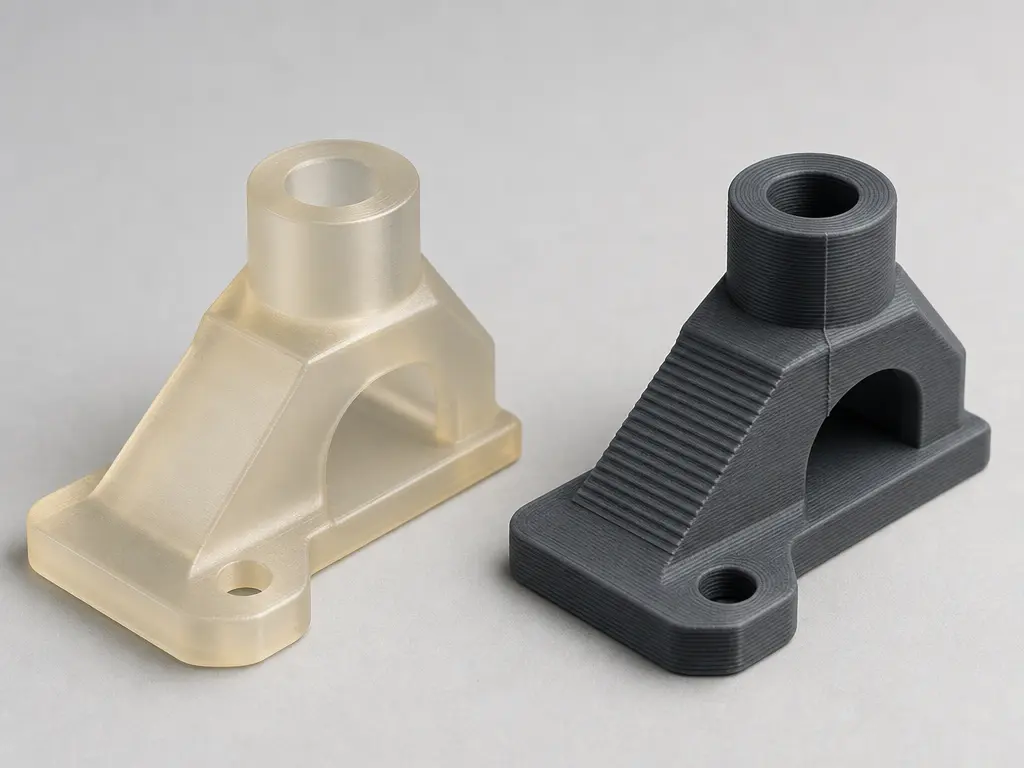
In a resin 3D printer vs filament printer comparison, material extrusion builds parts by pushing softened thermoplastic through a heated nozzle and laying down roads that stack into layers. That bead-based process naturally leaves line texture, stair-stepping on slopes, and a start-stop seam on many models. Prusa’s documentation notes a visible “scar” where layer changes occur in certain perimeter-based prints. [11]
Vat photopolymerization works differently. A platform moves relative to a vat of liquid resin, and light cures each layer into solid polymer. NIST describes vat photopolymerization as forming structures by curing liquid photopolymer resin with ultraviolet light. [15] Within that family, laser SLA, DLP, and MSLA/LCD are different subtypes with different imaging methods and different speed tradeoffs. [21]
Surface Finish and Visible Layer Lines
In resin vs filament 3D printer quality comparisons, the outer surface is usually the first difference people notice. Resin parts often look cleaner at typical settings because both the layer thickness and the horizontal feature scale can be small. One named resin example lists 0.05 mm XY resolution and layer height from 0.01 mm, with 0.05 mm recommended as the ordinary setting. [12] In buyer-language “SLA,” that visual advantage can appear across laser SLA, DLP, and MSLA/LCD systems, even though the image-forming method differs by subtype. [21]
Filament prints show their process more openly. A common desktop reference lists 0.05-0.35 mm layer height overall and a 0.4 mm default nozzle, and Prusa separately advises that layer height should remain below 80% of nozzle diameter, which puts a 0.4 mm nozzle at about 0.32 mm maximum layer height. [10] [11] Because material extrusion builds parts from deposited roads, sloped faces tend to show stepping while outer walls can show line texture and a perimeter seam. Even a well-tuned filament print usually reveals more of the build process than a comparable resin print. [11]
That is not a full surface-metrology claim. Measured roughness values are too dependent on machine, material, orientation, settings, and post-processing to compare cleanly here without matched tests. For this article, visible layer lines and fine-detail reproduction are the practical proxies for day-to-day print quality. [2] [20]
Resolution, Accuracy, and Repeatability Are Not the Same Thing
A common mistake in resin vs filament 3D printer resolution discussions is to treat the smallest advertised layer height as proof of overall print quality. It is not. NIST specifically warns that layer height, resolution, and accuracy are often mixed together even though they are not the same metric. [2]
| Metric | Material-extrusion example | Resin/vat-photopolymerization example | What it means / what it does not mean |
|---|---|---|---|
| Layer height / Z increment | 0.05-0.35 mm on one desktop machine; industrial FDM examples include 0.127, 0.178, 0.254, and 0.330 mm. [10] [18] | 0.01 mm minimum and 0.05 mm recommended in one resin example. [12] | Lower layer height mainly affects Z stepping and surface appearance. Minimum layer height is not a dimensional-accuracy guarantee. [2] |
| XY hardware constraint | 0.4 mm default nozzle on one desktop machine; Prusa’s 80% guideline gives about 0.32 mm maximum layer height for a 0.4 mm nozzle. [10] [11] | 0.05 mm XY is listed for one resin machine. [12] | Nozzle diameter is not directly equivalent to LCD pixel size or laser spot size. They constrain detail differently. [2] [21] |
| Accuracy spec | Stratasys F900 states ±0.089 mm or ±0.0015 mm per mm, whichever is greater, with geometry dependence and 95% dimensional yield in the note. [17] | No directly comparable resin-wide figure was found in the current source set. | Geometry-dependent accuracy specs should not be compared side by side with layer-height or XY figures as if they were the same metric. [2] [17] |
| Repeatability / repeated-build consistency | no reliable figure found for a directly comparable repeatability benchmark in the current source set. | no reliable figure found for a directly comparable repeatability benchmark in the current source set. | Repeatability is about consistency across repeated builds, not single-part appearance. [3] |
For fair comparison, ISO/ASTM 52902 frames geometric capability as a benchmark-artefact problem and explicitly says the standard prescribes what to measure without dictating one specific measurement method. [3] That matters because additive-manufacturing results depend on geometry and setup. NIST points to build direction, layer thickness, support structure, and scan or track direction as specification challenges in AM. [20] If two machines are tested on different artefacts, orientations, materials, or post-processing conditions, their “accuracy” numbers may not mean the same thing. [2] [20]
Strength, Stiffness, Toughness, Heat, and Failure Modes
These numbers are illustrative examples of named materials under named test conditions, not category averages. Material-extrusion parts are thermoplastic parts built from fused roads, so their properties often vary with print orientation. Many resin parts are cross-linked photopolymers, and their final properties can change substantially after washing and post-curing. [14] [15] [16]
- Stiff: resists elastic deformation.
- Strong: carries load before failure.
- Tough: absorbs energy before fracturing.
- Durable: survives use and environment over time.
- Heat-resistant: retains shape or properties under temperature and load.
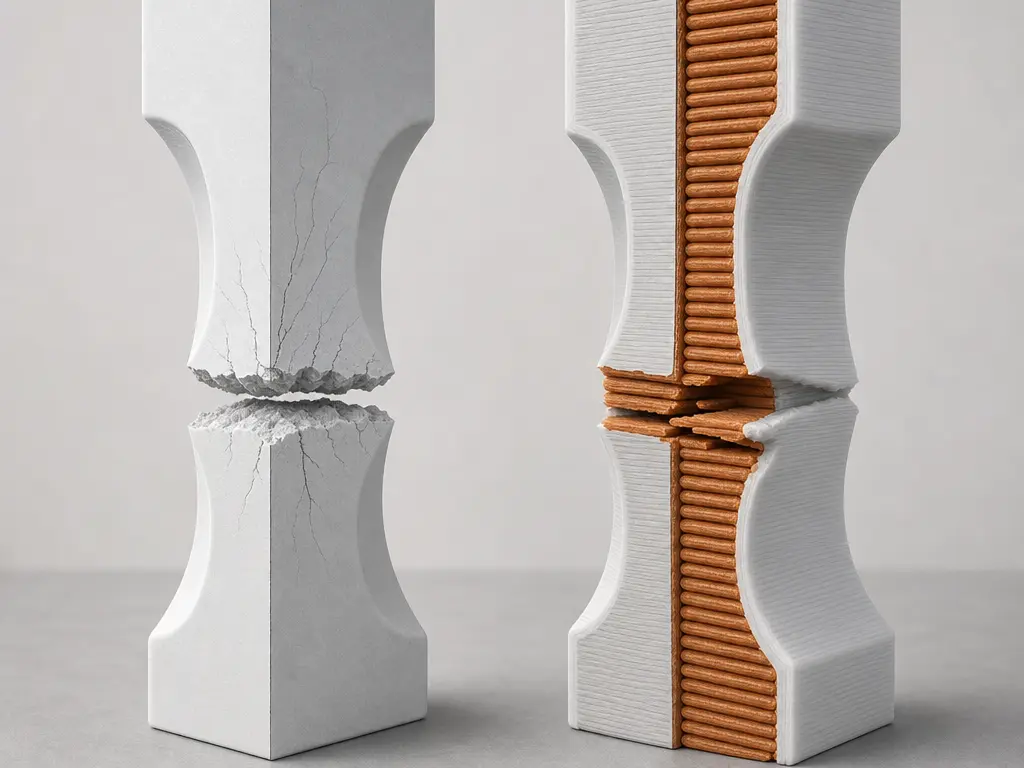
A clear resin vs filament strength example on the filament side is UltiMaker PLA. In its 2026 TDS, tensile modulus under ASTM D3039 is 3250 ± 119 MPa in XY, 3292 ± 101 MPa in YZ, and 3071 ± 181 MPa in Z. [16] Tensile stress at break under ASTM D3039 is 45.5 ± 1.1 MPa in XY, 56.0 ± 1.5 MPa in YZ, and 33.1 ± 2.8 MPa in Z. [16] Elongation at break is 7.8 ± 1.2% in XY, 4.2 ± 0.7% in YZ, and 2.0 ± 0.2% in Z. [16] UltiMaker also states that interlayer strength in Z is typically the lowest in FFF. [16] For heat behavior, the same PLA sheet lists HDT at 0.455 MPa of 58.8 ± 0.4 °C under ISO 75-2/B and says the material is not recommended for applications above 59 °C. [16]
Resin data highlight a different complication: cure state. Formlabs Draft Resin, using the conditions named in its TDS, changes in ultimate tensile strength under ASTM D638-14 from 24 MPa in the green state, to 36 MPa after room-temperature post-cure, to 52 MPa after post-curing at 60 °C. [14] Its HDT at 0.45 MPa under ASTM D648-16 changes from 43 °C to 53 °C to 74 °C across those same states. [14] Draft Resin’s notched Izod values are 26, 29, and 26 J/m in the same datasheet. [14] Clear Resin V5 shows the same pattern: ultimate tensile strength under ASTM D638-14 goes from 46 MPa to 51 MPa to 60 MPa across green, 5-minute ambient post-cure, and 15-minute 60 °C post-cure states, while HDT at 0.45 MPa under ASTM D648-16 goes from 52 °C to 56 °C to 74 °C. [15] Its notched Izod values are 32, 29, and 29 J/m. [15] Those impact figures are useful within each named datasheet, but they should not be treated as universal resin-versus-filament rankings without matched specimen conditions and test methods. [14] [15]
For a higher-heat thermoplastic example, Stratasys ABS-M30 shows why “filament equals PLA” is too narrow. In the 2025 ABS-M30 data sheet, HDT under ASTM D648 is 104.4 °C at 66 psi and 100.0 °C at 264 psi. [19] On an F900 at 0.25 mm layer height, the same sheet reports notched impact values of 101 J/m in XZ and 32.2 J/m in ZX, again showing orientation effects in printed thermoplastics. [19] The useful takeaway is not that one whole process family is stronger, but that properties have to be matched to the exact material, orientation, cure state, and test context you actually plan to use. [14] [15] [16] [19]
Speed, Throughput, and Workflow Burden
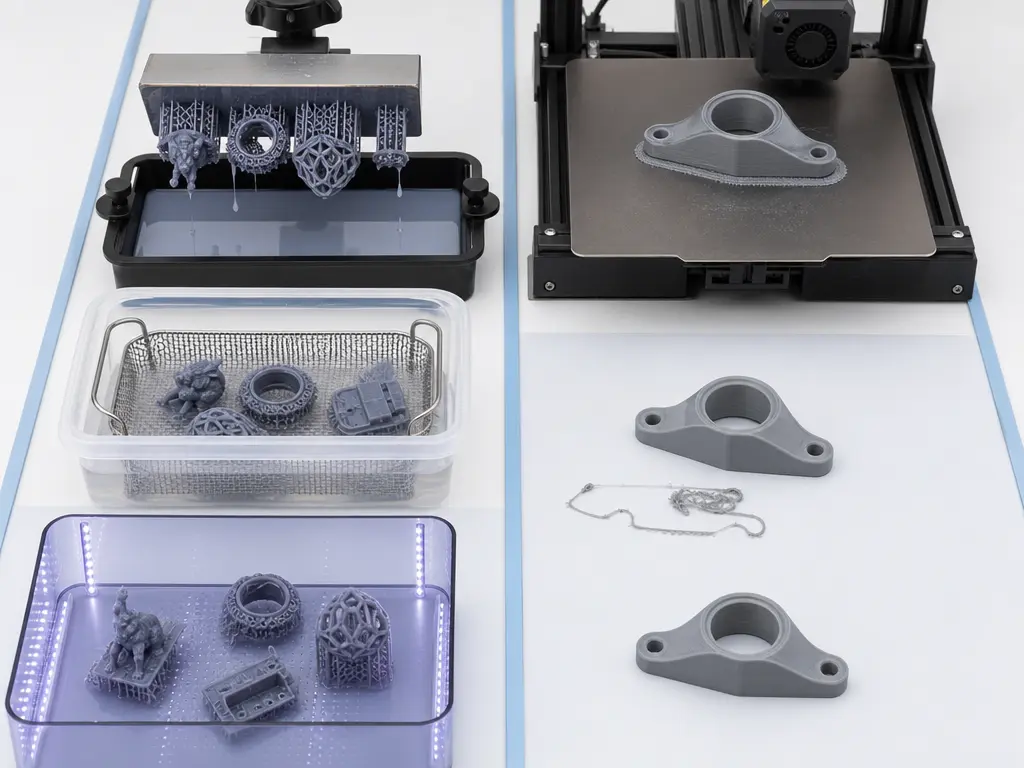
Speed is easy to misread if you only look at machine print time. What most users care about is finished-part throughput: preparation, printing, removal, cleanup, curing if required, and how many acceptable parts come out at the end. Quality is tied to that workflow because cure completeness, shrink or distortion risk, support marks, seam visibility, and orientation artifacts all affect whether a “fast” part is actually ready to use. [13] [21]
Resin can win on throughput when many small parts are packed onto one tray or when the resin subtype cures an entire layer at once. One named resin example lists 2 seconds per layer, with the note that this depends on the resin. [12] Formlabs says Draft Resin can create parts up to 5-10× faster than FDM printers, but that statement is a vendor claim tied to a defined 200 µm Draft Resin workflow rather than a process-wide rule. [13] [14] Subtype matters too: Formlabs notes that laser-powered SLA is generally slower per layer than DLP or MSLA/LCD in many medium-to-large or batch scenarios because the latter can expose a full cross-section at once. [21]
FDM can still feel faster in practice when you need one functional part with minimal handling. If a part comes off the bed, loses its supports quickly, and can be used without washing and curing, the end-to-end workflow may be shorter even when the print engine itself is not. That is especially true for rough prototypes where visible seam lines or layer texture are acceptable. Resin often asks for more touchpoints before the part reaches stable final properties. [13] [14]
Cost, Mess, and Operating Friction
Cost is one of the hardest honest comparisons in this topic. No reliable figure found for a clean, market-wide total cost per print comparison covering printer, material, wash/cure equipment, labor, and failed-print waste across consumer and prosumer systems. What the official workflow sources do show is that resin ownership usually involves more equipment and more post-processing stages than filament ownership. [13] [21]
Operating friction is where many buyers decide. Filament printing often means remove the part, trim supports if needed, and continue. Resin printing usually adds handling of uncured material, washing, drying, and post-curing before the part reaches its final state. [13] [14] Practical ownership also varies across resin subtypes, because laser SLA, DLP, and MSLA/LCD do not behave identically in speed or hardware design. [21] So the real difference is not just material price, but how much labor and cleanup each acceptable part demands.
Best Use Cases for Each
If you are really asking resin vs filament which is better, the useful answer is to match the process to the part and to the workflow you can tolerate.
| Use case | Better fit and why |
|---|---|
| Miniatures / display models | Usually resin. Small features and cleaner visual surfaces matter more here than easy handling. A named resin example lists 0.05 mm XY resolution and layer height from 0.01 mm. [12] |
| Visual prototypes | Usually resin. Presentation finish and finer visible detail often matter more than lower handling burden. [12] [21] |
| Jigs and fixtures | Usually filament. These parts often value easier iteration, less cleanup, and practical thermoplastic behavior more than cosmetic finish. [13] [19] |
| Light functional parts | Often filament, sometimes resin. PLA is easy to use but is not recommended above 59 °C and has an HDT of 58.8 ± 0.4 °C at 0.455 MPa. A resin can work if its cure state and thermal data match the job. [14] [16] |
| Heat-exposed parts | Usually engineering thermoplastic first. ABS-M30 is listed at 104.4 °C HDT at 66 psi and 100.0 °C at 264 psi, which is far beyond the PLA example used here. [19] |
| Beginner / home use | Usually filament. A common desktop reference starts from a 0.4 mm default nozzle, and filament workflows usually involve less post-processing than resin setups. [10] [13] |
The nuance is that modern materials blur older stereotypes. Clear Resin V5 is listed at 46, 51, and 60 MPa ultimate tensile strength across green and post-cured states, while Draft Resin moves from 24 to 36 to 52 MPa across its named cure conditions. [14] [15] On the filament side, the gap between easy-use PLA and engineering thermoplastics like ABS-M30 is also large. [16] [19] So the best use case depends on the exact material and workflow, not only the printer label.
SLA vs FDM Quality: Which Is Better?
For SLA vs FDM quality, the clearest answer is this: if you mean visual quality, resin printers in the vat-photopolymerization family usually win. If you mean easy functional prototyping with less handling friction, material extrusion often wins. The visual case for resin is helped by examples such as 0.05 mm XY resolution and layer height from 0.01 mm on a named resin machine. [12] The practical case for filament is helped by the simpler workflow and familiar desktop baseline of a 0.4 mm default nozzle with 0.05-0.35 mm layer-height capability on one common machine. [10] [13]
There is no universal winner. Choose resin when appearance, tiny features, and presentation matter most. Choose filament when you want easier iteration, easier handling, and access to a broader range of workshop thermoplastics, especially if heat matters. Then narrow the decision by material, orientation, cure state, and workflow tolerance. [14] [16] [19]
FAQ
Is SLA the same as a resin printer?
Not exactly. SLA is the laser-based subtype of a broader resin-printing family. Many consumer resin printers are actually DLP or MSLA/LCD systems, which also cure liquid resin with light but use different image-forming methods. In buyer language, people often say “SLA” to mean resin printing generally, but that is shorthand rather than strict process naming. [21]
Is SLA vs FDM quality mostly about looks, or also performance?
Both. Visual quality covers surface appearance, small detail, and visible layer lines. Functional quality covers dimensions, consistency, strength in the needed direction, heat behavior, and how much work it takes to get from fresh print to usable part. That is why a part that looks better is not automatically the better engineering part. [2] [3]
Does smaller layer height automatically mean better accuracy?
No. Smaller layer height mainly changes Z stepping and visible stair-stepping. NIST warns that layer height, resolution, and accuracy are often mixed together even though they are different measurements. One resin example lists 0.05 mm XY and 0.01 mm minimum layer height, while one desktop filament example lists 0.05-0.35 mm layer height overall with a 0.4 mm default nozzle. Those are capability figures, not universal tolerance guarantees. [2] [10] [12]
Are resin prints stronger than filament prints?
Sometimes, but not as a blanket rule. Resin properties can change a lot with cure state: Draft Resin is listed at 24, 36, and 52 MPa ultimate tensile strength across green and post-cured conditions, while Clear Resin V5 is listed at 46, 51, and 60 MPa across its named states. Filament parts, meanwhile, can gain or lose performance depending on orientation and material choice. [14] [15] [16]
Why do FDM parts often behave differently in XY and Z?
Because they are built from deposited strands bonded layer by layer. Within-layer behavior and between-layer behavior are not identical, so the part is anisotropic. UltiMaker’s PLA data show different tensile results by orientation, and the company notes that interlayer strength in Z is typically the lowest in FFF. Rotating the same geometry can therefore change how it fails. [16]
Can you compare a 0.4 mm nozzle directly with a 50 µm LCD pixel or laser spot?
Not directly. A nozzle diameter, an LCD pixel size, and a laser spot describe different physical constraints in different processes. The nozzle shapes an extruded road, while the resin system defines cured features through optical exposure. That is why one-number comparisons between nozzle size and pixel or spot size are usually misleading. [2] [10] [21]
Related on 3D Mag
- Who really invented 3D printing – and why it matters
- Resin Printing vs Filament Printing: Which Is Better?
- Resin vs filament 3D printing: which is best?
Sources
- ISO/ASTM 52900:2021 — Additive manufacturing — General principles — Fundamentals and vocabulary
- NIST — Progress Toward Standardized Additive Manufacturing Test Artifacts
- ISO/ASTM 52902:2023 — Additive manufacturing — Test artefacts — Geometric capability assessment of additive manufacturing systems
- ISO/ASTM 52927:2024 — Additive manufacturing — General principles — Main characteristics and corresponding test methods
- 3D Systems — Our Story
- Google Patents — US4575330A, Apparatus for production of three-dimensional objects by stereolithography
- Stratasys — Inventor of FDM 3D Printing and Co-Founder of Stratasys, Scott Crump, Inducted in to the TCT Hall of Fame
- Google Patents — US5121329A, Apparatus and method for creating three-dimensional objects
- Stratasys — Legal Information
- Prusa — Original Prusa i3 MK3S+ 10th Anniversary Edition 3D printer
- Prusa Knowledge Base — Layers and perimeters
- Prusa Medical One brochure
- Formlabs — FDM vs. SLA: Compare Filament and Resin 3D Printers
- Formlabs Draft Resin TDS
- Formlabs Clear Resin V5 TDS
- UltiMaker PLA TDS v5.00
- Stratasys F900 industrial printer page
- Stratasys ABS-CF10 material data sheet
- Stratasys ABS-M30 material data sheet
- NIST — Investigating the Role of Geometric Dimensioning and Tolerancing in Additive Manufacturing
- Formlabs — SLA vs. DLP vs. MSLA vs. LCD: Guide to Resin 3D Printers
- NIST — Additive Manufacturing Technologies