

Summary
Virtual Reality Modeling Language is a text-based 3D scene interchange format for describing structured 3D content, not just a mesh container. For most readers, the practical reference point is VRML97, formally standardized as ISO/IEC 14772-1:1997 and published on December 15, 1997. [1] [7]
Its scope is broader than raw model storage. The VRML97 specification describes a format that integrates 3D graphics and multimedia and was intended for distributed environments such as the World Wide Web. That is why a VRML file can include hierarchy, appearance, viewpoints, hyperlinks, and behavior alongside geometry. [3] [4]
What Is Virtual Reality Modeling Language?
Virtual Reality Modeling Language is a text-based scene description and interchange format for 3D graphics and multimedia. In practice, “VRML” usually refers to VRML97, the version standardized as ISO/IEC 14772-1:1997, Edition 1, published on December 15, 1997. [1] [3]
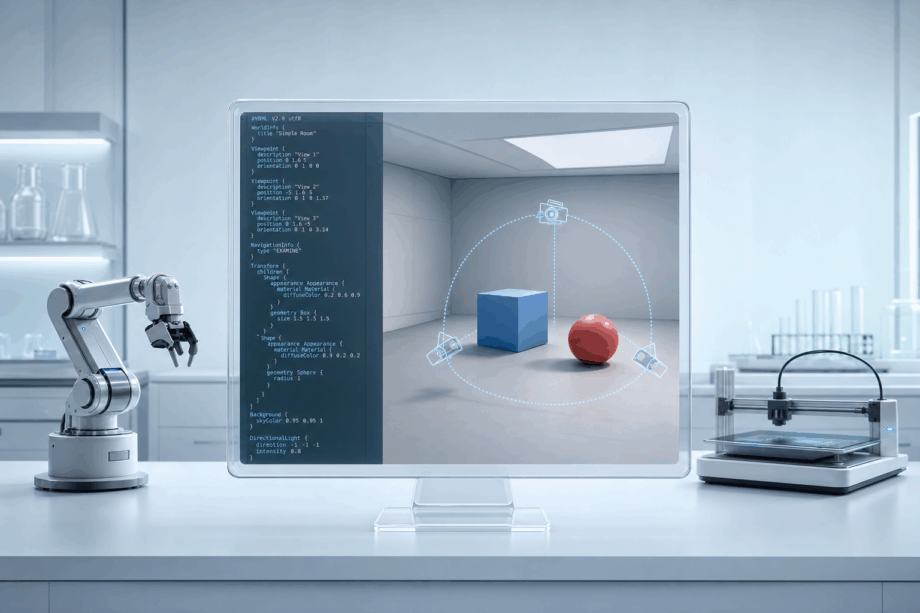
What sets VRML apart is that it describes more than shape alone. A VRML world can encode geometry, appearance, hierarchy, viewpoints, hyperlinks, and behavior in one structured scene, so it is more accurate to think of VRML as a scene description language than as a shape-only file format. [7] [3] [4]
What Is a VRML (.wrl) File?
A VRML file is usually a .wrl file containing a VRML97 scene in plain text. In practice, if someone sends you a .wrl, they are usually sending a 3D scene description that may include geometry, materials, textures, viewpoints, and sometimes interactive elements. [8] [9]
You may also encounter compressed variants such as .wrl.gz and .wrz. The current registered media type is model/vrml, while older documents and software may still use the legacy form x-world/x-vrml. [8] [9]
How to identify a VRML file
- Extension
.wrl: the standard filename extension for VRML files. [8] - Header
#VRML V2.0 utf8: the usual clear-text signature at the top of a VRML97 file. [8] - Media type
model/vrmlwith a legacy note:model/vrmlis the current registered type, whilex-world/x-vrmlis older backward-compatibility terminology. [8] [9]
VRML 1.0, VRML 2.0, and VRML97
The version naming is simpler than it looks. VRML 1.0 is the earlier generation, while the interactive generation most readers mean today is VRML 2.0, later standardized as VRML97. VRML97 is ISO/IEC 14772-1:1997, published on December 15, 1997, and the standard later received Amendment 1:2003, titled Enhanced interoperability. [1] [2] [8]
Key milestones in VRML’s evolution
- VRML 1.0: archival provenance points to the 26-MAY-95 specification and the header
#VRML V1.0 ascii. [6] - VRML 1.0 vs. 2.0: VRML 1.0 worlds are static, while VRML 2.0 worlds can move and interact. [7]
- VRML97: the standardized form of the interactive generation, published in 1997. [1]
- Amendment 1:2003: an official amendment addressed enhanced interoperability. [2]
For most practical purposes, treating “VRML 2.0” and “VRML97” as the same destination term is the least confusing approach. That is the version most .wrl files refer to when they are discussed today. [7] [8]
X3D is the successor family. Web3D describes X3D as a direct superset of VRML, and its current standards listings include ISO/IEC 19775-1:2023 for X3D Architecture and ISO/IEC 19776-2:2015 for X3D Encoding: Classic VRML. [10] [11]
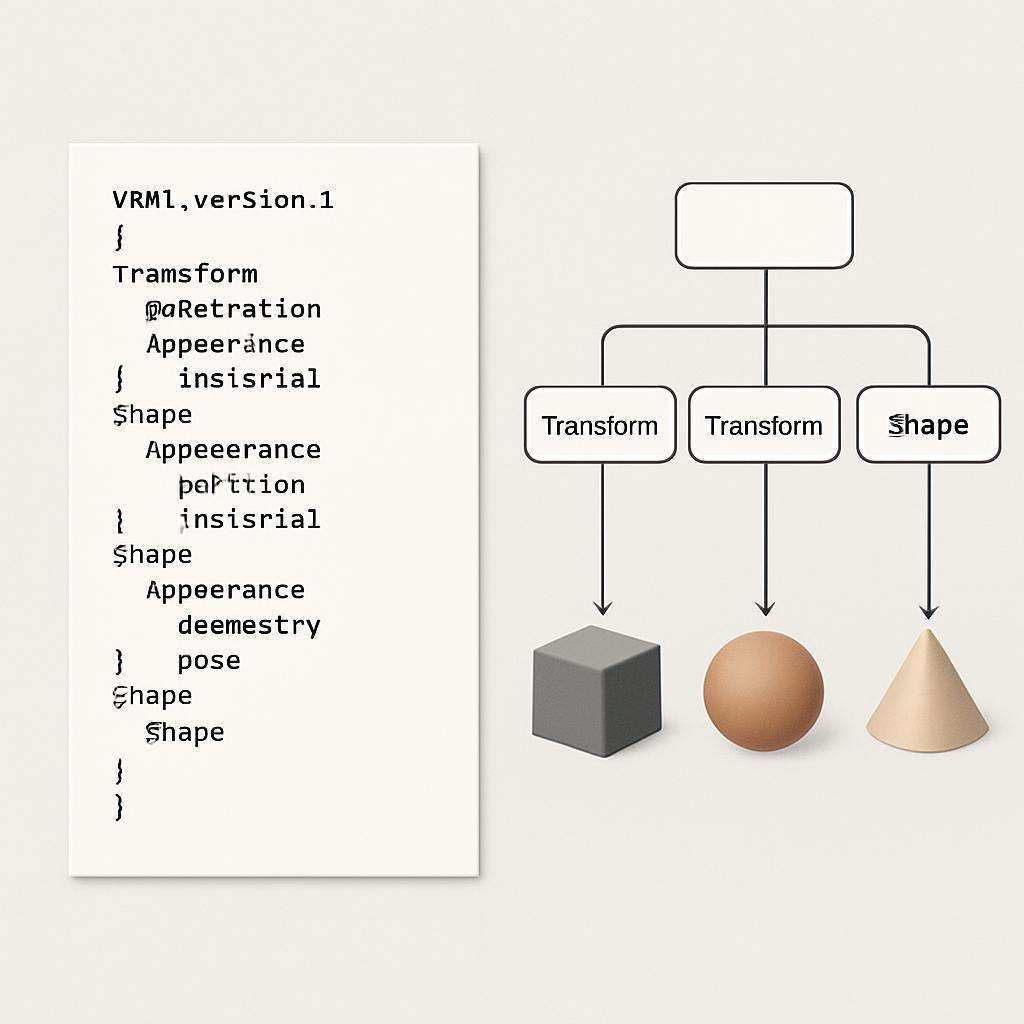
How VRML Works as a Scene-Graph Format
VRML is a text-based scene description language built around a scene graph, not one undifferentiated mesh. A VRML file describes a world as nodes with fields arranged in a hierarchy that can carry structure, transforms, reuse, and behavior together. [4]
At the object level, a Shape node links visible form to visible appearance. The specification says a Shape associates geometry with appearance and contains exactly one geometry node. That geometry can be Box, Cone, Cylinder, ElevationGrid, Extrusion, IndexedFaceSet, IndexedLineSet, PointSet, Sphere, or Text. On the appearance side, an Appearance node can specify Material, ImageTexture, PixelTexture, MovieTexture, and TextureTransform. Several geometry nodes also use separate property nodes such as Coordinate, Color, Normal, and TextureCoordinate; the specification explicitly notes that these are separated so instancing and sharing are possible across different geometry nodes. [4]
A short terminology map helps:
- scene graph: the hierarchical organization of a world as connected nodes. [4]
- node: a typed scene element such as
Shape,Appearance, orBox. [4] - field: a named slot that stores values or references inside a node. [4]
- world: the complete described 3D scene. [7]
- ROUTE: the construct used to establish event paths between nodes. [4]
That last term is what pushes VRML beyond static geometry. The specification defines ROUTE as the mechanism for event paths, and its execution model describes event cascades that begin once a sensor or Script generates an initial event. In other words, a VRML file can describe not only objects in a scene, but also how parts of that scene react over time. [4]
What a VRML File Can Store
A VRML file can store several kinds of 3D information. It can hold visible shape data, appearance data, scene organization, viewpoints, linked resources, and interactive behavior. That is why “3D scene interchange format” is usually a more precise label than “mesh file.” [3] [4]
For visible model content, VRML can store geometry plus several layers of appearance. Appearance supports Material, ImageTexture, PixelTexture, MovieTexture, and TextureTransform, while shared property nodes such as Coordinate, Color, Normal, and TextureCoordinate can be reused across geometry. Direct color data is also distinct from texture-image workflows: in IndexedFaceSet, color applies per face when colorPerVertex is FALSE and per vertex when it is TRUE. SketchUp’s current VRML export help reflects the same distinction in practical terms by noting that if Output Texture Maps is turned off, only colors are exported. [4] [5] [14]
VRML can also store scene and behavior elements beyond surfaces. The specification includes viewpoints, hyperlinks to other files, time-based changes, sensors, scripts, and ROUTE-based event paths. In some present-day print workflows, however, color handling may still depend on companion image files alongside the .wrl. [3] [4] [15]
| Capability | VRML support | Why it matters | Caveat |
|---|---|---|---|
| Geometry | Can store geometry nodes and shared property nodes such as Coordinate. [4] |
Preserves object form. | Geometry is only one part of the scene. |
| Materials | Can store Material through Appearance. [4] |
Preserves surface appearance for lighting. | Importers may remap or simplify it. |
| Textures | Can store ImageTexture, PixelTexture, MovieTexture, and TextureTransform. [4] |
Preserves image-based surface detail. | Some workflows also depend on external image assets. [15] |
| Color | Can store direct color data, including per-face or per-vertex color in IndexedFaceSet. [5] |
Useful for colored 3D models without relying only on texture images. | Export settings can collapse textured output to colors only. [14] |
| Viewpoints/cameras | Can store Viewpoint nodes, and some exporters map camera views into VRML output. [4] [14] |
Preserves intended views of a scene. | Not every tool treats viewpoints as first-class data. |
| Hyperlinks/media | Can store links to other files and related resources. [3] [4] | Supports richer scene behavior than static geometry alone. | Often ignored in limited import workflows. |
| Animation | Can store time-based changes and event-driven updates. [4] | Supports motion and state change. | Static exchange workflows may drop it. |
| Sensors/scripts | Can store sensor and script behavior. [4] | Enables interaction and logic. | Support is highly workflow-dependent. |
| Event routing | Can store ROUTE-based event paths and cascades. [4] |
Connects interactive parts of the scene. | Stored behavior does not guarantee preserved runtime behavior. |
So VRML can carry a broad package of scene information, but downstream preservation is selective. A .wrl may contain geometry, colors, textures, viewpoints, and behavior, while a later tool may keep only part of that package. [4] [14] [15]
Where VRML Still Shows Up in Named Workflows
VRML still appears in a few concrete workflow categories rather than as a general default. In current, source-backed examples, those categories are EDA export, SketchUp Pro export, color-print preparation, and archival or preservation context. No reliable figure found for overall current usage scale. [8] [12] [14] [15] [16]
Common places you may still encounter a VRML file
- KiCad and EDA export: KiCad’s PCB Editor manual says its VRML exporter creates a
.wrl3D model containing the PCB and any VRML files specified in footprints. The same manual says these VRML models are suitable where visual appearance is important and dimensional accuracy is not critical. KiCad’s CLI also includespcb export vrml, with.wrlas the default output extension. [12] [13] - SketchUp Pro export: SketchUp Pro can export
.wrl, and its current help page lists camera views, edges, faces, groups, lights, materials and textures, and transparency among the supported exported features. ItsOutput Texture Mapssetting also determines whether textures are written or whether the export falls back to colors only. [14] - Stratasys and GrabCAD print workflows: Stratasys documentation says many CAD-generated VRML workflows create a
.wrlcontaining geometry, including texture, plus a separate image file carrying color information. GrabCAD Print lists VRML/WRL/V2.0, also known as 97, with color and texture support. [15] [16] - Archival and preservation contexts: the Library of Congress says VRML was superseded by XML-based X3D and notes that it held a small number of VRML files in its collections as of May 2024. [8]
These are real, named workflows, but they should not be overstated. They show that VRML survives in specific toolchains, not that it remains a mainstream default across the broader 3D ecosystem. [8] [12] [16]
Performance and Fidelity in Practice
In practice, fidelity depends less on what VRML can express than on what a particular exporter, importer, or downstream workflow chooses to preserve. A .wrl can carry geometry, appearance, viewpoints, and behavior, but the delivered result is still workflow-dependent. KiCad is a useful example: its own manual frames VRML output as suitable when visual appearance is important and dimensional accuracy is not critical. [12]
Appearance fidelity is especially sensitive to settings and companion assets. SketchUp can export texture maps or only colors depending on the Output Texture Maps option. Stratasys J5 guidance says many VRML print workflows also use a separate image file for color information, and GrabCAD Print says supported texture image formats for VRML workflows are GIF, PNG, BMP, and JPEG. Support for color and texture therefore does not mean every downstream tool will preserve those results identically. [14] [15] [16]
VRML vs OBJ, STL, X3D, and glTF
The useful comparison axes are encoding style, scene hierarchy, appearance/color, behavior/interactivity, external dependencies, and ecosystem fit. These formats solve different exchange problems. [10] [19] [20] [21]
| Format | Native strengths | Main limits | Best-fit use |
|---|---|---|---|
| VRML | Text-based 3D scene interchange with hierarchy, appearance, viewpoints, and behavioral mechanisms. [3] [4] | Workflow-dependent support; many tools preserve only part of the model. [14] [16] | Legacy or workflow-specific scene exchange where geometry plus appearance matter. |
| OBJ | Geometry-focused text exchange that can use associated MTL files for colors and textures. [19] | Does not define a full scene with lighting positions, predefined viewing positions, or animation. [19] | Broad geometry exchange with optional material sidecars. |
| STL | Simple surface description as triangular mesh or triangular facets. [20] | Very limited semantics beyond shape; no standard support for colors or textures. [20] | Basic fabrication and shape-only transfer. |
| X3D | Successor family and direct superset of VRML, with XML .x3d, Classic VRML .x3dv, VRML97 .wrl, and JSON encodings. [10] |
Successor status does not guarantee identical tool behavior across all encodings. [10] [11] | Standards-based continuation of VRML-style scene description. |
| glTF | Modern asset format for node hierarchy, materials, cameras, meshes, and animations. [21] | Designed as a runtime asset format, not an authoring or streaming format. [21] | Delivery of 3D assets into current engines and viewers. |
The pattern is straightforward. STL is the narrowest: it describes surface geometry. OBJ expands that toward materials and textures, but remains geometry-focused rather than scene-first. VRML goes further by treating the file as a world description with structure and behavior. X3D continues that standards lineage, while glTF occupies a different role as a modern runtime-oriented asset format. [10] [11] [19] [20] [21]

Limitations and Compatibility Traps
The biggest trap is assuming that a .wrl import or export path means full VRML97 support. It does not. VRML97 remains formally standardized, and model/vrml remains the registered media type, but formal standards status is not the same thing as broad behavioral fidelity in current software. The contrast between the full VRML97 specification and current workflow documentation is the key point here: recent tool documentation usually focuses on narrower tasks such as export, geometry, appearance, camera views, or print preparation. [1] [9] [12] [14] [16]
Textures create a second trap: the .wrl file may not be the whole asset. SketchUp can omit texture maps depending on export settings, and Stratasys documents workflows in which a separate image file carries color information. Even where GrabCAD Print supports VRML color and texture, that support applies within a specific print workflow rather than proving universal scene-behavior preservation. [14] [15] [16]
X3D as the Successor Path
X3D matters because it provides standards continuity for VRML rather than a clean break. Web3D describes X3D as a direct superset of VRML with four encodings: XML .x3d, Classic VRML .x3dv, VRML97 .wrl, and JSON. Current Web3D standards listings include ISO/IEC 19775-1:2023 for X3D Architecture and ISO/IEC 19776-2:2015 for Classic VRML encoding. [10] [11]
That matters if you encounter a .wrl file now. The format belongs to a maintained standards lineage, even though present-day software support is selective. The Library of Congress describes VRML as superseded by XML-based X3D, which is the most practical framing: not identical, not interchangeable in every tool, but clearly connected. [8] [10] [11]
Is Virtual Reality Modeling Language Still Relevant?
Virtual Reality Modeling Language is still relevant, but in a narrower, workflow-specific way. It remains historically important, richer than mesh-only formats, and still appears in named pipelines such as KiCad export, SketchUp Pro export, Stratasys or GrabCAD color-print workflows, and archival holdings. X3D is the maintained successor family and direct superset, not a separate unrelated track. [8] [10] [11] [12] [14] [16]
The practical bottom line is simple: VRML is not the default choice for modern real-time or web delivery, but a .wrl file is still meaningful when a specific toolchain expects it. If you encounter one today, treat it as a workflow-specific scene or interchange artifact and confirm which geometry, appearance, texture, viewpoint, or behavior data your target software actually preserves. [12] [14] [16]
FAQ
Here are short answers to the questions readers usually ask after encountering a .wrl file.
What is Virtual Reality Modeling Language?
Virtual Reality Modeling Language, usually shortened to VRML, is a text-based scene description language for 3D worlds. It describes geometry and behavior, not just mesh data, which is why it is better understood as a scene interchange format than as a simple shape container. [7] [3]
What is a VRML (.wrl) file?
A VRML file is usually a .wrl file containing a VRML97 scene in plain text. Clear-text VRML97 files typically begin with #VRML V2.0 utf8, and the registered media type is model/vrml, although older material may still use x-world/x-vrml. [8] [9]
Is VRML a 3D model file format or a 3D scene interchange format?
It is both, but “3D scene interchange format” is usually more precise. VRML can store model geometry, yet it also supports hierarchy, appearance, viewpoints, links, and behavior, which places it beyond a geometry-only exchange format. [3] [4] [7]
Can VRML store colored 3D models?
Yes. VRML can store direct color data, materials, and texture references. In IndexedFaceSet, color can apply per face when colorPerVertex is FALSE and per vertex when it is TRUE, so a .wrl can preserve more visual information than a shape-only mesh format. [4] [5]
Is VRML obsolete?
Not completely, but it is no longer the default choice for most new workflows. The format was superseded by X3D, yet it still appears in named export, print, and preservation contexts, which makes “superseded but still workflow-relevant” a better description than simply “obsolete.” [8] [10] [16]
Expert-level: What is the difference between VRML 1.0, VRML 2.0/VRML97, and X3D?
VRML 1.0 is the earlier, comparatively static generation. VRML 2.0 added movement and interaction, and VRML97 is the standardized form of that second generation. X3D is the later direct superset and standards continuation, not a separate unrelated format family. [6] [7] [10] [11]
Expert-level: Why doesn’t opening a .wrl in modern software guarantee ROUTE, Script, sensor, or viewpoint behavior will survive unchanged?
Because support is usually workflow-specific, not full-spec by default. The VRML97 specification defines event routing, scripts, sensors, and viewpoints, but many current tools document narrower goals such as geometry, materials, camera views, or print-oriented color workflows. A .wrl path therefore does not prove complete behavioral fidelity. [4] [12] [14] [16]
Sources
- ISO/IEC 14772-1:1997
- ISO/IEC 14772-1:1997/Amd 1:2003
- Web3D VRML97 Scope
- Web3D VRML97 Concepts
- Web3D VRML97 Node Reference
- Web3D archival VRML 1.0 provenance page
- Web3D archived comp.lang.vrml FAQ
- Library of Congress VRML family page
- IANA media types registry
- Web3D What is X3D?
- Web3D Recommended Standards
- KiCad PCB Editor manual 9.0
- KiCad CLI docs 9.0
- SketchUp Help: Exporting VRML Files
- Stratasys J5 guide: VRML Files
- Stratasys GrabCAD Print: supported file formats
- Blender 4.1 manual: Web3D X3D/VRML2
- Blender latest import-export index
- Library of Congress OBJ page
- Library of Congress STL page
- Khronos glTF 2.0 specification