
Summary
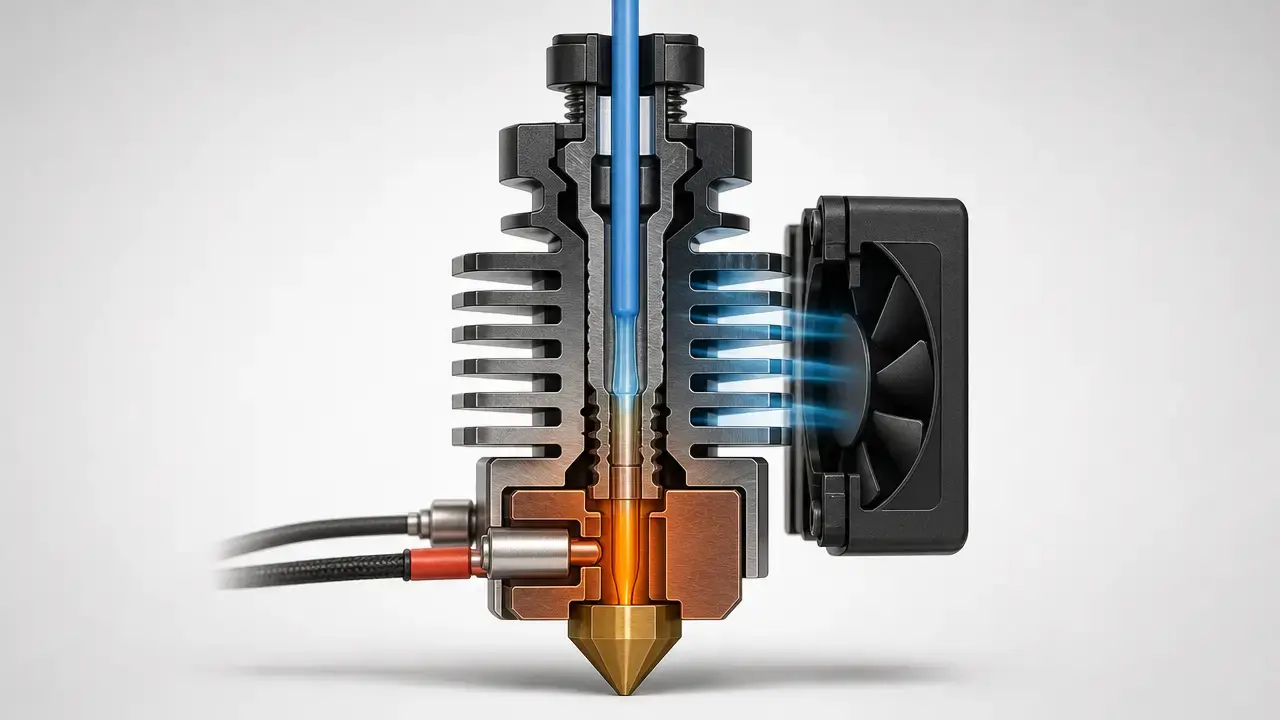
Heat creep in 3d printing is a hotend thermal-separation failure: heat travels upward from the hot side into the cold side, softens filament too high in the hotend, and can turn a normal feed path into a jam. When that softened length above the intended transition zone becomes too long, the filament can deform or buckle under extruder force, which is why users often notice clicking, grinding, or extrusion stopping partway through an otherwise normal print. [S4] [S9] [S10]
Not every mid-print extrusion stop is heat creep. A restriction can be in the nozzle, the PTFE-lined section, or elsewhere in the filament path, so the safest approach is to locate the blockage first and then choose the fix. [S4] [S5]
Heat creep vs. nozzle clog
When a print suddenly stops extruding, the first useful question is not what to call it, but where the restriction is most likely located. Prusa’s support material explicitly separates a clogged hotend from a clogged nozzle, and the research literature treats heat creep as a thermal failure mode rather than a catch-all term for every jam. [S5] [S9] [S10]
Symptoms overlap, so a quick comparison helps narrow the problem before you start replacing parts. [S4] [S5]
| Failure type (user wording) | Likely location | Typical clue | First check |
|---|---|---|---|
| Heat creep clog / hotend jam | Heat break or cold side. [S4] [S9] | Prints normally for a while, then clicking, grinding, or loss of extrusion starts. [S4] | Confirm the hotend heatsink fan, airflow path, and ambient or enclosure conditions. [S4] [S10] |
| Nozzle debris clog | Nozzle orifice or just above it. [S5] | Weak or inconsistent extrusion, sometimes only a partial blockage. [S5] | Use the manufacturer’s unclog procedure before replacing parts. [S5] |
| Too-low temperature / poor melting | Melt zone. [S18] | Under-extrusion begins early and matches profile or slicer-setting changes. [S18] | Re-check the material profile and intended temperature range for that filament. [S18] |
| Filled-filament clog | Nozzle restriction driven by filler and flow conditions. [S17] | Trouble appears specifically with particle-filled material. [S17] | Check nozzle size and the material maker’s guidance for filled filaments. [S17] |
The main takeaway is simple: locate the restriction before naming it. That avoids needless nozzle swaps when the real issue is hotend cooling, PTFE seating, or a filled-filament flow restriction. [S5] [S17]
Quick diagnostic workflow
If extrusion stops mid-print, pause or stop the job, avoid repeatedly forcing filament into the jam, and reduce obvious heat soak before you start disassembly. Prusa’s clog guidance begins with unload and access steps, while its heat-creep guidance treats the problem as a hotend clog first and then works backward through likely thermal causes. [S4] [S5]
The goal here is to narrow the restriction location, whether it is at the nozzle, in the heat break, in a PTFE-lined section, or farther up the feed path. Diagnose first and replace parts last. [S5] [S9]
Check in this order before replacing parts…
- Try a normal unload and reload cycle, because success or failure is a strong clue about where the blockage sits. [S5]
- Inspect the removed filament tip for a swollen bulb, softened section, or grind marks from the drive gears. [S4]
- Confirm that the hotend heatsink fan is running and that its airflow path is unobstructed, and do not confuse that fan with the part cooling fan. [S4] [S9]
- Check ambient and enclosure heat as printer- and material-specific risk factors rather than universal limits. [S4] [S10]
- Confirm that nozzle temperature is not unnecessarily high for the material and profile you intended to use. [S4] [S18]
- Note low-throughput conditions such as thin layers, very slow segments, or long hot pauses as a practical risk factor in manufacturer guidance, not a universal law of all hotends. [S4]
- Clear any partial clog with the manufacturer’s supported procedure, such as a cold pull where that method is recommended. [S5] [S6]
- Only after those checks should you move to part swaps such as nozzle, PTFE tube, fan, heat break, or the full hotend assembly. [S5]
What is heat creep in 3D printing?
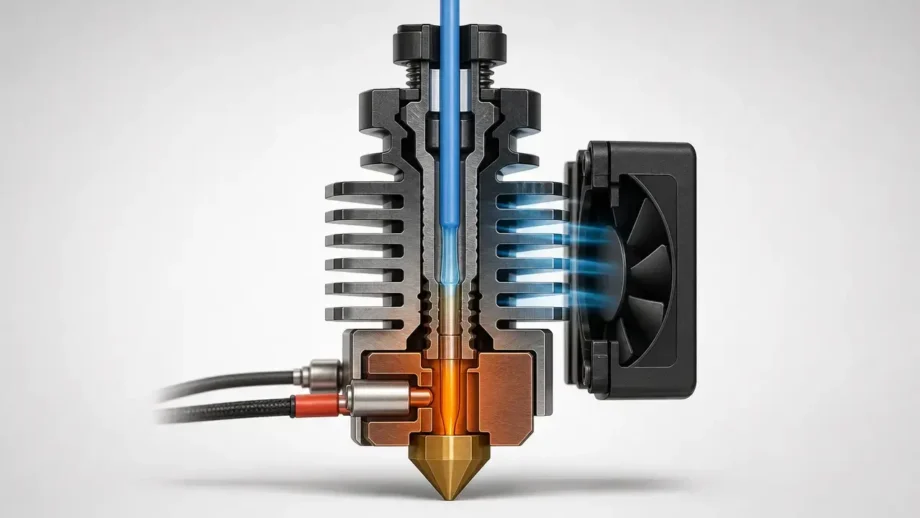
Here, heat creep means loss of the sharp temperature gradient that should exist across the hotend’s heat break. When too much thermal energy travels from the hot side toward the cold side, filament begins to soften before it reaches the intended melt zone, which raises drag in the feed path and can turn a stable print into a jam. That matches recent research language and aligns with manufacturer support descriptions of hotend parts above the heater block getting too hot and softening filament higher in the hotend. [S4] [S9] [S10]
A related problem can happen farther upstream when enclosure or ambient heat softens filament in the extruder body or guide path before the hotend is the main bottleneck. That can look similar to the user, but in this article, “heat creep” refers to the hotend-origin thermal-separation failure, while upstream softening is treated as related but distinct. [S4] [S10]
Terminology note
For generic process language, “material extrusion” and “FFF” are safer than “FDM.” ISO/ASTM 52900:2021 is the formal vocabulary anchor for additive manufacturing, NIST describes material extrusion as a layer-by-layer AM process, and Stratasys identifies FDM as one of its trademarks. [S1] [S2] [S3]
How a hotend is supposed to work
A simple way to separate the parts is this: the extruder is the drive system that pushes filament, the hotend is the heated assembly that manages the temperature transition, and the nozzle is the final outlet at the bottom. Inside the hotend, the heater block and nozzle form the hot side, while the heat break, heatsink, and dedicated cooling airflow form the cold side. The heat break matters because it both mechanically secures the assembly and thermally separates those two regions. [S5] [S7]
The cold side is not passive. E3D’s engineering explanation treats the heatsink and its airflow as part of the hotend’s cooling system, and E3D’s fan guidance says the cold-side fan is intended to stay on as long as the printer is powered so heat is continuously removed from that side. Prusa’s support guidance makes the same distinction in practical terms and warns that a reversed fan can be identified by the sticker side being visible when it should be pushing air into the heatsink. [S4] [S7] [S8]
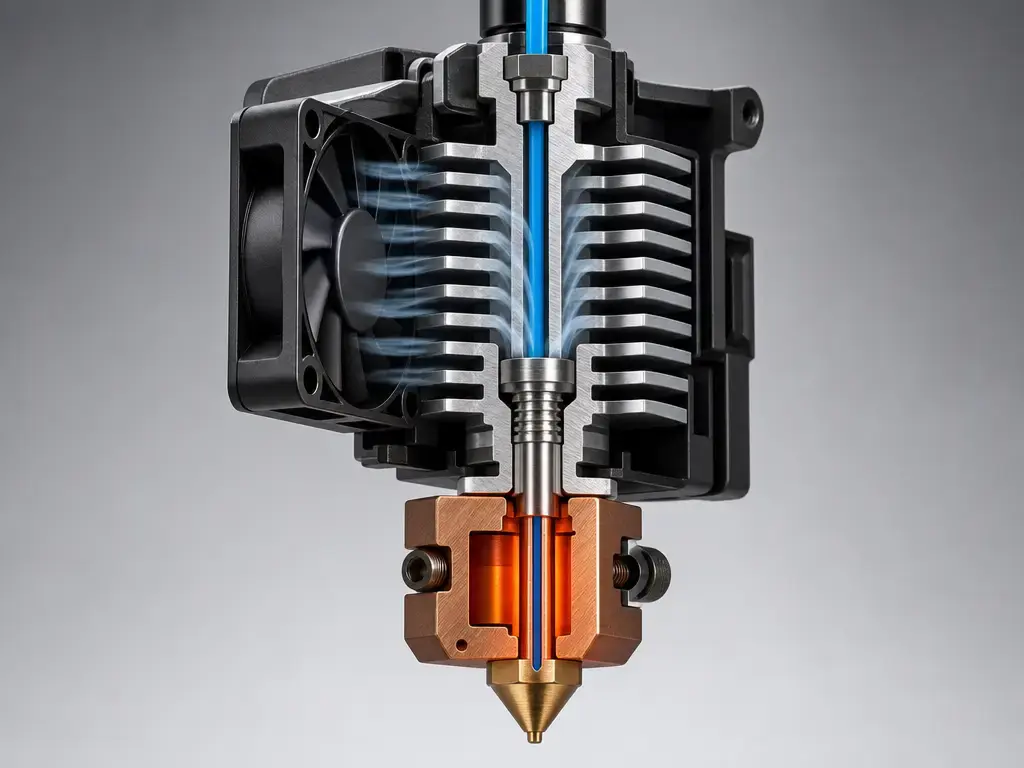
The design goal is a short, controlled transition zone between solid filament above and melt below. E3D uses its V6 as an example and says that transition is kept very short, about 2 mm, because a long softened zone promotes adhesion to the walls and makes clogging more likely. [S7]
Why heat creep causes jams: softening, Tg, and buckling
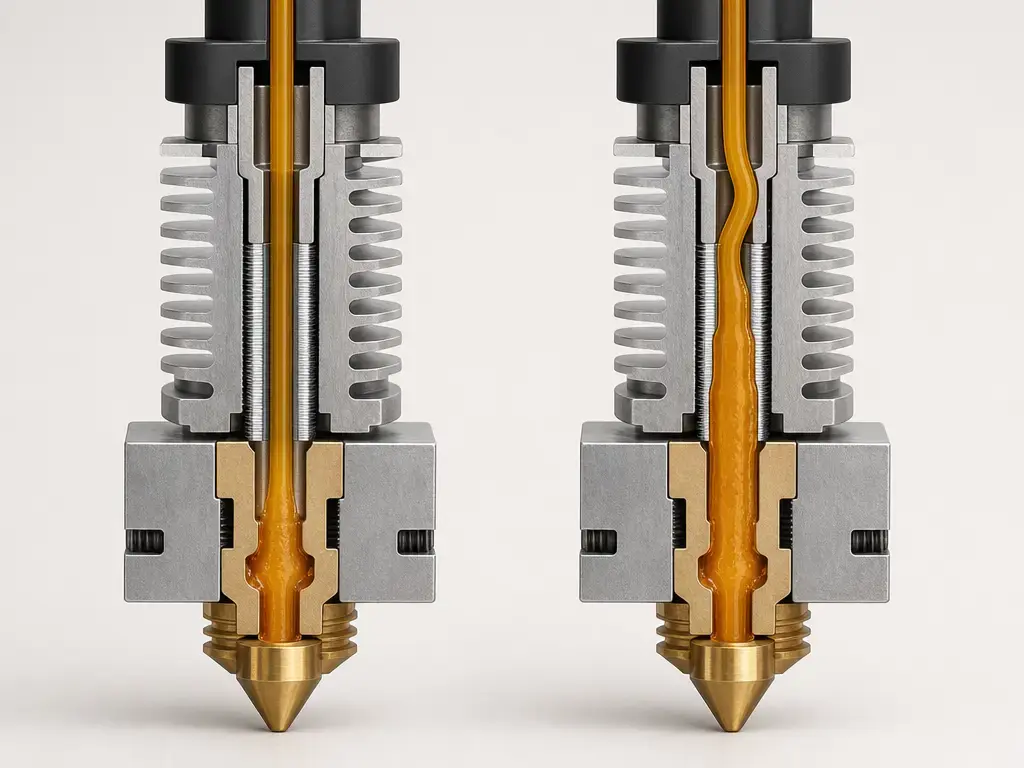
Filament needs to stay mechanically stable through the cold side and only become soft enough to flow where the hotend intends it to. If heat propagates too far upward, that stability is lost before the nozzle, and the hotend starts behaving less like a controlled melt system and more like a collapsing column of soft plastic. [S7] [S10]
Taheri and co-authors provide the clearest mechanism. In their experiments and model, poor cooling increased the length of filament inside the heat barrier whose temperature was above the glass transition temperature, and that longer softened region then became vulnerable to swelling, sticking, and buckling under extruder force. They also distinguish a complete clog from a case where the filament swells, sticks in the heat barrier, and must be pulled out and trimmed before printing can continue. The problem is not just that the filament gets warm, but that too much of it gets warm in the wrong place. [S9]
Tg and HDT help explain why some materials have less thermal margin than others, but they are comparative test properties, not jam thresholds. ISO 11357-2 covers DSC-based determination of glass transition temperature, and ISO 75-1 explicitly says HDT data are not meant to predict actual end-use performance or endurance at elevated temperatures. As example properties only, Bambu’s PLA Basic TDS lists Tg at 60 °C and HDT at 54 °C under ISO 75 at 1.8 MPa, while Bambu’s PETG Basic TDS lists Tg at 69 °C and HDT at 68 °C under the same load. Datasheet Tg/HDT values do not directly predict the exact enclosure temperature where your printer will jam. [S11] [S12] [S13] [S14]
Variables and checks that affect heat creep
These are best treated as categories of variables, not one neat set of universal metrics. The literature points to both component-level thermal separation and system-level airflow or ambient conditions, which means a printer can look acceptable on paper yet still jam when dust, enclosure heat, or marginal cooling erodes its thermal margin. [S9] [S10]
It also helps to sort numbers by purpose. Some are diagnostic targets for one printer family, some are material-property test results from datasheets, and some are brand-specific support guidance that should not be generalized. [S4] [S11] [S12] [S14]
- Environment, using printer- and material-specific guidance: Elevated room or enclosure temperature can raise risk, but no reliable universal figure was found. Prusa gives a model-specific example that flags ambient above 35 °C, or 30 °C for some filaments, as risky in its MK-series context, while recent research also points to enclosure temperature, airflow restriction, dust accumulation, and fan degradation as contributors. [S4] [S10]
- Hardware and the thermal path: Heat break geometry, heatsink effectiveness, and fan performance all affect whether the hot and cold sides stay separated. E3D frames the heat break as the separator, E3D also notes that replacement fans need adequate static pressure, and Taheri’s study quantified one test rig’s equivalent cooling velocities from about 0.048 to 0.649 m/s, which are research setup values rather than consumer fan rules. [S7] [S8] [S9]
- Operating conditions: Prusa explicitly notes that thin layers and slow printing can raise heat-creep risk because very little filament is moving through the nozzle and carrying heat away, and it suggests a modest speed increase as a test in that printer context. The same article also gives a Prusa MK-series diagnostic example of 4000–4400 RPM for the nozzle fan and a Prusa E3D v6.1 assembly example of about a 0.5 mm gap between the heater block and nozzle hex. [S4]
- Material properties, as comparative data: Tg and HDT can help explain why a low-Tg filament has less upstream thermal margin than a higher-Tg one, but ISO cautions against treating HDT as a real-world operating limit. The PLA and PETG figures in the Bambu TDS documents are useful examples, not universal constants for every brand or formulation. [S11] [S12] [S14]
How to fix a heat creep clog
Treat it as a hotend clog first, not as proof that the nozzle alone is bad. Prusa’s clog guidance is explicit that the blockage may be in the PTFE tube or elsewhere in the hotend path, so a nozzle swap is not the universal fix. [S4] [S5]
Start with the lowest-risk fixes. Restore cold-side cooling, clean dust from the heatsink and fan, verify that the heatsink fan is mounted to blow into the heatsink, and reduce enclosure heat or stagnant hot air where appropriate for the material you are printing. If the problem repeats after a long heat soak, that pattern itself is a clue that cooling margin or ambient temperature is part of the failure, not just debris at the nozzle tip. [S4] [S8] [S10]
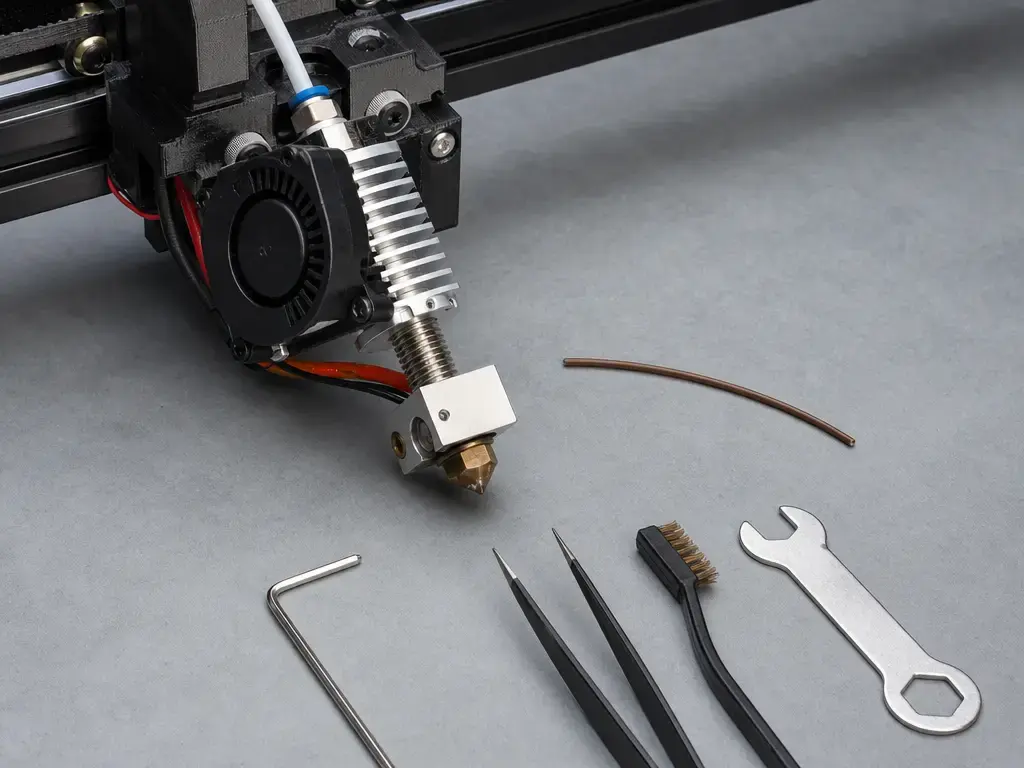
Then clear the clog with a manufacturer-supported method. If the printer can still load and unload, a cold pull is often the least destructive place to start on printer families that support it. If the printer cannot load, follow the manufacturer’s manual for a hotter clearing method rather than inventing temperatures or tool sizes, because those values are not universal across hotends, nozzles, and PTFE-lined designs. Once flow is restored, inspect the PTFE path, the heat break region, and the extruder drive gears for ground filament or accumulated residue so the same restriction does not immediately return. [S5] [S6]
Do this, in this order…
- Restore heatsink cooling and reduce obvious ambient heat problems first. [S4] [S8] [S10]
- Unload filament if possible and inspect the tip before you take the hotend apart. [S4] [S5]
- Use a cold pull or the manufacturer’s recommended unclog procedure for that printer and hotend. [S5] [S6]
- After clearing, inspect PTFE seating, heat-break area cleanliness, and extruder gear contamination. [S4] [S5]
- Replace components only if inspection shows wear, damage, poor seating, or persistent repeat failure after the thermal causes have been addressed. [S5] [S19]
Example: Prusa MK-series procedure (do not generalize). Prusa’s clog-clearing example uses 260 °C for PLA or 280 °C for PETG or ABS, waits 2 minutes, and uses a 0.3–0.35 mm needle inserted 1–2 cm from below. [S5]
Example: Prusa MK-series procedure (do not generalize). Its cold-pull example heats to 270 °C, keeps the nozzle filled until about 170 °C with PLA, and pulls at 85 °C, but you should follow your own printer’s manual instead of copying those numbers blindly. [S6]
PTFE-lined hotends: temperature-limits and caution
PTFE-lined hotends are typically lower-temperature systems than all-metal designs, so they require closer attention to manufacturer limits. E3D’s Lite6 is a clear example: the product page describes it as PTFE-lined and presents it as a lower-temperature hotend, with the comparison table listing a maximum temperature class around 245 °C for everyday materials rather than the higher-temperature capability of E3D’s all-metal V6 family. [S16]
Check your printer or hotend manufacturer’s maximum temperature and ventilation guidance. No universal safe figure was found. [S4] [S14] [S15]
How to prevent heat creep in a 3D printer
Preventing heat creep in a 3D printer mostly means protecting the temperature split that the hotend was designed to maintain. In practice, that means reliable cold-side airflow, a clean heatsink, and avoiding operating conditions that slowly push the cold side closer to the filament’s softening range. [S4] [S8] [S10]
- Keep the hotend heatsink fan healthy, correctly oriented, and unobstructed. [S4] [S8]
- Clean dust and fine debris from the heatsink fins and fan before airflow degrades enough to matter. [S4] [S10]
- Avoid unnecessary heat soak, such as leaving the hotend sitting hot for long periods without extrusion when you can reasonably avoid it. [S4]
- Use enclosure practices that fit the material, especially for lower-Tg filaments where trapped hot air can shrink your thermal margin. [S4] [S10]
- Prefer known-good material profiles over manually adding extra temperature unless you have a clear reason to do so. [S4] [S18]
- If you use Bambu guidance, treat it as brand-specific: an authorized Polish translation recommends keeping chamber temperature at least 10 °C below filament Tg, but because the original wiki page was not directly accessible for verification here, that should not be presented as a universal engineering rule. [S14] [S15]
Limitations and common misdiagnoses
Heat creep is easy to over-diagnose because several other failures can look similar at the extruder. A first layer that is too close to the bed can choke flow immediately, ordinary debris or burnt polymer can obstruct the nozzle path, damp filament can worsen under-extrusion symptoms, a wrong slicer or temperature profile can change flow enough to mimic a clog, a worn or badly seated PTFE tube can jam the path, and a badly seated nozzle can create leaks or clogs after maintenance. Prusa’s own heat-creep page warns that heat creep is only one cause of clogging and often not the most probable one, which is why location-first diagnosis is safer than blame-the-nozzle diagnosis. [S4] [S5] [S6] [S18] [S19]
Filled-filament clogging is a separate failure family and should not be collapsed into heat creep. Beran and co-authors studied filled-polymer nozzle clogging in terms of nozzle diameter, filler size, filler volume fraction, resin viscosity, and extrusion pressure, which is a different mechanism space from loss of hotend thermal separation. [S17]
Current research and design direction
Recent research adds something support pages usually do not: it measures the printer as a thermal environment, not just the hotend as an isolated part. The 2026 Electronics study examined enclosure-driven thermal gradients and heat-pipe-assisted cooling for FFF extruders, while Taheri’s work remains useful for explaining why cooling effectiveness matters mechanically, through the length of softened filament above Tg and the resulting buckling risk. [S9] [S10]
The design lesson is not that one hardware trick makes heat creep disappear. Better heat-break geometry and material choice, better airflow management, enough fan static pressure, and more careful placement of heat rejection surfaces can all improve margin, but they still have to be validated against the printer’s real ambient and enclosure conditions. [S7] [S8] [S10]
FAQ
What is heat creep in 3D printing?
It is a hotend thermal-separation failure in which heat moves from the hot side toward the cold side, softening filament too high in the hotend before it reaches the nozzle and increasing the chance of a jam. [S4] [S9] [S10]
How do I fix a heat creep clog without damaging parts?
Start by restoring cooling and reducing heat soak, then use your printer maker’s supported unclog method, such as a cold pull where appropriate, instead of forcing filament or blindly replacing the nozzle. [S5] [S6]
Why does it print fine for 30–60 minutes, then jam?
That delayed pattern fits heat soak and shrinking cooling margin: over time, the cold side warms up, the softened filament length above Tg grows, and the filament becomes more likely to swell, stick, or buckle under extruder force. [S9] [S10]
Heat creep vs clogged nozzle: how can I tell?
Think in terms of location. A nozzle clog is at or near the orifice, while heat-creep symptoms point toward the heat break and cold side, especially if the print ran normally for a while before clicking or air-printing behavior began. [S4] [S5]
Expert: How do Tg and HDT relate to heat creep risk, and why aren’t they jam thresholds?
Tg helps describe when a polymer begins losing stiffness, and ISO 11357-2 covers how Tg is determined by DSC methods, while ISO 75-1 says HDT data are comparative and not meant to predict real operating limits. That is why example values such as PLA Basic at Tg 60 °C and HDT 54 °C, or PETG Basic at Tg 69 °C and HDT 68 °C, are useful for comparison but not for declaring a universal jam temperature. [S11] [S12] [S13] [S14]
Expert: What hotend design features reduce heat creep susceptibility?
A well-designed heat break, a short transition zone, effective heatsink airflow, and a fan that can deliver enough static pressure all help preserve thermal separation. E3D’s engineering explanation of a short transition zone and its fan guidance on cold-side airflow point in the same direction as recent research on cold-end thermal management. [S7] [S8] [S10]
Are all-metal hotends immune to heat creep?
No. All-metal hotends still rely on proper thermal separation and active cooling, so they can still suffer heat creep if the cold side loses enough cooling margin or the enclosure environment raises ambient temperature around the extruder. [S7] [S10]
Related on 3D Mag
- 3D Printing Ghosting: Causes and Fixes
- Over Extrusion in 3D Printing: Causes and Fixes
- Elephant Foot 3D Printing: Causes and Fixes
Sources
- S1 — ISO/ASTM 52900:2021, Additive manufacturing — General principles — Fundamentals and vocabulary. https://www.iso.org/standard/74514.html
- S2 — Stratasys, Legal Information. https://www.stratasys.com/en/legal/legal-information/
- S3 — NIST, Weld formation during material extrusion additive manufacturing. https://www.nist.gov/publications/weld-formation-during-material-extrusion-additive-manufacturing
- S4 — Prusa Knowledge Base, Extrusion stopped mid-print (Heat creep). https://help.prusa3d.com/article/extrusion-stopped-mid-print-heat-creep_1948
- S5 — Prusa Knowledge Base, Clogged nozzle/hotend (MK3.5/S, MK3S+, MK2.5S). https://help.prusa3d.com/article/clogged-nozzle-hotend-mk3-5-s-mk3s-mk2-5s_2008?product=mk3s
- S6 — Prusa Knowledge Base, Cold pull (MK3/S/+, MK2.5/S, MK3.5/S). https://help.prusa3d.com/article/cold-pull-mk3-s-mk2-5-s-mk3-5-s_2075?product=mk3
- S7 — E3D, Anatomy of a 3D Printer HotEnd. https://e3d-online.com/blogs/news/anatomy-of-a-hotend
- S8 — E3D, 3D printing tips: 7 ways to improve your 3D printing experience. https://e3d-online.com/blogs/news/7-ways-to-improve-your-3d-printing-experience
- S9 — Taheri, Karimnejad Esfahani, and Ramiar, Thermal study of clogging during filament-based material extrusion additive manufacturing: experimental–numerical study (accessible preprint PDF). https://assets-eu.researchsquare.com/files/rs-303933/v1_stamped.pdf
- S10 — Szymanski and Pelle, Experimental Investigation of Heat Pipe-Assisted Cooling for Heat Creep Mitigation in FFF Extruders. https://www.mdpi.com/2079-9292/15/5/976
- S11 — Bambu Lab, PLA Basic Technical Data Sheet (PDF, v3.0). https://store.bblcdn.com/s1/default/58b85d0f3db94878854a28fdb8a0006e/Bambu_PLA_Basic_Technical_Data_Sheet.pdf
- S12 — Bambu Lab, PETG Basic Technical Data Sheet (PDF, v3.0). https://store.bblcdn.com/s1/default/cb94589bf7994fdcbfa833badefae9cd/Bambu_PETG_Basic_Technical_Data_Sheet.pdf
- S13 — ISO 11357-2:2020, Plastics — Differential scanning calorimetry (DSC) — Part 2: Determination of glass transition temperature and step height. https://www.iso.org/standard/77310.html
- S14 — ISO 75-1:2020, Plastics — Determination of temperature of deflection under load — Part 1: General test method. https://www.iso.org/standard/77576.html
- S15 — Bambu Lab Wiki authorized Polish translation via get3d.pl, Heat creep and how to avoid extruder/hotend clogs. https://bambulab.get3d.pl/pl/filament-acc/filament/heat-creep
- S16 — E3D, Lite6: The low-cost, high-quality HotEnd for everyone!. https://e3d-online.com/blogs/news/lite6-the-low-cost-high-quality-hotend-for-everyone
- S17 — Beran et al., Nozzle clogging factors during fused filament fabrication of spherical particle filled polymers. https://www.sciencedirect.com/science/article/am/pii/S2214860418303609
- S18 — Prusa Knowledge Base, Under-extrusion. https://help.prusa3d.com/article/under-extrusion_2007
- S19 — Prusa Knowledge Base, Changing/replacing the nozzle (MINI). https://help.prusa3d.com/article/changing-replacing-the-nozzle-mini_134235