
Summary
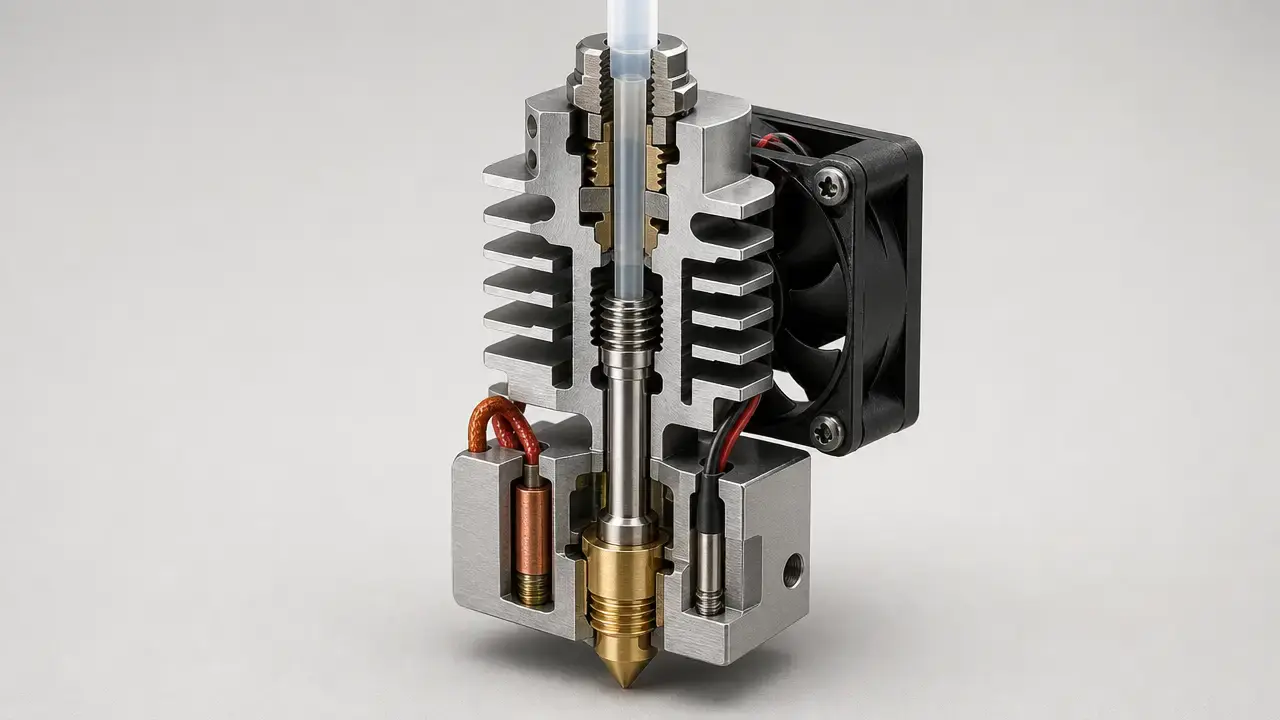
A 3D printer hotend is the heated melt-forming subsystem in material extrusion, or MEX: the part where incoming filament is softened, melted, and formed for deposition through a nozzle orifice. ISO/ASTM 52900:2021 defines material extrusion as an additive manufacturing process in which material is selectively dispensed through a nozzle or orifice, and it defines 3D printing as fabricating objects by depositing material with a print head, nozzle, or other printer technology. [1] That is why the d printer hotend is central to layer formation in filament printers. [1]
This guide covers what the hotend includes, how it differs from the extruder and the nozzle, which parts are common across designs, how hotend type affects temperature and flow, and why clogs are usually multi-cause problems rather than single-fault failures. It does not cover resin-printer terminology, firmware-modification walkthroughs, or mains-voltage wiring advice.
Key things the hotend controls
- temperature
- melt flow
- nozzle diameter
- material compatibility
- clogging risk
What Is a 3D Printer Hotend?
A 3D printer hotend is the heated melt-forming subsystem in a material-extrusion printer. In standards language, material extrusion is defined around selective dispensing through a nozzle or orifice, and 3D-printing terminology explicitly includes deposition through a print head or nozzle. [1] In practical terms, the hotend is the assembly that creates and controls the molten state of the filament just before it leaves the machine as an extruded strand.
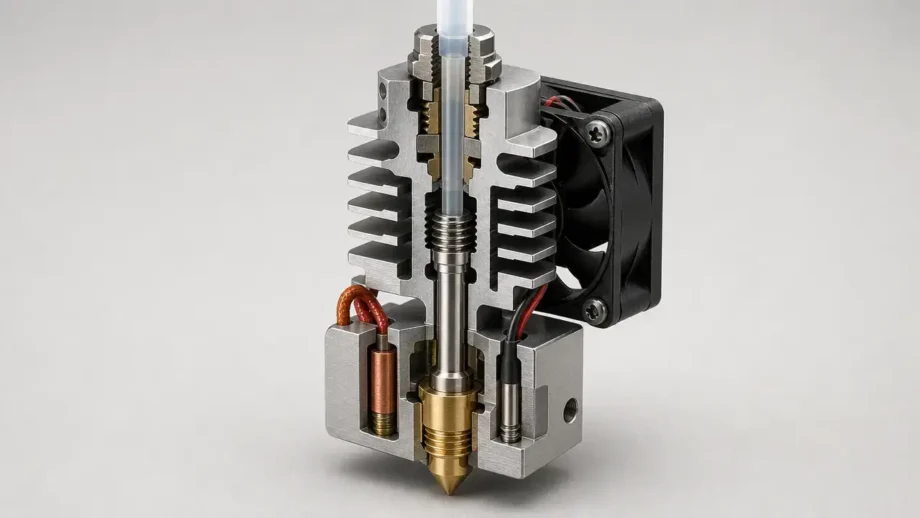
The hotend typically includes the nozzle, the heated melt path, and the temperature-control hardware around that path. A common assembled replacement hotend may include a nozzle, heater block, heat break, heat sink, PTFE tube, heater cartridge, and thermistor. [1] [9] It does not include the feeder gears or drive motor that push or pull filament into that heated section. A common misuse is to call the whole toolhead, or even the whole extruder assembly, “the hotend,” when only the heated melt section is meant. In plain language, the feeder moves filament into the hotend, and the hotend melts and forms it for deposition. [1]
Historical Background: From FDM to FFF Hotends
For generic discussion, material extrusion or FFF is more precise than treating FDM as a universal formal term. Stratasys lists FDM as a Stratasys trademark, so using it as a brand-neutral catch-all is technically imprecise. [2] In everyday use, many people still say FDM to mean almost any filament printer, but that is common shorthand rather than neutral standards language. [1] [2]
Hotend vs Extruder vs Nozzle
These terms get mixed together because the parts sit close to each other, fail in related ways, and are often sold as overlapping modules. A user may swap a nozzle, replace a hotend, or troubleshoot an extruder, yet describe all three actions as “fixing the hotend.” Standards terminology keeps the nozzle and print-head idea central to material extrusion, while the trademark status of FDM is another reason to use more precise generic terms when comparing hardware. [1] [2]
| Term | What it does | Typical parts | Common confusion |
|---|---|---|---|
| Hotend | Heats and melts filament, then meters the melt to the exit. It includes the heated melt path and temperature-control hardware, but excludes the feeder drive. | Nozzle, heater block, heater, temperature sensor, heat break, heat sink, and often a liner or guided filament path. | The whole toolhead or extruder is called the hotend. |
| Extruder / feeder | Drives filament into the hotend at a controlled rate. It includes the feed mechanism and motor-driven path, but excludes the heated melt section. | Drive gears, idler, motor, gearbox, filament guide. | A hotend clog is described as an “extruder clog.” |
| Nozzle | Forms the final outlet geometry. It includes the orifice tip, but excludes the heater, sensor, and cold-side cooling parts. | Brass, hardened-steel, or other nozzle body with a defined orifice size. | The nozzle is treated as if it were the whole hotend. |
| Toolhead | Carries the print-end hardware as a larger module. It may include the hotend, fans, sensors, and carriage-mounted wiring, but excludes the rest of the printer. | Hotend, fans, wiring, probes, covers, mounting hardware. | Toolhead and hotend are used as synonyms. |
| Print core | Vendor-specific integrated packaging of hotend-related parts. It includes the heating and sensing parts defined by that vendor, but it is not a universal industry synonym for hotend. | Swappable integrated module containing nozzle path, heater, sensor, and housing. | “Print core” is assumed to mean any hotend from any brand. |
A simple boundary helps: the extruder or feeder drives filament, the hotend melts it, and the nozzle defines the exit geometry. UltiMaker’s S7 shows why nozzle size is only one variable by offering 0.25, 0.4, 0.6, and 0.8 mm options within a broader print-head system. [5] UltiMaker’s Print Core AA goes further by packaging a 2.85 mm filament path, a 25 W 24 V heater cartridge, a PT100B sensor, and operation up to 280 °C into one swappable module. [6] E3D’s V6 documentation, by contrast, describes a cartridge-style heater block that lets users replace heater cartridges and temperature sensors more directly. [7] A Prusa assembled hotend page shows the more traditional exposed-parts approach, listing a V6 nozzle, heater block, heat break, heat sink, PTFE tube, heater cartridge, and thermistor as elements of one assembly. [9]
Parts of a 3D Printer Hotend
The parts of a 3D printer hotend are best understood by function first and by brand packaging second. Most hotends still need a nozzle, a heated melt zone, a thermal break, temperature sensing, and cold-side cooling, even if those functions are hidden inside a print core or a quick-swap module rather than exposed as separate user-serviceable parts. [6] [7] [9]
- nozzle — the final outlet orifice that shapes the extruded strand and strongly affects line width, detail potential, and restriction
- heater block — the metal block that holds the heating and sensing parts and transfers heat into the melt zone
- heater cartridge or ceramic heater — the part that provides thermal energy to the block and melt path
- temperature sensor — usually a thermistor or RTD that reports hotend temperature to the controller
- heat break — the narrow thermal bridge that limits heat conduction upward into the colder filament-guidance region
- heat sink — the finned upper section that sheds heat from the cold side so filament stays solid until it reaches the melt zone
- cooling fan — the airflow source that removes heat from the heat sink and cold side
- PTFE liner or all-metal filament path — the internal guide path for filament, either with PTFE in cooler sections or with metal-only guidance through the hotter region
- silicone sock, if present — an insulating cover around the heater block that reduces heat loss and helps keep stray plastic off the block
A traditional assembled hotend makes these functions easy to see. Prusa’s MK3 assembled hotend lists a V6 nozzle, heater block, heat break, heat sink, heatsink collet, PTFE tube, 24 V 40 W heater cartridge, and thermistor in one replacement bundle. [9] UltiMaker’s Print Core AA hides more of the same functional elements inside one module, including the heater cartridge and PT100B sensor. [6] E3D’s V6 sits between those extremes, using a cartridge-style heater block that keeps heater and sensor replacement relatively straightforward. [7]
That difference matters for service. On some printers, users replace the nozzle, sensor, or heater separately; on others, they replace a larger module that contains those parts. A hotend assembly therefore has common thermal functions across brands, but not a universal parts layout or repair method. [6] [7] [9]
How a Hotend Works
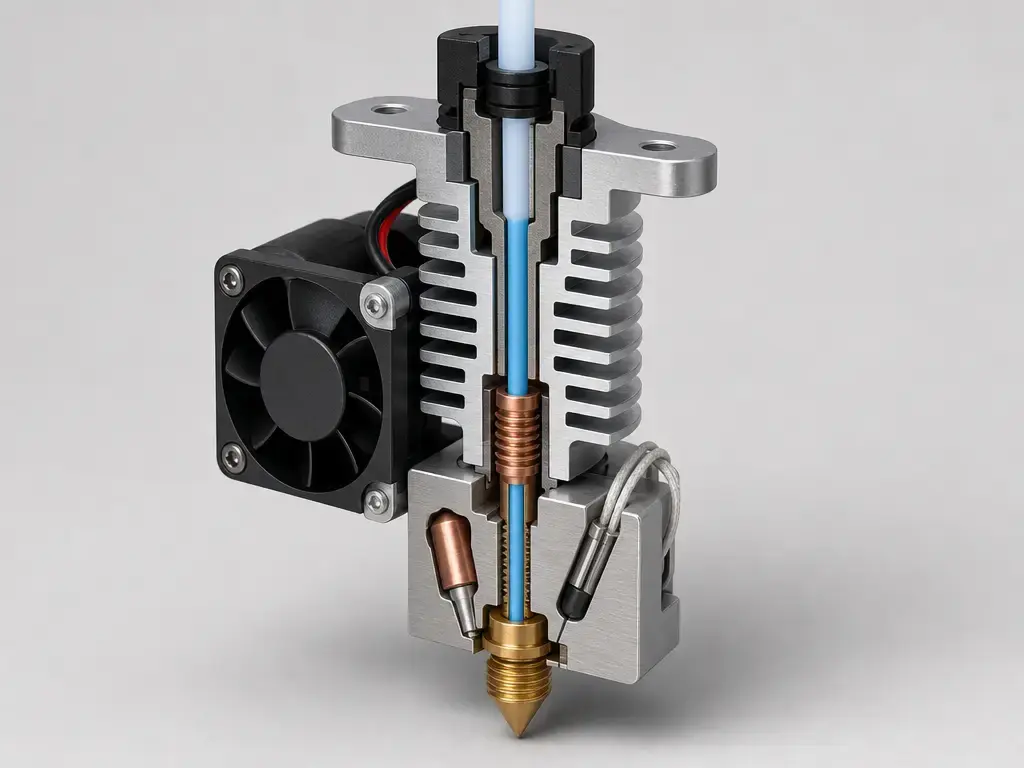
A hotend works as a thermal system with four practical zones: the cold end, the transition zone or heat break, the melt zone, and the nozzle. The cold end has to stay cool enough that incoming filament remains dimensionally stable while it is being driven downward. The transition zone limits unwanted heat travel upward. The melt zone is where the filament becomes a viscous melt, and the nozzle shapes that melt as it leaves the printer. [12]
The displayed temperature is only part of the story. NIST describes non-isothermal hotend conditions as a main cause of defects in material extrusion and reports that measured temperature and temperature variance depend on volumetric flow rate, temperature setpoint, and nozzle orifice diameter. [12] In practice, the same 240 °C setpoint can behave differently if you change print speed, layer geometry, nozzle size, or melt demand. A hotend is not just a heater with a number on a screen; it is a flow-dependent thermal system. [12]
3D Printer Hotend Types
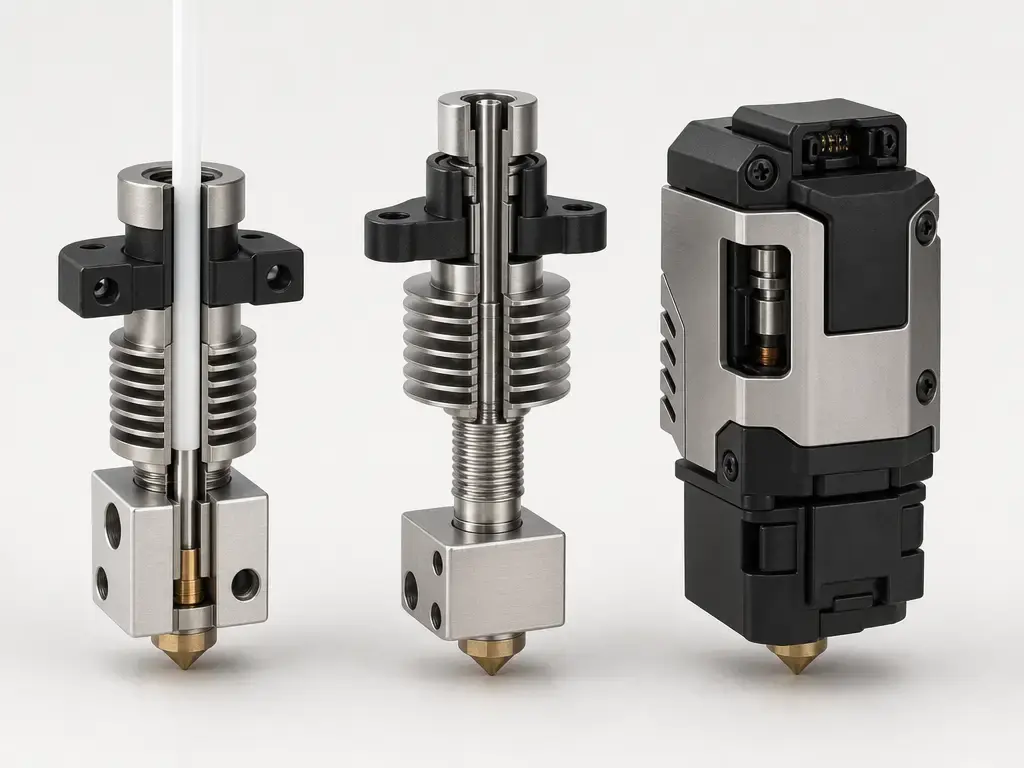
The main split in 3D printer hotend types is usually PTFE-lined versus all-metal. A PTFE-lined design keeps PTFE close to the melt path, which can make filament guidance easier at moderate temperatures but can narrow the practical operating envelope as more heat reaches that region. An all-metal design removes PTFE from the high-temperature melt zone and is commonly used when higher nozzle temperatures or longer thermal exposure are needed. Current examples include the Bambu Lab X1C, which is specified with an all-metal hotend, a hardened-steel 0.4 mm nozzle, and a 300 ℃ maximum hot-end temperature, and the Original Prusa MK4S, which is specified with an all-metal hotend, a high-flow 0.4 mm Prusa Nozzle brass CHT, and a 290 °C maximum nozzle temperature. [3] [4]
Beyond that baseline, hotends diverge into standard-flow, high-flow, high-temperature, and integrated-module designs. UltiMaker’s S7 illustrates a multi-nozzle desktop architecture with a 180–280 °C nozzle temperature range and 0.25, 0.4, 0.6, and 0.8 mm nozzle diameters. [5] UltiMaker’s Print Core AA shows a swappable integrated-module approach with 2.85 mm filament, a PT100B sensor, and operation up to 280 °C. [6] E3D’s V6 shows how temperature capability can depend on configuration: it reaches 300 °C with the supplied thermistor, but up to 500 °C requires a plated copper heater block plus PT100 or PT1000 sensing. [7] Bambu’s H2D hotend adds a quick-swap example, listing 0.2, 0.4, 0.6, and 0.8 mm versions and a maximum printing temperature of 350 ℃. [8] Cooling architecture matters too. In one 2026 study, an augmented cooling setup reduced measured cold-end temperatures by 24.3 °C for PLA and 27.4 °C for ABS under natural-convection test conditions, showing that hotend behavior depends on cold-side design as well as nozzle and heater choices. [14]
Nozzle material and diameter are part of type selection as well. A brass nozzle may be fine for general-purpose filaments, while filled or abrasive filaments can push users toward hardened-steel or other wear-resistant options. Bambu’s H2D guidance says filaments containing carbon fiber, glass fiber, metal, or other inorganic particles are prone to clog a 0.2 mm nozzle and recommends a hardened-steel 0.6 mm nozzle for carbon- or glass-fiber filaments. [8] E3D’s Revo High Flow family shows another axis of variation by spanning 0.4, 0.60, 0.80, 1.00, 1.20, and 1.40 mm sizes. [17] None of these types is universally best; each changes the tradeoff between temperature capability, flow capacity, serviceability, detail, wear resistance, and clog risk. [3] [4] [5] [6] [7] [8] [17]
All-Metal Hotend: What It Means and When It Matters
An all-metal hotend is one in which PTFE does not continue into the high-temperature melt zone. That is a description of melt-path construction, not a guarantee about maximum temperature, ease of use, or print quality. The term also does not mean every part in the assembly is literally metal, nor does it mean every all-metal design behaves the same way with retraction, cooling, or abrasive materials. [3] [4] [7]
What changes is the thermal boundary around the melt path. Removing PTFE from the hot zone can matter for higher-temperature materials or for systems that spend more time at elevated nozzle temperatures. But the real operating limit still depends on the whole configuration: the Bambu Lab X1C is specified at 300 ℃, the Original Prusa MK4S at 290 °C, and the E3D V6 at 300 °C with its supplied thermistor, with up to 500 °C only when paired with a plated copper heater block and PT100 or PT1000 sensing. [3] [4] [7] So the answer to what is an all metal hotend is simple in physical terms, but not interchangeable in temperature terms. [3] [4] [7]
Hotend Temperature Range and Material Compatibility
The hotend temperature range is a hardware specification, not a universal law of desktop printing. It tells you what a specific printer or hotend assembly is designed to reach under its intended heater, sensor, firmware, and mechanical configuration. A filament’s recommended print temperature is a different number: it describes what that material usually needs at the nozzle to print correctly. Mixing those two ideas is one of the most common spec-reading mistakes. [3] [4] [5] [7]
The manufacturer examples in this article should not be averaged together. Bambu’s X1C lists a maximum hot-end temperature of 300 ℃. [3] Prusa’s MK4S lists a maximum nozzle temperature of 290 °C. [4] UltiMaker’s S7 lists a 180–280 °C nozzle temperature range. [5] E3D’s V6 reaches 300 °C with the supplied thermistor and up to 500 °C only with the matching plated copper block and PT100 or PT1000 upgrade path. [7] Those values describe different devices, architectures, and sensor arrangements, so they do not add up to one “normal hotend range.” [3] [4] [5] [7]
Filament data sheets make the distinction clearer. Prusament PC Blend specifies 1.75 ± 0.03 mm filament, a recommended nozzle temperature of 275 ± 10 °C, a heatbed temperature of 110 ± 10 °C, and print speeds up to 200 mm/s. [15] Bambu’s PPS-CF page lists a nozzle temperature of 310–340 °C, a bed temperature with glue of 100–120 °C, drying at 100–140 °C for 8–12 h, and hardened-steel nozzle guidance that includes 0.4, 0.6, and 0.8 mm sizes with 0.6 mm recommended. [16] Those are material-system requirements, not generic promises about every printer marketed as high temperature. [15] [16]
Temperature framework — max temp vs filament temp vs bed / chamber / drying
A practical way to read specifications is to separate five different temperatures. Hotend max temperature is the hardware ceiling of the printer or hotend assembly. Filament print temperature is the material’s preferred nozzle range during extrusion. Bed temperature supports first-layer adhesion and part stability. Chamber temperature, if the machine has controlled chamber heating, is a separate system-level condition rather than a hotend rating. Drying temperature is what the filament needs before printing to reduce moisture-related problems. UltiMaker’s S7 hotend range, Prusament PC Blend settings, and Bambu PPS-CF drying guidance show why these numbers are not interchangeable. [5] [15] [16]
High-Speed 3D Printer Hotend and Flow Rate
A high-speed 3D printer hotend is not just a hotend with a bigger nozzle. High-speed performance depends on how much material the hotend can melt consistently, how efficiently it transfers heat into the moving filament, and how stable the melt temperature remains as volumetric flow rises. NIST’s work is useful here because it ties measured temperature and temperature variance to volumetric flow rate, temperature setpoint, and nozzle orifice diameter. [12] That is why motion-system speed and hotend speed are related but not identical.
Nozzle size still matters because it changes restriction and pressure. In one TPLA modeling study, the maximum predicted pressure was 3.34 MPa with a 0.4 mm outlet, 2.91 MPa with a 0.6 mm outlet, and 2.04 MPa with a 0.8 mm outlet. [13] That trend helps explain why larger nozzles can reduce back-pressure, but it does not make every large-nozzle setup a high-speed setup. E3D’s Revo flow-rate guidance explicitly says maximum achievable flow cannot be portrayed accurately by one single value because line width, layer height, print temperature, extrusion force, printer setup, and filament choice all matter. [18] Many vendors therefore publish figures that are not directly comparable unless the test method is also disclosed. [18]
Why a 3D Printer Hotend Keeps Clogging
When a 3D printer hotend keeps clogging, the most useful approach is a diagnostic order rather than a random parts swap. Start with thermal causes, then move to material and contamination causes, then finish with geometry, assembly, and settings causes. The visible symptom may be the same in all three cases—partial extrusion, missing lines, or a blocked nozzle—but the root causes can be very different.
Thermal causes
Thermal problems usually involve heat creep or inadequate cold-side cooling. Prusa’s troubleshooting documentation says ambient room temperature above 35 °C, or above 30 °C for some filaments, can contribute to heat-creep issues, and it notes that lowering bed temperature by 5 or 10 °C can help in some PLA cases. [10] Those numbers are vendor troubleshooting guidance, not universal thresholds. In one 2026 study, a stock extruder under natural convection reached measured cold-end temperatures of 91.3 °C for PLA and 108.0 °C for ABS, while the augmented cooling setup reduced those temperatures by 24.3 °C and 27.4 °C respectively for that test setup. [14] The broader lesson is that clogged hotends are often cooling problems before they are nozzle problems. [10] [14]
Material, contamination, and nozzle causes
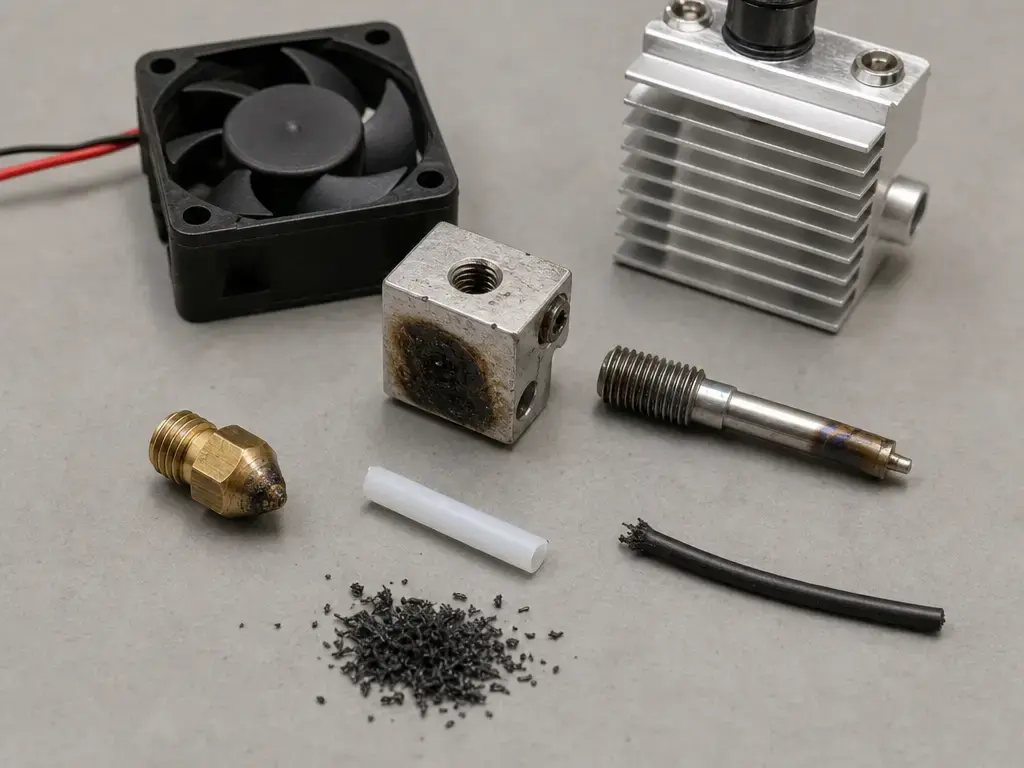
Not every clog is thermal. Prusa’s clogged-hotend documentation says damaged or distorted PTFE and impurities in filament can cause jams. [11] Filled filaments add another risk: Bambu’s H2D guidance says carbon fiber, glass fiber, metal, and other inorganic particles are prone to clog a 0.2 mm nozzle, and it recommends a hardened-steel 0.6 mm nozzle for carbon- or glass-fiber filaments. [8] Nozzle diameter changes the restriction level as well. In one TPLA study, predicted pressure fell as outlet diameter increased from 0.4 mm to 0.8 mm, which helps explain why debris and fillers become more troublesome in smaller outlets. [13]
Assembly and settings causes
Assembly faults and settings changes can create clog-like symptoms even when the filament is fine. Prusa’s assembled hotend example shows how many interfaces exist in one common design: nozzle, heat break, heat sink, PTFE tube, heater cartridge, and thermistor. [9] If those interfaces are assembled incorrectly, the melt path and thermal path can change. Prusa’s documentation also shows that PTFE damage is a real failure mode, while NIST’s work shows that flow rate, setpoint, and nozzle diameter alter the hotend’s thermal behavior. [11] [12] That is why overly aggressive retraction, a recent reassembly, or a major nozzle or speed change can all precede a clog without heat creep being the only explanation. [10] [11] [12]
A useful shortcut is to separate timing from material. A clog that appears after long hot idle periods points toward heat management. A clog that starts when you switch to abrasive or filled filament points toward nozzle material, nozzle size, or contamination. A clog that appears right after maintenance points toward assembly. That kind of ordered diagnosis is more reliable than treating every under-extrusion event as “just a bad nozzle.”
Applications and Selection Criteria
For general PLA and PETG work, the goal is usually stability rather than extreme temperature. A system such as the UltiMaker S7 shows how multiple nozzle sizes can support detail or faster draft printing inside a 180–280 °C operating range, while the Bambu Lab X1C and Original Prusa MK4S show all-metal desktop architectures with 300 ℃ and 290 °C maximum nozzle-area temperatures respectively. [3] [4] [5] If the application moves into soluble-support workflows, modular print-end systems such as UltiMaker’s swappable print cores become relevant because the architecture is built around predictable tool changes and paired material handling. [5] [6]
As material demands increase, the selection logic shifts. Prusament PC Blend prints at 275 ± 10 °C with a 110 ± 10 °C bed and can run up to 200 mm/s according to its datasheet, while Bambu PPS-CF asks for 310–340 °C nozzle temperature and recommends hardened-steel nozzles, with 0.6 mm recommended. [15] [16] That means engineering polymers and abrasive composites are not just higher-temperature problems; they are also wear, flow, and cooling problems. For fast draft printing, high-flow designs and larger nozzle families matter. For print farms or maintenance-heavy environments, quick-swap or integrated modules such as the H2D hotend or print-core systems can matter because service time becomes part of system performance. [6] [8]
Limitations and Safety Notes
Vendor specs are not interchangeable. UltiMaker’s Print Core AA ties operation up to 280 °C to a specific 25 W 24 V heater cartridge and PT100B sensor inside one module. [6] E3D’s V6 reaches up to 500 °C only when matched with the plated copper block and PT100 or PT1000 configuration described by E3D. [7] Bambu’s H2D hotend lists 350 ℃ for that specific design. [8] Those examples are useful illustrations, but they do not create a universal rule you can transfer from one printer to another. All-metal hotends can also require more careful tuning because thermal behavior changes with flow, setpoint, nozzle size, retraction behavior, and cold-side cooling margin. [10] [12] [14]
High-temperature setups need the full system to match the claim: heater, sensor, block, firmware limits, and material workflow. Abrasive and filled filaments can wear soft nozzles and may increase clogging risk in very small outlets, which is why hardened-steel guidance appears in filament and hotend documentation. [8] [16] PTFE damage and filament impurities are also real clogging causes, so an apparent temperature problem may start as a materials or maintenance problem instead. [11] If wire gauge comes up, the correct answer here is no reliable figure found unless a device-specific official manual is cited. Do not modify heater wiring, thermistor type, or firmware temperature limits without official documentation. [6] [7] [8]
Current Research and Market Context
In one NIST-linked study context, the authors identify non-isothermal hotend conditions as a main cause of defects in material extrusion and show that measured temperature behavior varies with volumetric flow rate, setpoint, and nozzle diameter. [12] In one 2026 cooling study, the authors measured lower cold-end temperatures with augmented cooling than with the stock natural-convection setup, including reductions of 24.3 °C for PLA and 27.4 °C for ABS in that test configuration. [14] Both findings are setup-specific, but together they reinforce a simple point: hotend performance is governed by the full thermal path, not only by the setpoint.
The market response has been mostly architectural. Higher-flow nozzles, quick-swap hotends, integrated print cores, hardened nozzles, and higher-temperature desktop modules are all ways of managing different combinations of flow, wear, service time, and thermal margin. E3D’s Revo High Flow range spans 0.4 to 1.4 mm sizes, while E3D’s support guidance separately notes that one universal maximum-flow number is not reliable across different printers, temperatures, and line geometries. [17] [18] That is a useful reality check: hotend performance is increasingly specified as a system behavior, not a single headline number. [12] [18]
How to Choose and Maintain a 3D Printer Hotend
When comparing a 3D printer hotend, use the same five filters every time. First, match temperature to material: PC Blend at 275 ± 10 °C asks far less of the system than PPS-CF at 310–340 °C. [15] [16] Second, match nozzle material to filament: abrasive-filled materials often justify hardened-steel guidance. [8] [16] Third, match flow to the real speed target rather than to a marketing label, because measured hotend behavior changes with flow, setpoint, and nozzle diameter and because vendor flow claims are not always directly comparable. [12] [18] Fourth, check architecture: an X1C-style all-metal hotend, a MK4S high-flow nozzle setup, an UltiMaker print core, an E3D V6 upgrade path, and a Bambu H2D quick-swap module are different solutions to different operating priorities. [3] [4] [6] [7] [8]
Maintenance follows the same logic. Keep the cold side cooled, keep the melt path clean, verify that the hotend assembly is seated correctly, and do not assume one brand’s temperatures or materials map directly onto another brand’s hardware. [9] [10] [11] If you change nozzle size, speed, or filament class, re-check thermal behavior instead of assuming the old settings still apply. [12] [18] The useful summary is simple: match temperature to material, match nozzle material to filament, match flow to the speed target, maintain cooling and correct assembly, and verify vendor specs before making assumptions. A hotend is a thermal system, not just a nozzle. [12]
FAQ
What is a 3D printer hotend on a 3D printer?
A 3D printer hotend is the heated melt-forming assembly in a material-extrusion printer. In ISO/ASTM terminology, material extrusion dispenses material through a nozzle or orifice, and 3D printing is described as deposition using a print head, nozzle, or related printer technology. [1] In practical terms, the hotend creates the melt and controls how it leaves the nozzle, while the feeder drives solid filament into it.
Hotend vs nozzle: what is the difference?
In hotend vs nozzle terms, the hotend is the whole heated melt section, while the nozzle is only the final outlet component at the tip. The hotend includes the heater, sensor, melt path, and thermal break around that outlet, while the nozzle mainly defines the exit geometry. Systems such as the UltiMaker S7 and UltiMaker Print Core AA show that nozzle size is one variable inside a larger hotend or print-core assembly. [5] [6]
What is an all-metal hotend?
An all-metal hotend is a hotend in which PTFE does not continue into the high-temperature melt zone. That physical definition does not automatically tell you the temperature limit, because the limit still depends on the block, heater, sensor, and firmware configuration. The X1C is specified at 300 ℃, the MK4S at 290 °C, and the E3D V6 at 300 °C with its supplied thermistor, with up to 500 °C only in the upgraded configuration. [3] [4] [7]
What is the hotend temperature range for 3D printers?
There is no single universal hotend temperature range. UltiMaker’s S7 lists 180–280 °C, the Prusa MK4S lists 290 °C maximum nozzle temperature, the Bambu X1C lists 300 ℃ maximum hot-end temperature, and the Bambu H2D hotend lists 350 ℃ maximum printing temperature. [3] [4] [5] [8] E3D’s V6 also shows that one hotend family can extend from 300 °C to up to 500 °C depending on the sensing and heater-block configuration. [7]
Why does my 3D printer hotend keep clogging?
Common causes include heat creep, damaged PTFE, dirty or contaminated filament, abrasive fillers, a too-small nozzle for the material, or an assembly/settings problem after maintenance. Prusa’s documentation flags ambient temperatures above 35 °C, or 30 °C for some filaments, as possible heat-creep contributors, while separate Prusa guidance notes PTFE damage and filament impurities as clog sources. [10] [11] Bambu also warns that filled filaments are prone to clog a 0.2 mm nozzle. [8]
Is a high-speed hotend just a bigger nozzle?
No. A larger nozzle can reduce restriction, but a high-speed hotend also needs enough melt capacity and thermal stability at higher volumetric flow. NIST reports that hotend temperature behavior changes with flow rate, setpoint, and nozzle diameter, and one TPLA study found lower predicted pressure at larger outlet diameters. [12] [13] E3D’s flow-rate guidance adds that one single universal maximum-flow number is not reliable because print geometry, temperature, extrusion force, printer setup, and filament all matter. [18]
Do I need a high-temperature hotend for nylon, PC, PPS, or PEEK?
Usually yes if the filament’s required nozzle temperature exceeds your current hardware limit, but the answer depends on the full system, not only the hotend label. Prusament PC Blend is specified at 275 ± 10 °C, while Bambu PPS-CF is specified at 310–340 °C with hardened-steel nozzle guidance. [15] [16] E3D’s V6 and Bambu’s H2D hotend show how some systems extend into higher-temperature territory, but materials such as PEEK still require the rest of the printer to match the thermal demand. [7] [8]
Sources
- ISO/ASTM 52900:2021 sample PDF — material extrusion and 3D printing terminology. https://cdn.standards.iteh.ai/samples/74514/aa9c4ef281ff48cea23757dbb8b5bb07/ISO-ASTM-52900-2021.pdf
- Stratasys legal information — FDM trademark status. https://www.stratasys.com/en/legal/legal-information/
- Bambu Lab X1C product page — all-metal hotend, 300 ℃ max hot-end temperature, hardened-steel 0.4 mm nozzle, 1.75 mm filament. https://us.store.bambulab.com/products/x1-carbon
- Original Prusa MK4S product page — all-metal hotend, high-flow 0.4 mm Prusa Nozzle brass CHT, 290 °C max nozzle temperature. https://www.prusa3d.com/product/original-prusa-mk4s-3d-printer-7/
- UltiMaker S7 product page — 180–280 °C nozzle temperature range and 0.25, 0.4, 0.6, 0.8 mm nozzle diameters. https://ultimaker.com/3d-printers/s-series/ultimaker-s7/
- UltiMaker Print Core AA datasheet — 2.85 mm filament, up to 280 °C, 25 W 24 V heater cartridge, PT100B sensor. https://um-support-files.ultimaker.com/Product-datasheet/parts/Product-data-sheet-Print-core-AA.pdf
- E3D V6 All-Metal HotEnd — 300 °C with supplied thermistor, up to 500 °C with plated copper heater block plus PT100 or PT1000, cartridge-style heater block serviceability. https://e3d-online.com/products/v6-all-metal-hotend?cat=289
- Bambu Hotend – H2D — 350 ℃ max printing temperature, 0.2/0.4/0.6/0.8 mm variants, quick-swap design, and abrasive-filament guidance. https://us.store.bambulab.com/products/bambu-hotend-h2d
- Prusa MK3 assembled hotend page — common hotend component list and 24 V 40 W heater cartridge example. https://www.prusa3d.com/product/assembled-hotend-for-mk3-series/
- Prusa heat creep article — ambient-temperature and bed-temperature troubleshooting guidance. https://help.prusa3d.com/article/extrusion-stopped-mid-print-heat-creep_1948
- Prusa clogged nozzle/hotend article — PTFE damage and filament impurities as clogging causes. https://help.prusa3d.com/article/clogged-nozzle-hotend-mini-mini_112011
- NIST, Steady Melting in Material Extrusion Additive Manufacturing — non-isothermal hotend conditions and dependence on flow, setpoint, and nozzle diameter. https://www.nist.gov/publications/steady-melting-material-extrusion-additive-manufacturing
- Numerical modeling of the effect of nozzle diameter and heat flux on the polymer flow in fused filament fabrication — study-specific pressure values for 0.4, 0.6, and 0.8 mm outlets. https://www.sciencedirect.com/science/article/pii/S1526612522005886
- Experimental Investigation of Heat Pipe-Assisted Cooling for Heat Creep Mitigation in FFF Extruders — study-specific cold-end temperatures and cooling reductions. https://www.mdpi.com/2079-9292/15/5/976
- Prusament PC Blend TDS — 275 ± 10 °C nozzle temperature, 110 ± 10 °C bed, 1.75 ± 0.03 mm filament, up to 200 mm/s. https://prusament.com/wp-content/uploads/2022/10/PCBlend_Prusament_TDS_2022_16_EN.pdf
- Bambu PPS-CF product page — 310–340 °C nozzle temperature, 100–120 °C bed, 100–140 °C drying for 8–12 h, hardened-steel nozzle guidance. https://us.store.bambulab.com/products/pps-cf/
- E3D Revo High Flow nozzles — 0.4 to 1.4 mm nozzle range. https://e3d-online.com/products/revo-high-flow-nozzles
- E3D Revo Support: Volumetric Flow Rates — explanation of why one single maximum-flow value is not universally reliable. https://e3d-online.com/pages/revo-support-volumetric-flow-rates