
Summary
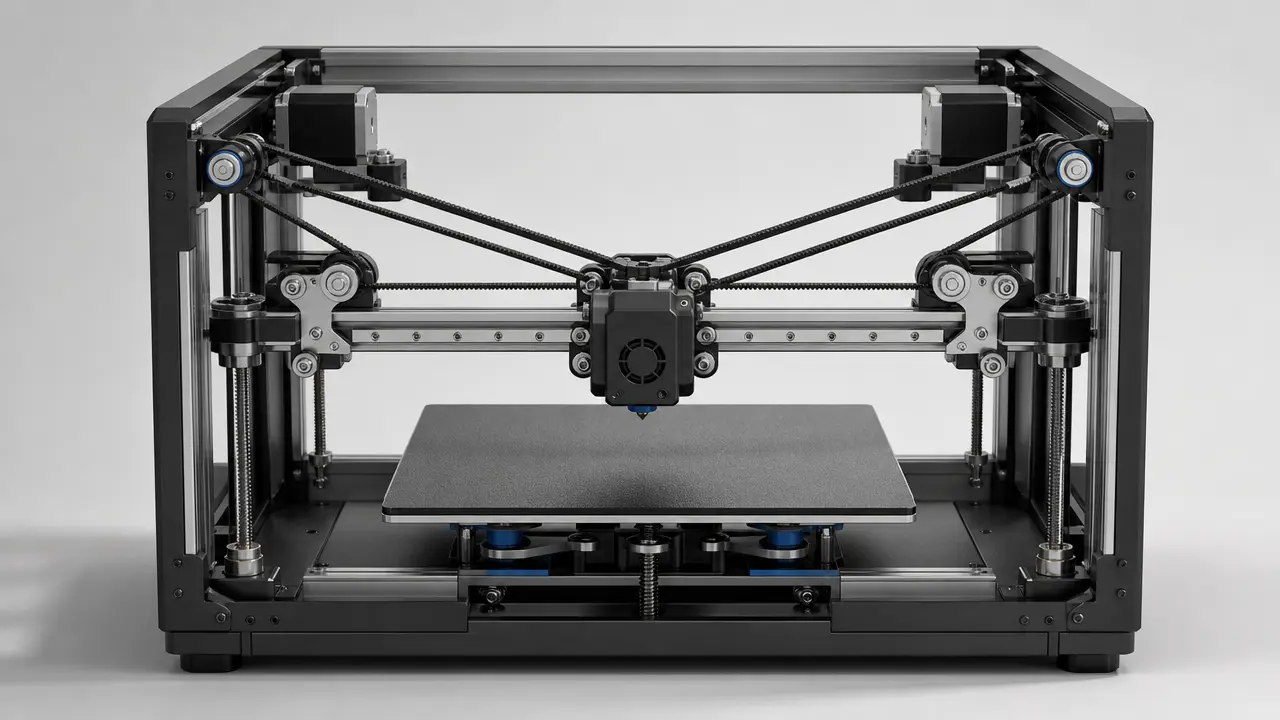
CoreXY vs Cartesian is mainly a comparison of motion layouts, not a verdict on print quality by itself. CoreXY’s own documentation describes it as a way to create cartesian motion, and Klipper treats CoreXY as a Cartesian-style kinematic option rather than a different coordinate system. When this article compares speed, footprint, or bed inertia, the default comparison target is a typical bed-slinger Cartesian desktop printer, because that is what most readers usually mean in hobby discussions. [S03] [S06]
The short version: CoreXY often improves high-speed potential and enclosure efficiency because the bed is usually not being accelerated back and forth in Y, while a typical bed-slinger Cartesian often wins on simplicity, visibility, and easier service access. High-speed material extrusion is still a multi-factor problem involving motion, flow, vibration, and thermal management, so architecture alone does not settle the outcome. Neither architecture is automatically better. [S09] [S16]
Before You Compare: Motion Architecture vs Frame Type
The usual “CoreXY or Cartesian?” framing is a false binary. In standards language, additive manufacturing is the broader process family that builds 3D geometry by successive addition of material, and material extrusion is the additive manufacturing process in which material is selectively dispensed through a nozzle or orifice. In everyday speech, people often say “3D printing” for the same general idea, especially around non-industrial machines. FDM is also a Stratasys trademark, which is why neutral technical writing often prefers material extrusion or, where appropriate, FFF. [S01] [S02]
- Cartesian coordinates describe nozzle position in X, Y, and Z. [S01]
- CoreXY is a Cartesian kinematic arrangement, not a different coordinate system. [S03] [S06]
- The motion system is separate from the frame or chassis that supports it. [S03] [S06]
- Enclosure style and bed motion are related design choices, not fixed definitions of the architecture. [S09]
RepRap Darwin was documented as a 3-axis Cartesian drive using stepper motors. Ilan Moyer dates CoreXY to June 2011 through April 2012 and describes it as a stationary-motor approach for lowering moving mass. [S17] [S18]
CoreXY vs Cartesian 3D Printer: How the Motion Actually Works
On a conventional Cartesian desktop printer, the mental model is simple: X motion comes from the X mechanism, Y motion comes from the Y mechanism, and Z is handled separately. In the common bed-slinger version, the toolhead rides on X while the bed moves in Y, so it is easy to see which major part belongs to which axis. Klipper’s Cartesian kinematics description follows that direct one-axis-per-stepper intuition. [S05]
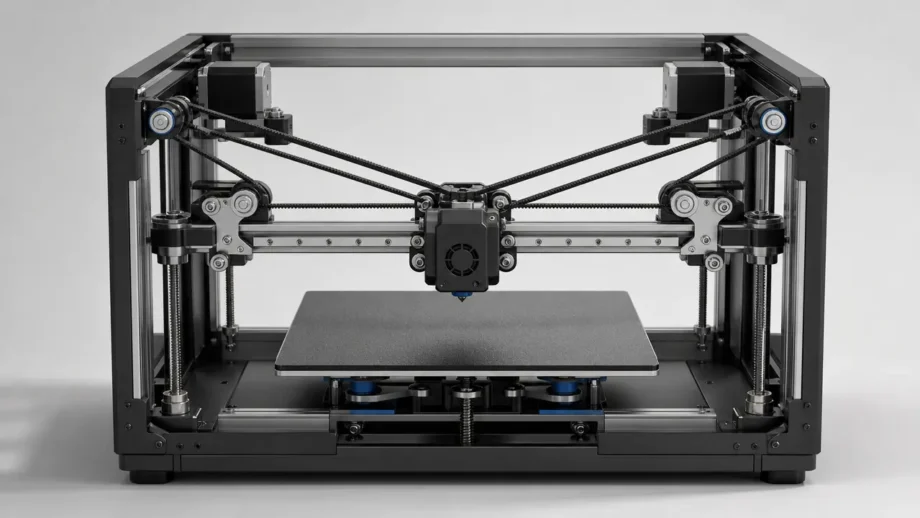
CoreXY still moves the nozzle through normal X-Y coordinates, but the axis split happens in the belt system rather than in a visibly separate X motor and Y motor. The two horizontal steppers are often thought of as A and B, because neither belongs only to X or only to Y. On the reference CoreXY mechanism, rotating both motors the same way produces motion along one horizontal axis, while rotating them in opposite directions produces motion along the other. Klipper describes the same idea in firmware terms: requested X-Y motion is translated into combined A and B stepper motion, while Z remains Z. The CoreXY reference also notes that extra pulleys can move the belt crossover outside the working envelope. [S04] [S05]
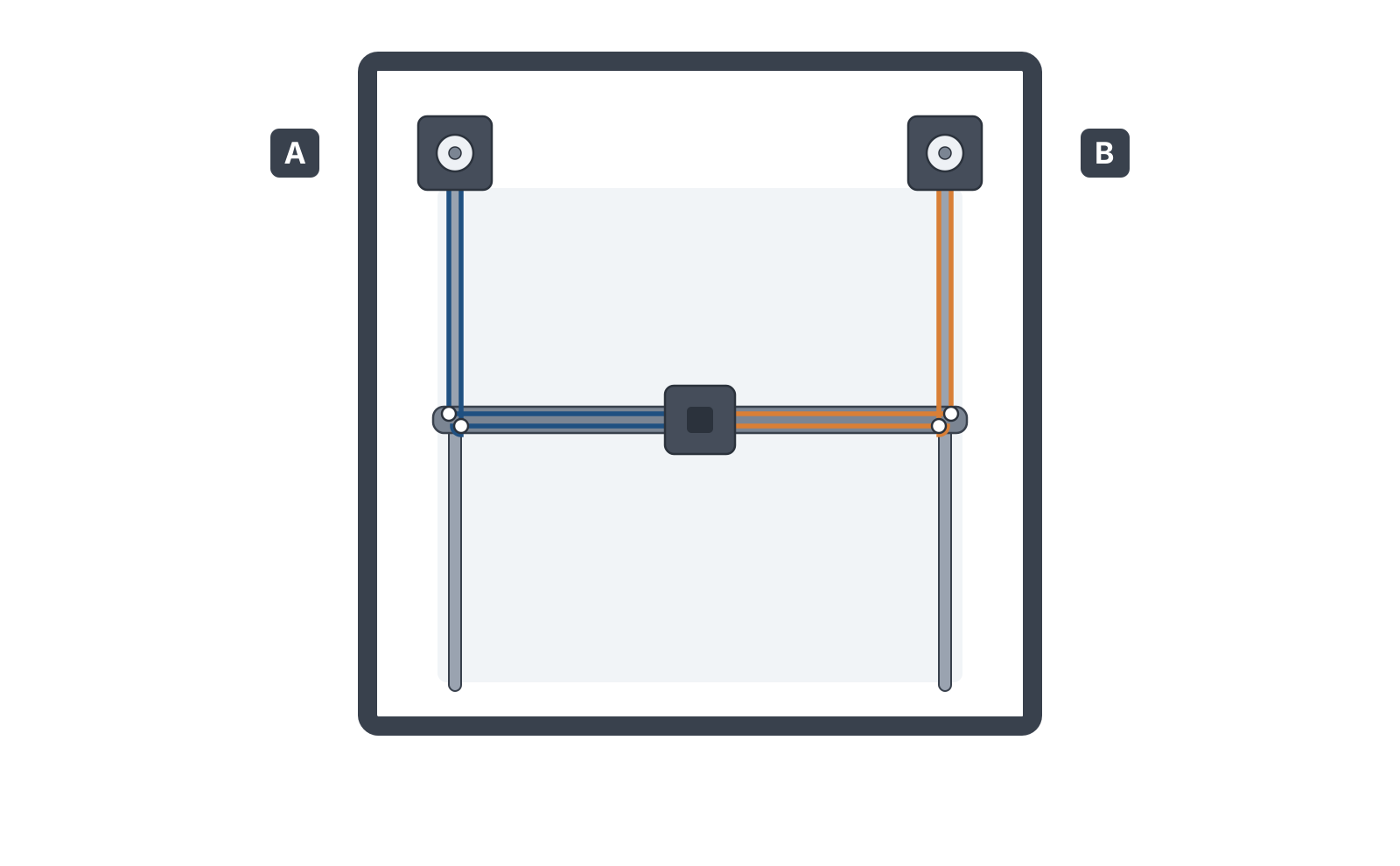
x + y and belt B’s tracks x − y. Turn both motors together and the carriage moves in X; turn them against each other and the whole gantry moves in Y; drive one alone and you get a diagonal. On a bed-slinger each of those axes would instead be one motor doing one job. More on CoreXY motion and its belt paths.What physically moves during printing?
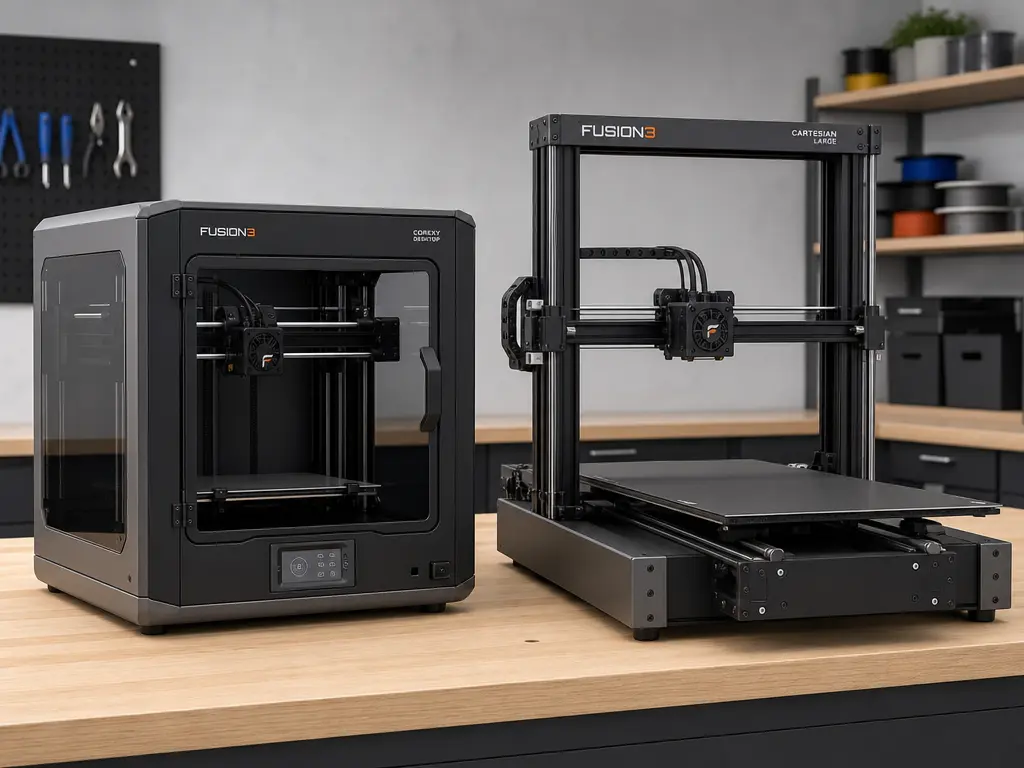
- Typical bed-slinger Cartesian: the printhead moves on X, and the bed plus printed part move back and forth on Y. [S09]
- Typical desktop CoreXY: the toolhead moves in X and Y, while the bed usually moves only in Z to set print height. [S09]
That difference changes the mechanical problem more than the coordinate system. Because CoreXY X-Y position is not determined by a single stepper, belt routing, pulley alignment, and reasonably balanced belt behavior become more sensitive setup points than they are on a simple one-axis-per-belt layout. Klipper notes that some stepper-specific calibration assumptions do not apply to CoreXY XY endstops for this reason, and peer-reviewed work on related belt routings highlights alignment and stiffness tradeoffs. [S08] [S15]
CoreXY vs Cartesian: Key Mechanical Differences
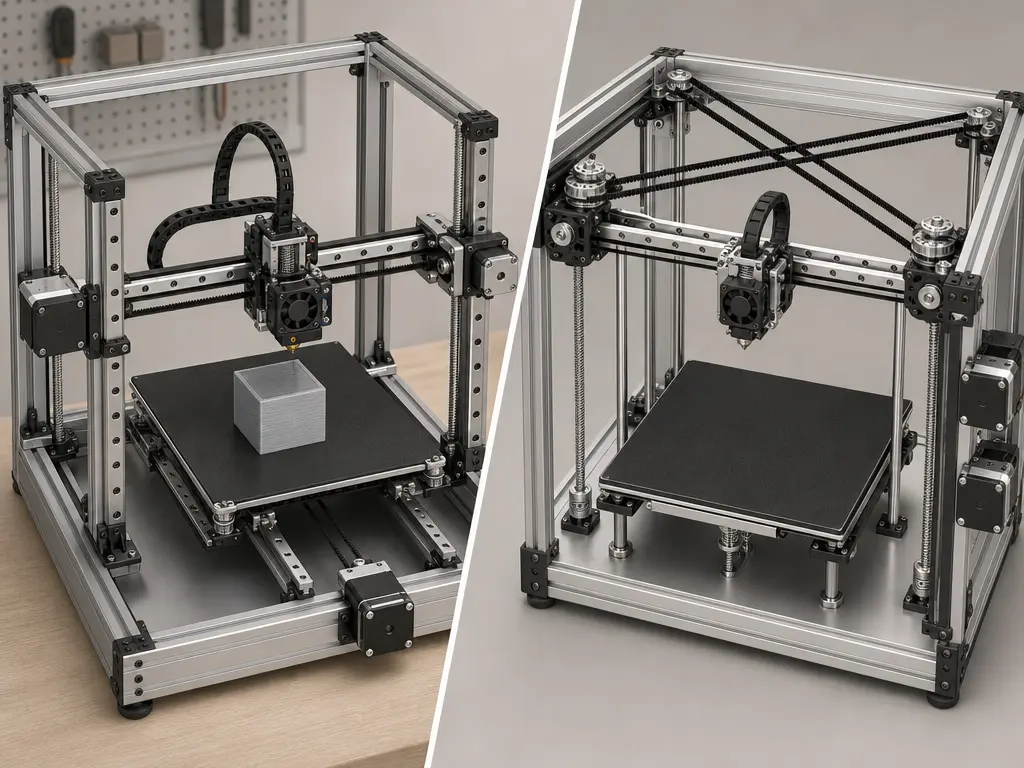
The most useful architecture-level comparison is not the product badge but which masses are accelerated, how force enters the frame, and how much room the mechanism needs while printing. Prusa’s practical overview says reduced X-Y moving mass can lower fast-print artifacts and allow more of the machine’s total volume to be used as build volume, while the longer CoreXY belt path can make belt issues larger and harder to repair. Independent literature on related belt-driven horizontal positioning systems likewise points to alignment constraints and belt-stiffness tradeoffs as real design factors, not just vendor claims. [S09] [S15]
Example model specs are discussed later; this table is architecture-level. [S09] [S15]
| Attribute | Typical bed-slinger Cartesian | Typical CoreXY | Why it matters |
|---|---|---|---|
| moving mass in XY | Toolhead moves on X; bed and part move on Y | Toolhead moves in X and Y | Higher changing mass can limit usable acceleration |
| bed motion during printing | Bed repeatedly travels in Y | Bed usually moves slowly in Z | Tall or heavy parts are shaken less in the horizontal plane |
| belt complexity | Shorter, more direct paths are common | Longer coupled belts and more pulleys are common | Routing and alignment errors are more likely to matter |
| enclosure friendliness | Extra front/rear bed clearance is needed | Fast X-Y motion stays mostly inside the frame | Paneling and chamber control are often easier |
| footprint efficiency during motion | Operating depth grows with bed travel | Motion usually stays within a box-like frame | Desk space is used more efficiently |
| service access | Open layouts often expose belts, rails, and bed hardware | Belts and gantry parts may sit deeper inside the machine | Troubleshooting visibility changes |
These are architecture traits, not full performance verdicts. They do not decide hotend flow, controller tuning, resonance compensation quality, cooling, or slicer strategy. A careful Cartesian can beat a sloppy CoreXY, and a well-built CoreXY can turn its layout into real speed headroom. [S07] [S15]
Is CoreXY Faster Than Cartesian? Speed vs Stability
Often, yes in potential; not automatically in finished-part time. CoreXY usually has a higher acceleration ceiling than a typical bed-slinger because the bed and growing part are not being thrown back and forth in Y, but the useful answer depends on what kind of “speed” you mean. [S09] [S16]
What speed numbers actually mean
- Travel speed is non-printing movement between extrusion paths.
- Print speed is commanded motion while material is being deposited.
- Acceleration is how quickly the machine ramps toward a target speed.
- Volumetric flow is how much molten material the hotend can actually supply.
Acceleration potential does not equal finished-part throughput. A machine can advertise a high top speed and still spend most of a real print below that number because of short segments, corners, cooling limits, extrusion limits, or conservative acceleration settings. “Stability” also needs to be defined by mechanism rather than treated as a winner label: bed inertia, gantry moving mass, belt synchronization, frame rigidity, resonance control, and maintenance robustness all matter. Klipper’s resonance guide says ringing comes from mechanical vibration during quick direction changes and points to insufficient frame rigidity, loose or springy belts, alignment issues, and heavy moving mass as common causes. The 2025 material-extrusion review makes the same broader point from the process side: high-speed printing is not just faster motion, but a balance among motion response, material flow, and thermal management. [S07] [S16]
Vendor/example specs help show the difference between architecture and implementation. As a vendor/example spec, Bambu Lab lists the X1 Carbon at 256 × 256 × 256 mm³ build volume, 500 mm/s maximum toolhead speed, and 20 m/s² maximum toolhead acceleration. As a separate vendor/example flow spec, Bambu’s X1 Carbon technical sheet lists 32 mm³/s at ABS under a 150 × 150 mm single-wall test condition, which is a hotend-throughput figure, not a promise that every print will run at that pace. Bambu’s X1E page makes the same model-specific argument in words, saying its CoreXY motion structure reduces moving-part weight and enables 20,000 mm/s² acceleration so 500 mm/s travel speed can be maintained for longer. Those are useful product examples, but they are not architecture-wide benchmarks. [S11] [S12] [S13]
For a universal CoreXY-vs-Cartesian speed multiplier, no reliable figure found. The current source set supports a narrower conclusion instead: CoreXY usually gives designers better conditions for high acceleration, while real print time still depends on motion, flow, cooling, vibration control, and part geometry. [S16]
Print Quality, Resonance, and Surface Artifacts
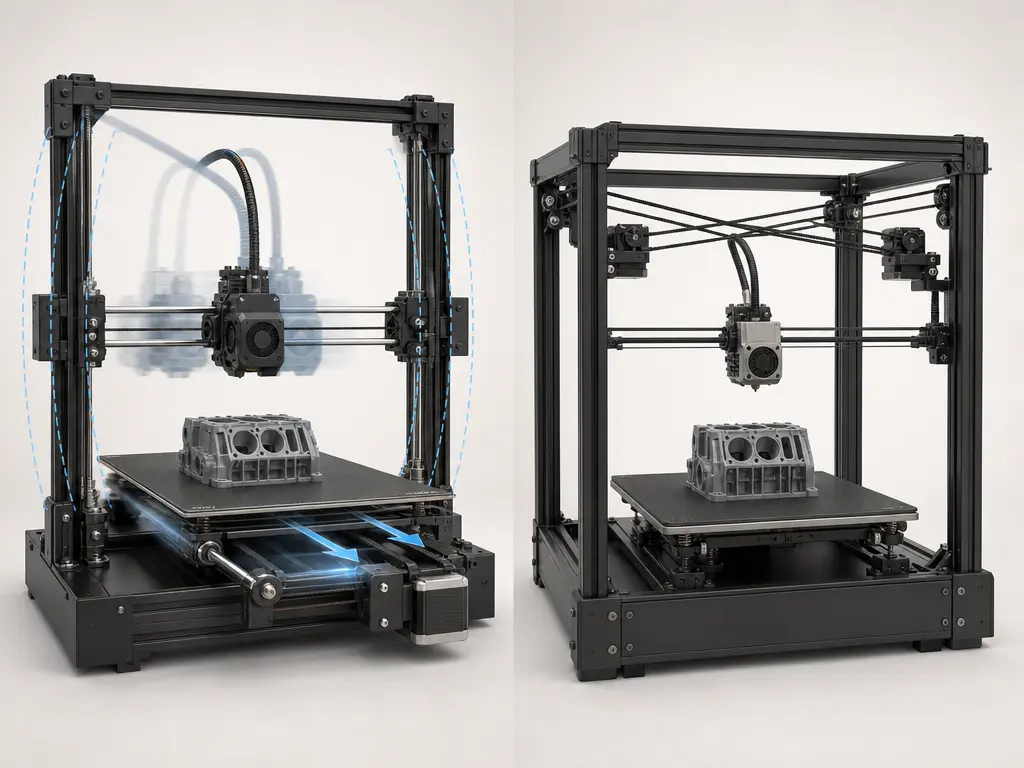
Ringing or ghosting appears when rapid direction changes excite vibration and leave repeated ripples near edges. On a bed-slinger, the moving bed and growing part can contribute to that behavior because the moving load changes during the print. On a typical CoreXY, the part is usually not moving in the horizontal plane, but the gantry, belts, pulleys, and frame still have their own vibration modes. High-speed material extrusion research treats vibration and thermal limits as central constraints, not side issues. [S07] [S16]
Surface quality at speed is therefore as much an implementation question as an architecture question. Because CoreXY X-Y motion is coupled across two steppers, belt alignment and routing errors can show up in ways that do not map neatly to one visible axis, and peer-reviewed work on related belt layouts highlights real stiffness and alignment tradeoffs. Input shaping can reduce ringing, but it is mitigation, not magic; it does not fix a flexible frame, poor belt setup, or inconsistent extrusion. A well-tuned Cartesian can outperform a poorly implemented CoreXY. [S08] [S15] [S07]
Which Motion System Is Easier to Build, Tune, and Repair?
A typical Cartesian bed-slinger deserves credit for being easy to read mechanically. The axis roles are obvious, the hardware is often exposed, and a fault that appears on one axis is more likely to be investigated on that same axis first. That directness is a real advantage for learning, maintenance, and routine troubleshooting. [S09]
CoreXY maintenance is not harder simply because there are more pulleys. The more practical issue is routing sensitivity: one X-Y move is the result of two steppers working through a shared belt system, so small alignment errors or belt-path problems can echo across the motion system. Prusa explicitly notes that longer CoreXY belts make belt issues larger and their path harder to repair, while independent literature points to alignment constraints and stiffness tradeoffs in this class of routing. [S09] [S15]
Common tuning pain points include the following. [S08] [S09] [S15]
- Belt tension balance: the two belt paths should behave comparably so one side is not dominating the combined motion. [S08] [S15]
- Gantry squareness: a CoreXY frame that is not square can turn a belt problem into a motion problem very quickly. [S09] [S15]
- Idler/pulley alignment: belts should stay in plane without rubbing, twisting, or climbing flanges through travel. [S15]
- Diagnosing artifacts from coupled motion vs general frame issues: a mark on one wall may come from belt coupling, resonance, or frame looseness rather than a single “bad axis.” [S08] [S15]
Repair work also feels different in practice. On an open Cartesian machine, swapping a belt or checking a connector may require only partial access. On a CoreXY, the same job can involve tracing a longer belt path and checking several idlers before the real fault is obvious. Klipper’s note that CoreXY X-Y position is not determined by a single stepper helps explain why diagnosis is less visually direct. [S08] [S09]
Build Volume, Footprint, and Enclosure Considerations
At the architecture level, CoreXY’s footprint advantage comes from keeping fast X-Y motion largely inside a fixed frame while the bed usually moves in Z. A bed-slinger needs extra operating depth because the bed must travel during printing, and that same motion complicates enclosure design because the chamber has to accommodate front-and-rear clearance. Prusa’s overview says CoreXY can devote a larger share of machine volume to build volume for exactly this reason. Enclosed CoreXY machines are common because the layout fits naturally into a box-shaped frame, but enclosure is still a design choice, not a rule of the kinematics. [S09]
Labeled examples help separate architecture from products. As a vendor/example spec, the Bambu X1 Carbon lists 256 × 256 × 256 mm³ build volume. As a vendor/example spec, the Prusa CORE One+ lists 250 × 220 × 270 mm build volume and an actively heated enclosed chamber up to 55 °C. As a professional FFF example with a very different form factor from an entry-level hobby machine, the UltiMaker S7 manual lists 330 × 240 × 300 mm build volume, 495 × 585 × 800.5 mm dimensions, and 30 kg net weight, while the S7 Pro Bundle is listed at 495 × 488 × 1187.5 mm and 48 kg. [S11] [S10] [S14]
Architecture Traits vs Implementation Variables
Architecture-level traits describe the motion concept: which parts move in X-Y, whether the bed is accelerated during printing, how the belts transmit force, and how naturally the layout fits an enclosure. Those traits matter, but they are not the whole printer. [S09] [S15]
Implementation-level variables are everything built on top of that concept: frame stiffness, rails or wheels, belt quality, controller features, hotend flow, cooling, and slicer tuning. Klipper’s resonance documentation directly ties artifacts to factors such as frame rigidity, belt condition, alignment, and moving mass, while the 2025 review ties high-speed performance to motion, flow, and thermal management together. That is why broad claims such as “CoreXY prints better” or “Cartesian is slower” usually oversimplify the real cause. [S07] [S16]
CoreXY vs Cartesian: Which Should You Choose?
Choose by priorities, not by prestige. The practical checklist is simplicity, serviceability, enclosure efficiency, speed potential, and tuning tolerance. CoreXY and Cartesian each win some of those categories, and the right answer depends on which tradeoffs you actually care about. [S09] [S16]
For a first-time buyer, a typical Cartesian bed-slinger is still a strong starting point if you value open access, lower mechanical coupling, and easier fault isolation. For a tinkerer or upgrader, the choice depends on what kind of work you enjoy: exposed, one-axis-at-a-time mechanics on many Cartesian machines, or more compact but more routing-sensitive CoreXY mechanics. Prusa’s own framing is balanced here: CoreXY brings packaging and motion advantages, but longer belts and harder-to-trace belt issues are real tradeoffs. [S09]
For a speed-focused prosumer, CoreXY is often the better starting architecture because it avoids repeatedly accelerating the bed and printed part in Y. For enclosed-material or workshop workflows, it also fits naturally into a chambered machine. Even then, the deciding factors still include hotend flow, cooling, vibration control, and build quality, not just the kinematic label. If you want the calmest maintenance path, lean Cartesian; if you want compact enclosed speed headroom and accept stricter setup discipline, lean CoreXY. [S15] [S16]
FAQ
Here are the common questions, answered without treating either label as a guarantee.
What is the difference between CoreXY and Cartesian?
Both move the nozzle in Cartesian X, Y, and Z coordinates. The practical difference is how X-Y motion is generated mechanically. A standard Cartesian layout maps motion more directly to individual axes, while CoreXY uses two coupled belts and steppers so firmware combines their motion into X and Y movement at the toolhead. [S03] [S04] [S05]
Is CoreXY faster than Cartesian?
Often in acceleration potential, yes; automatically in print completion time, no. A typical CoreXY avoids throwing the bed and part back and forth in Y, but real throughput still depends on vibration control, hotend flow, cooling, and part geometry. The current source set supports no universal multiplier for “how much faster,” so no reliable figure found. [S07] [S11] [S12] [S13] [S16]
Which is more stable: CoreXY or Cartesian?
Neither is automatically more stable unless you define the mechanism. A typical bed-slinger has more bed inertia in Y, while a CoreXY depends more on belt synchronization, gantry stiffness, and frame squareness. Resonance control and input shaping can help both, but they do not replace sound mechanics. [S08] [S07] [S15] [S16]
Are all Cartesian printers bed-slingers?
No. Cartesian describes motion organized around X, Y, and Z axes; it does not require a Y-moving bed as a definition. Many hobby Cartesian machines are bed-slingers because that layout is common and inexpensive, but the category itself is broader than that. [S09]
Does CoreXY always mean a fixed bed?
No. In many desktop CoreXY printers, the bed still moves in Z while the toolhead handles X-Y motion. Prusa’s CoreXY overview says the print surface is lifted to meet the extruder, and the current CORE One+ product page is a clear enclosed example of that pattern. [S09] [S10]
Expert FAQ: Why does CoreXY belt synchronization matter more than people expect?
Because X-Y position is the result of two steppers working together through the belt path. CoreXY’s reference theory shows that same-direction and opposite-direction motor rotation create different horizontal moves, while Klipper notes that CoreXY X-Y position is not determined by a single stepper. In practice, that makes alignment, belt behavior, and squareness more consequential than many new users expect. [S04] [S05] [S08] [S15]
Expert FAQ: Can input shaping make a bed-slinger effectively “the same” as CoreXY at speed?
No. Input shaping can reduce ringing by compensating for measured vibration, but it does not change which masses are moving, how much hotend flow is available, or how the enclosure is arranged. A bed-slinger still carries the bed and part in Y, while a typical CoreXY does not. High-speed printing remains a combined motion, flow, and thermal problem. [S07] [S16]
Related on 3D Mag
- Metal vs Plastic 3D Printing: Key Differences
- Electron Beam Melting (EBM) in Metal 3D Printing: Key Differences with SLM
- DLP Printing vs SLA: Understanding Digital Light Processing Technology
Sources
Sources cited in the article are listed below by the same source IDs used in the text.
- S01. ISO/ASTM 52900:2021, additive manufacturing vocabulary. https://cdn.standards.iteh.ai/samples/74514/57d795b6267a427899d7b351598bece2/ISO-ASTM-52900-2021.pdf
- S02. Stratasys legal information page. https://www.stratasys.com/en/legal/legal-information/
- S03. CoreXY official homepage. https://corexy.com/index.html
- S04. CoreXY theory page. https://www.corexy.com/theory.html
- S05. Klipper kinematics documentation. https://www.klipper3d.org/Kinematics.html
- S06. Klipper config reference. https://www.klipper3d.org/Config_Reference.html?h=gcode_arcs
- S07. Klipper resonance compensation documentation. https://www.klipper3d.org/Resonance_Compensation.html?h=measure
- S08. Klipper endstop phase documentation. https://www.klipper3d.org/Endstop_Phase.html
- S09. Prusa Knowledge Base, “Types of printers and their differences.” https://help.prusa3d.com/article/types-of-printers-and-their-differences_112464?product=mk3s
- S10. Prusa CORE One+ product page. https://www.prusa3d.com/product/prusa-core-one/
- S11. Bambu Lab X1 Carbon product page. https://us.store.bambulab.com/en/products/x1-carbon
- S12. Bambu Lab X1-Carbon technical specifications PDF. https://public-cdn.bambulab.com/store/bambulab-X1-carbon-tech-specs.pdf?v=20241214042009
- S13. Bambu Lab X1E product page. https://bambulab.com/en/x1e
- S14. UltiMaker S7 installation and user manual v1.2. https://um-support-files.ultimaker.com/manuals/user-manual/S7/EN-UltiMaker-S7-V1.2.pdf
- S15. MDPI 2022 paper on horizontal-positioning mechanisms related to FDM/CoreXY-style routing. https://www.mdpi.com/2075-1702/10/7/542
- S16. MDPI 2025 review on high-speed material extrusion. https://www.mdpi.com/2076-3417/15/22/12176
- S17. RepRap Darwin historical page. https://reprap.org/wiki/RepRapOneDarwin
- S18. Ilan Moyer MIT portfolio. https://web.mit.edu/imoyer/www/portfolio-phd/